Filter: Safe | Tue, Aug 4, 1:13 PM CDT

Renderosity Forums / Carrara


Welcome to the Carrara Forum

Forum Coordinators: Kalypso, Anim8dtoon

Carrara F.A.Q (Last Updated: 2026 Jul 30 8:26 pm)


Visit the Carrara Gallery here.

Carrara Free Stuff here.

 
Visit the Renderosity MarketPlace - Your source for digital art content!


Subject: New user question on placing skies into a scene


pisaacs ( ) posted Thu, 01 February 2007 at 4:59 PM ยท edited Thu, 09 July 2026 at 12:25 AM

I've probably missed something, but with C5 when I start with a new empty doc and then place an object in the scene and then afterwards decide to put a sky behind it by selecting a sky from the browser pane, the program adds a second camera1 and a greyed-out light and when I try to render there is nothing but blackness behind the object I originally created. So what am I doing wrong? Do I always have to start with a sky first?


MarkBremmer ( ) posted Thu, 01 February 2007 at 5:18 PM

Hi Pisaacs, How are you adding your sky? There is several ways, so knowing might help figure out the issue. Black skys are not the norm. Mark


pisaacs ( ) posted Thu, 01 February 2007 at 5:45 PM

Thanks Mark. I'm dragging on the sky icon in the browser into the scene. I've also tried dragging it into the "instance" pane


MarkBremmer ( ) posted Thu, 01 February 2007 at 11:50 PM

file_367687.jpg

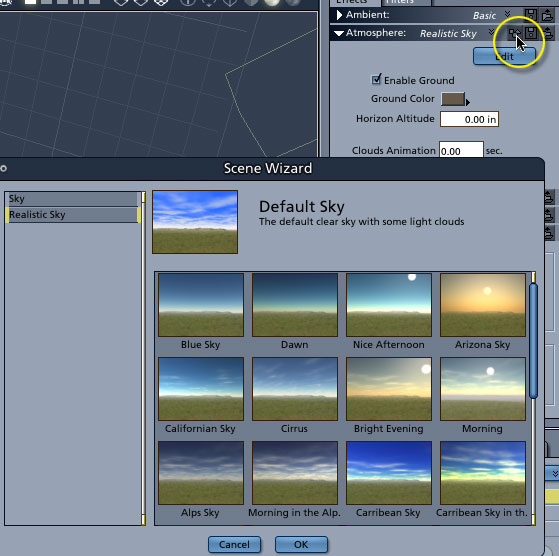
pisaacs, The skies in the browser are actual scenes, not just pure skies. So, you will need to delete a camera if you do the drag and drop thing. If you'd like to simply load a sky preset, then click on the load preset button in the properties tray. Mark


danamo ( ) posted Thu, 01 February 2007 at 11:56 PM

file_367688.jpg

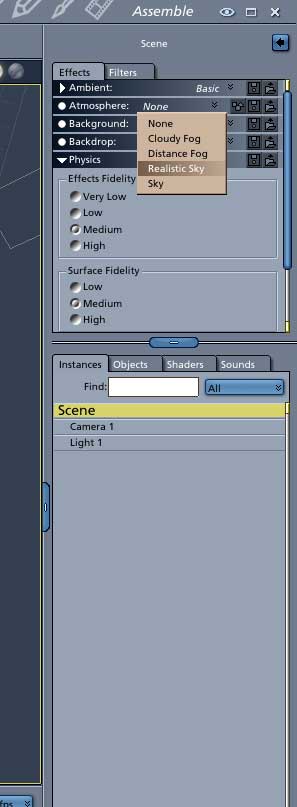
I seldom use sky presets anymore since I found out about the sky editor. All you have to do is click on SCENE, on your instances tab, then go to the effects tab above that and click on the ATMOSPHERE drop-down menu. and pick one of the choices there; cloudy fog, distance fog, realistic sky, sky, etc. If you pick the realistic sky you'll see an edit button; click on that and the sky edit controls will appear. You can add 4 different layers of clouds and a fog layer, sun and moon position, sky and haze color etc.  It may take a little getting used to if you come from other apps like Vue, or Bryce, but Carrara can do some excellent skies, especially in conjunction with the new volumetric clouds you can add to your scene. Good luck, and have fun. Dan


pisaacs ( ) posted Fri, 02 February 2007 at 6:17 AM

Thanks guys! I had never tried highlighting the scene tab. Whole new world!


Privacy Notice

This site uses cookies to deliver the best experience. Our own cookies make user accounts and other features possible. Third-party cookies are used to display relevant ads and to analyze how Renderosity is used. By using our site, you acknowledge that you have read and understood our Terms of Service, including our Cookie Policy and our Privacy Policy.