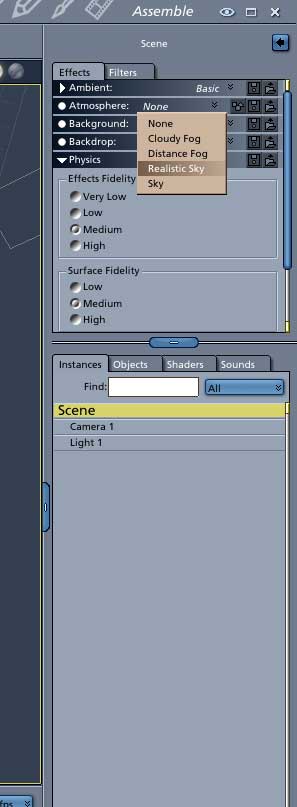
I seldom use sky presets anymore since I found out about the sky editor. All you have to do is click on SCENE, on your instances tab, then go to the effects tab above that and click on the ATMOSPHERE drop-down menu. and pick one of the choices there; cloudy fog, distance fog, realistic sky, sky, etc. If you pick the realistic sky you'll see an edit button; click on that and the sky edit controls will appear. You can add 4 different layers of clouds and a fog layer, sun and moon position, sky and haze color etc. It may take a little getting used to if you come from other apps like Vue, or Bryce, but Carrara can do some excellent skies, especially in conjunction with the new volumetric clouds you can add to your scene. Good luck, and have fun. Dan
