
Renderosity Forums / Carrara
Welcome to the Carrara Forum
Forum Coordinators: Kalypso, Anim8dtoon
Carrara F.A.Q (Last Updated: 2026 Sep 09 4:39 am)
Visit the Carrara Gallery here.

Subject: Looking for some beta testers (PC, PoserContent->Carrara)


That looks like Aiko. I've never managed to get Aiko to import successfully without having the clothing and hair go all over the place. Was she imported with transposer?
Truth has no value without backing by unfounded belief.
Renderosity
Gallery

That "Advanced Library" seems to be trying to play catchup to the long time great programme P3dO Explorer (www.senosoft.com) Two versions. The Free and the dirt cheap Pro. The current version 1.8 was made available just a couple of days ago. P3dO is to have Carrara file type integration added shortly I believe.
Message edited on: 02/07/2006 00:13
bwtr
I noticed it uses .net... is this a spyware issue? Not sure why else something used to navigate on a local machine needs .net.
It does seem to be free from what I can tell on the website, as is P3dO which I've been using since the first alpha or beta release back, I think, in 1999.
This app seems like it can integrate into Poser - or so I gather from the note that I won't use the library palette again? The website however, formats aoddly on Safari, layout isn't fully w3c compliant - the note on 'again' wraps around to down over the navigation, which itself sits partly under the word 'ADVANCED'.
While obviously the application's audience are not Mac people, it makes me wonder if the same problem exists or not in firefox?
Message edited on: 02/07/2006 00:26
Truth has no value without backing by unfounded belief.
Renderosity
Gallery

That "Advanced Library" seems to be trying to play catchup to the long time great programme P3dO Explorer (www.senosoft.com) No. AL is a browser for Poser runtimes not for lots of different 2d/3d files. > P3dO is to have Carrara file type integration added shortly I believe. What i meant by "Carrara import part" wasn't being able to see Carrara files in Advanced Library but to load Poser files with AL directly into Carrara without using any of Carrara's file open dialogs... I.e. - click the thumb for the "Aiko 3" cr2 in Advanced Library and with Carrara open it'll be imported with the native importer (well, you have to click the import confirmation dialog in Carrara). - select the figure in Carrara and then click all those clothing items you want Aiko to wear in AL and they'll be imported - click through your collection of poses in AL and they'll be applied > Not sure why else something used to navigate on a local machine needs .net. Because it's programmed in C#... And there's little reason to write a new application using MFC or even more ancient Windows techniques...


Privacy Notice
This site uses cookies to deliver the best experience. Our own cookies make user accounts and other features possible. Third-party cookies are used to display relevant ads and to analyze how Renderosity is used. By using our site, you acknowledge that you have read and understood our Terms of Service, including our Cookie Policy and our Privacy Policy.
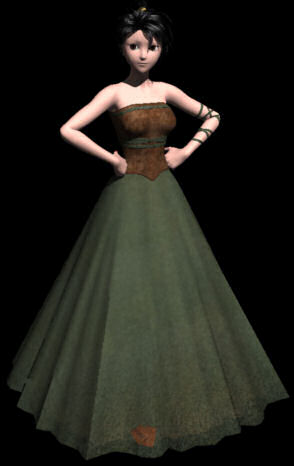
I'm probably finishing [Advanced Library](http://www.neocron.lunarpages.com/library/)'s Carrara import part tomorrow and could use a few people to test it on their PCs. Please send me a PM if you're interested. And please Mail Eovia to make the "Import Pose" and "Import Cloth" buttons accessible via hotkeys - that'd make import saver, simulating mouse clicks just isn't that save when the buttons you want aren't there ;-) Aiko 3 in the attached image was dressed and posed without touching Carrara's Interface...