
Renderosity Forums / Poser - OFFICIAL
Welcome to the Poser - OFFICIAL Forum
Forum Moderators: RedPhantom Forum Coordinators: Anim8dtoon
Poser - OFFICIAL F.A.Q (Last Updated: 2026 Nov 06 10:48 am)

Subject: Saving item as a "smart" prop; I forget how.


As far as I know, a smart-prop should load across different figures, assuming the body parts have the standardized names in both cases.
Are you parenting to a body part actor, or to BODY itself?
===========================sigline======================================================
Cage can be an opinionated jerk who posts without thinking. He apologizes for this. He's honestly not trying to be a turkeyhead.
Cage had some freebies, compatible with Poser 11 and below. His Python scripts were saved at archive.org, along with the rest of the Morphography site, where they were hosted.
I asked this same question upon a small private board of veteran Poser pals and one of them linked this short video.
https://www.youtube.com/watch?v=mEXB8C_GmSE
I did exactly what was demonstrated, except when it came to the point of saving the mesh as a prop to the runtime library, it did NOT prompt me with a box asking if I wished to save it as a "smart" prop. Is there anything special about parenting a mesh to the "head" of a figure as opposed to, say, a "hand"?
The situation is more academic at this point because I was able to load the prop and MANUALLY adjust its location and rotation to align to the posed figure's head. But, obviously, I should NOT have to do that.
I do appreciate the feedback!
*** *** ***
Tempt the Hand of Fate and it'll give you the "finger"!
Tried it with one of the legacy Poser figures, the P4 Nude Man.
Same issue. No prompt to save as a 'smart" prop though I had "parented" a simple box prop (one native to Poser) to the Dork's right hand. I cleared the workspace, loaded the Dork again, loaded the 'test box" and it just "hovered" there when I flapped his arm.
*** *** ***
Tempt the Hand of Fate and it'll give you the "finger"!
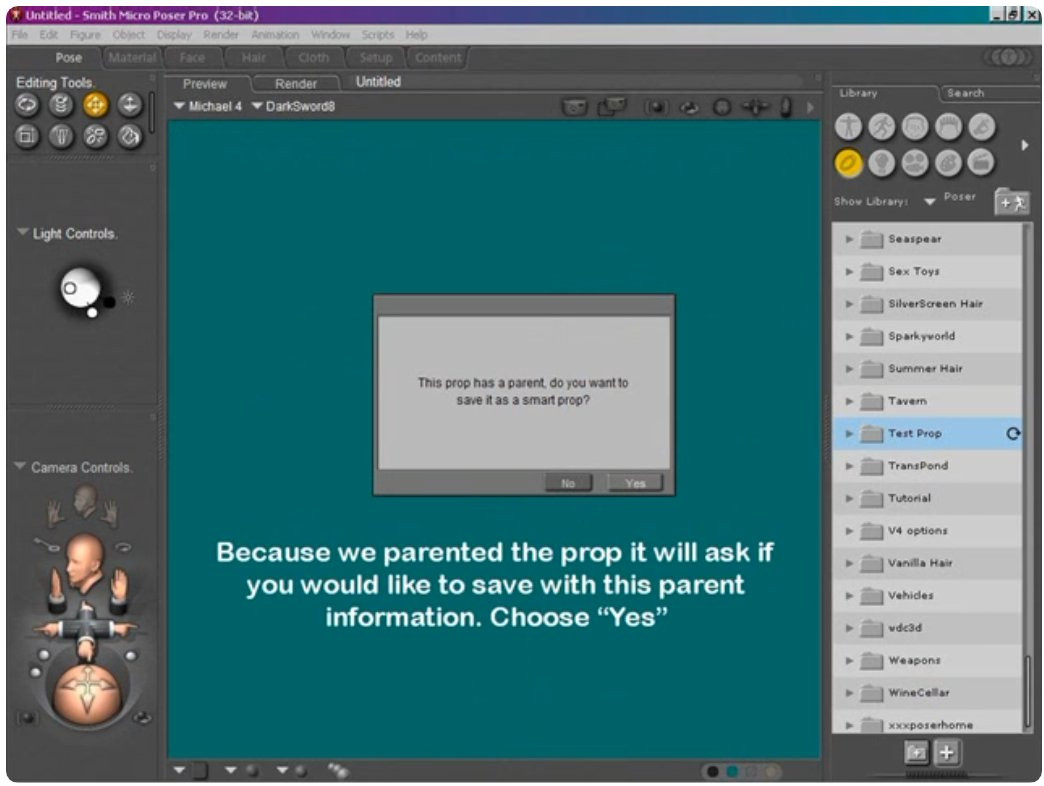

I was just able to do it in Poser Pro 2014. Parent a prop. Hit add to library. Give it a name, and it should ask if you want it saved as a smart prop. Things to double-check would be that you have the parented prop selected and you are saving to a props folder. Make sure it is a prop and not a figure you're working with.
Available on Amazon for the Kindle E-Reader Monster of the North and The Shimmering Mage
Today I break my own personal record for the number of days for being alive.
Check out my store here or my free stuff here
I use Poser 14 and Windows 11
I discovered my problem!
When I clicked the "+" button to save the prop, it displays this box...
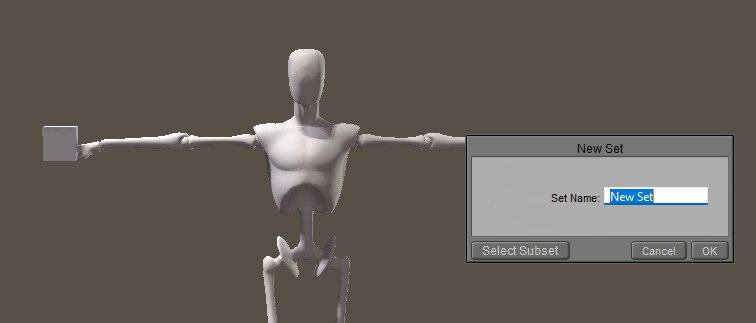
My problem was that I then pressed the "Select Subset" button to open the hierarchical window.
Seems I should NOT do that.
Instead, I should simply press the "OK" button and THAT will then prompt the window asking if I wish to save it as a "smart" prop/
Basically, I added steps that nullified the effect! Idiot moi...
Problem resolved. Thanks for all the feedback!
*** *** ***
Tempt the Hand of Fate and it'll give you the "finger"!
Glad to hear you figured it out.
Available on Amazon for the Kindle E-Reader Monster of the North and The Shimmering Mage
Today I break my own personal record for the number of days for being alive.
Check out my store here or my free stuff here
I use Poser 14 and Windows 11

Just in case: if you edit the PP2 with a text editor, you can either replace this line:
parent UNIVERSE
by the instruction to parent it to item of your choice:
smartparent hip:1
or replace the already smartparent line to another part
This is how magnets are "linked" to the part they are influencing
𝒫𝒽𝓎𝓁
(っ◔◡◔)っ
👿 Win11 on i9-13900K@5GHz, 64GB, RoG Strix B760F Gaming, Asus Tuf Gaming RTX 4070 OC Edition, 1+2 TB SSD's, 6+4TB HD
👿 Mac Mini M2, 27 Golden Gate, 16GB, 500GB SSD
👿 Nas 10TB
👿 Poser 13 and 14 ❤️

Privacy Notice
This site uses cookies to deliver the best experience. Our own cookies make user accounts and other features possible. Third-party cookies are used to display relevant ads and to analyze how Renderosity is used. By using our site, you acknowledge that you have read and understood our Terms of Service, including our Cookie Policy and our Privacy Policy.
Using geometry from s a SpaceBones set, I've created some comically exaggerated anime styled tears. I'd like to apply them to a figure I've already posed. In theory, saved as a "smart" prop, it should do that.
But I forget how to do that.
I thought one simply "parented" them to the desired figure and then saved that "parented" mesh to the props folder. Then, when loaded into a scene with the that intended figure and body part highlighted, one loads that smart prop which then "snaps" into place.
Except, it's not doing that. I've likely missed a step, but I can't figure out what that may be.
I tried browsing the PDF manual, but it just discusses props in general, not how to create a "smart" version. Oh, I'm running PoserPro 2014 on a Windows 11 machine.
Any feedback will be appreciated.
*** *** ***
Tempt the Hand of Fate and it'll give you the "finger"!