
Renderosity Forums / Poser 14

Subject: Going back to Poser 13


It looks like there might be a bug in the system. When you add the background image, go to the edit tab and connect the BG Picture (or BG Environment, depending on which you used) and connect it to the color of the background. If you use the BG Picture, you may need to move the BG Environment node as they might be stacked. They were in mine.
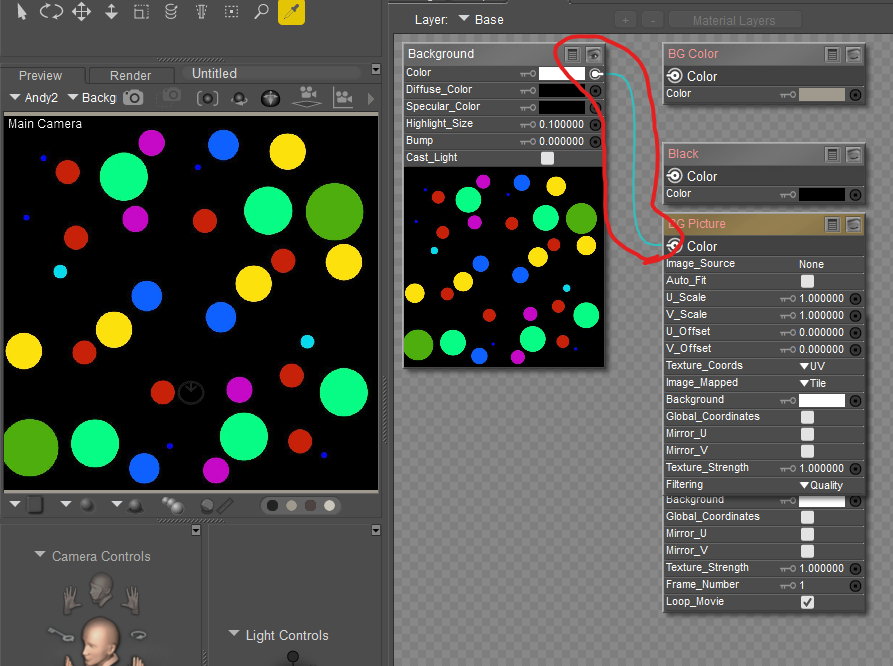
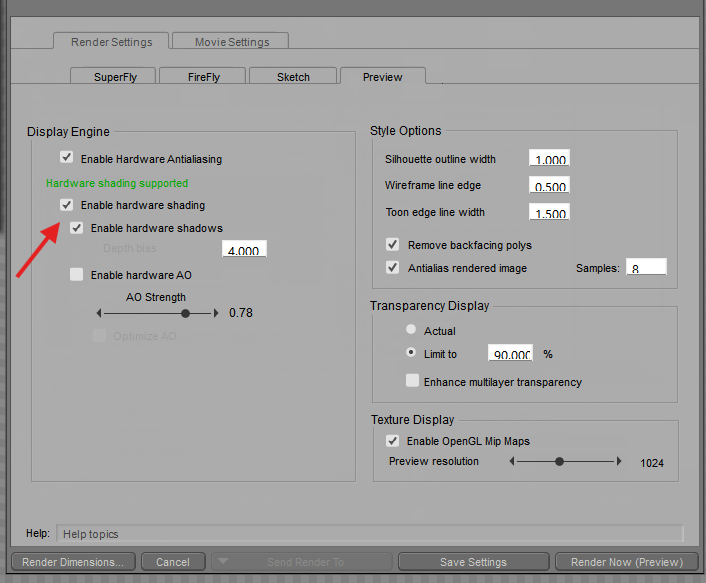
To see the image, make sure you have Enable hardware shading checked.
Available on Amazon for the Kindle E-Reader Monster of the North and The Shimmering Mage
Today I break my own personal record for the number of days for being alive.
Check out my store here or my free stuff here
I use Poser 14 and Windows 11
Thanks for looking. The Material is connected as you suggest. It renders the background, although it's off centre despite the resolutions being the same. So not even that works. I can't get the preview to display it.
It just used to be File - Import - Background Picture. Then it would ask if you wanted to resize your window automatically. Yet some genius thought, lets remove that, force them to go into the material room, select the background, Select Picture, Load the picture in, decide if it's tiled etc.., then it doesn't even work and you have to start fiddling around with the nodes. Someone new to this would be baffled.
It defies belief it really does. Was it even tested? Why remove the quick load of the background picture and movie? Why charge $100 for this as an 'upgrade'? (it's not like the simple materials tabs are particularly new, it's just that they decided to remove them in a previous edition, then re-add them and charge for the privaledge. And also charge to remove the Cloth Room and include that as a 'feature').
It's a shame as Poser is a great peice of software, but those working on developing it simply don't seem to have a clue sadly.

For the Cloth Room, there was already a long talk about in previous months. The room was no longer able to be updated with the newest versions of Poser. Soon or later, it would have disappeared.
It's likely the import background was removed because it wasn't compatible with the changes made to the background. As for the lack of connections, I put in a support ticket.
Available on Amazon for the Kindle E-Reader Monster of the North and The Shimmering Mage
Today I break my own personal record for the number of days for being alive.
Check out my store here or my free stuff here
I use Poser 14 and Windows 11
RedPhantom posted at 4:51 PM Sun, 27 September 2026 - #4510589
Perhaps you're right. I can't get it to work anyway.It's likely the import background was removed because it wasn't compatible with the changes made to the background. As for the lack of connections, I put in a support ticket.
Thanks for putting in a support ticket and trying to help RedPhantom.
Update on this. I tried again and I could see the background in the preview tab (maybe some of my settings had gone wrong previously), although it only showed the middle part of it. To get it to work, I went into the material editor and clicked auto fit on the BG Picture node. Perhaps that option should be included in the simple materials tab.
Also, I realise my tone was a bit annoyed above (although I'm still a bit annoyed the simple import picture to backgound was removed), so feel free to delete this thread as it's a bit negative in tone.
So I'll persist with Poser 14.
Thanks.


For the background picture that has been discussed shortly after the release of Poser 14. The main points being that there were several ways to put in background pictures and every single one of them was incomplete. That is while you could load a picture from the import picture menu it failed to properly update all the other areas that also had something to do with the background. That along with the fact there were 4 menu type of imports not to mention what could be done in the material room along with Python and none of them could be relied upon to know what the true state of the background is/was. So the Dev team decided to place all the background options in the simple tab and try to get the users to adapt. The new way allows you to have a Python script make a change and you will be able to see it when you go into the material room. That was not always the case
Poser 5, 6, 7, 8, Poser Pro 9 (2012), 10 (2014), 11, 12, 13, 14
Something I missed in my tests was I didn't think to select the picture but left it on color. When I mark it properly, it connects as it should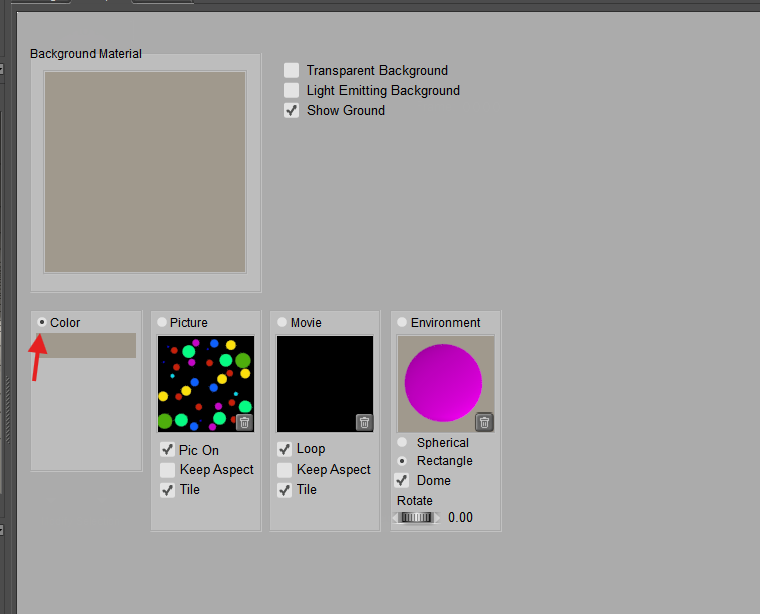
Available on Amazon for the Kindle E-Reader Monster of the North and The Shimmering Mage
Today I break my own personal record for the number of days for being alive.
Check out my store here or my free stuff here
I use Poser 14 and Windows 11

Privacy Notice
This site uses cookies to deliver the best experience. Our own cookies make user accounts and other features possible. Third-party cookies are used to display relevant ads and to analyze how Renderosity is used. By using our site, you acknowledge that you have read and understood our Terms of Service, including our Cookie Policy and our Privacy Policy.
Poser 14 really feels like a backward step.
Obviously, they removed the cloth room and replaced it with something more complex.
But when even trying to add a "Simple" material like a Background picture, I can no longer quickly and easily import it like I used to. They have removed the Import - Background Picture functionality for some reason, and placed it in the Simple tab of the Material room, so you kind of have to know how to fiddle with that tho get a simeple background.
And even when I go in, it doesn't apply it properly and I can't see it in the preview either, even when removing the ground.
I'll wait until they hopefully get their act together with this release. If I was brand new to Poser, I'd be appalled with this. I'm not brand new and I'm pretty appalled by it.