
Renderosity Forums / Poser 14

Subject: HDRI Setup using Simple option


HDRi are used only at render time indeed. That's why I've setup a scene, besides the one that already exists with "Pose lights"
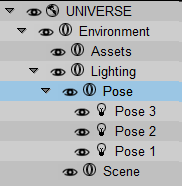
"Pose" is a group containing three infinite lights, set as this, so that they don't interfere at render time:
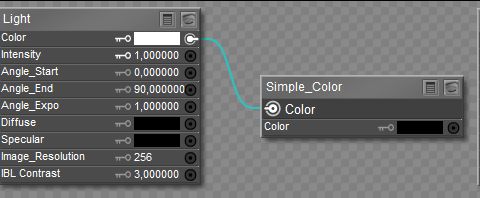
The group with its lights is stored as a prop, ready to be loaded at any time
𝒫𝒽𝓎𝓁
(っ◔◡◔)っ
👿 Win11 on i9-13900K@5GHz, 64GB, RoG Strix B760F Gaming, Asus Tuf Gaming RTX 4070 OC Edition, 1+2 TB SSD's, 6+4TB HD
👿 Mac Mini M2, 27 Golden Gate, 16GB, 500GB SSD
👿 Nas 10TB
👿 Poser 13 and 14 ❤️
HDRi are used only at render time indeed. That's why I've setup a scene, besides the one that already exists with "Pose lights"
"Pose" is a group containing three infinite lights, set as this, so that they don't interfere at render time:
The group with its lights is stored as a prop, ready to be loaded at any time
That's a good idea setting up a scene, and I notice in the pre made HDRI scene you can load at launch, the preview light is connected up to the HDRI image map. I hope in future versions of Poser, it does this automatically as part of the simple HDRI setup, or at least gives you the option for it to be set up.
For people new to Poser, when they load up the simple HDRI, then it appears in the preview, so they load up a figure or prop and it's blank, so they have to go and figure out workarounds, it doesn't look great in my view, it just looks broken.
Thanks for the replies.

Privacy Notice
This site uses cookies to deliver the best experience. Our own cookies make user accounts and other features possible. Third-party cookies are used to display relevant ads and to analyze how Renderosity is used. By using our site, you acknowledge that you have read and understood our Terms of Service, including our Cookie Policy and our Privacy Policy.
Hi,
When I select an empty scene, then set up a HDRI image, in the preview the figures in the scene remain black.
It renders fine, but it would probably help if the simple selection also set up a Preview Light and automatically assigned the HDRI to that, so you can see your figures in the preview.
Just an observation for anyone new trying to set this up. Unless, of course, it's just me doing it wrong.
Rob.