
Renderosity Forums / MarketPlace Showcase
Welcome to the MarketPlace Showcase Forum
Forum Moderators: Staff
MarketPlace Showcase F.A.Q (Last Updated: 2026 Oct 28 3:54 pm)

Subject: Universal Product Installer released! STOP Manually Installing DAZ Products


Hello, Just purchased today. There's a lot of good stuff here, but I do have some issues/thoughts.
1. Your Canny roadmap isn't public, so it's only visible to your company.
2. Content Type, Compatibilities, and Compatibility Base are all not editable. It just brings up the edit window with the option of tree or flat view, the main window is blank and there's no way to edit inside. Is that a known issue?
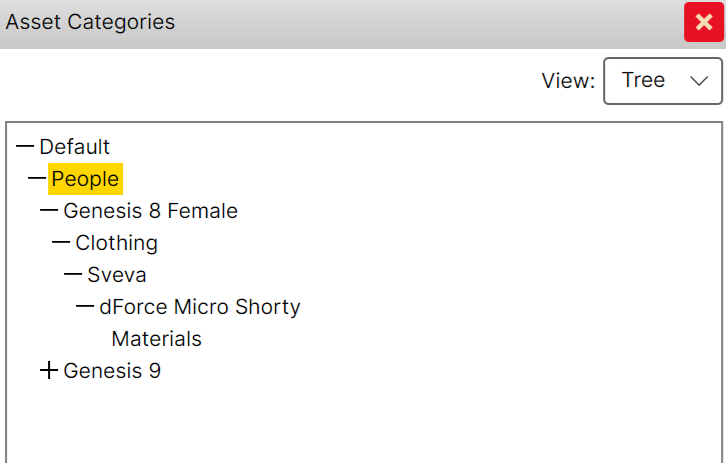
3. The categories are based off of the file path, and not editable. File path is not the correct way to determine category. For instance for the main file in this product https://www.renderosity.com/marketplace/products/172009/dforce-micro-shorty-g8fg81f-g9 there are only these options, but these are all wrong, the category should be /Default/Wardrobe/Pants
On the plus side, I have used many products for taming metadata, Content Wizard, CDDS, and the built in tools. I like your layout and workflow best.
Hello!!! Thanks for the feedback, it is hugely appreciated and we will definitely check it out in detail!!!!
I am pleased to inform you that some of the suggestions you make are already covered by the new version, currently in alpha.
Please email me at support@matronius.co.site or gio@matroniussolutions.com if you are interested to test the alpha.
We will also check our Canny settings out!!! Thanks again for your support and best wishes, Matronius

SlickSHWart posted at 8:36 AM Thu, 25 June 2026 - #4507645
I'm having the same problems as well as some strange behavior when I edit the metadata in DAZ Studio. The product gets duplicated in UPI but not in DS.
2. Content Type, Compatibilities, and Compatibility Base are all not editable. It just brings up the edit window with the option of tree or flat view, the main window is blank and there's no way to edit inside. Is that a known issue?
3. The categories are based off of the file path, and not editable. File path is not the correct way to determine category. For instance for the main file in this product https://www.renderosity.com/marketplace/products/172009/dforce-micro-shorty-g8fg81f-g9 there are only these options, but these are all wrong, the category should be /Default/Wardrobe/PantsOn the plus side, I have used many products for taming metadata, Content Wizard, CDDS, and the built in tools. I like your layout and workflow best.


Privacy Notice
This site uses cookies to deliver the best experience. Our own cookies make user accounts and other features possible. Third-party cookies are used to display relevant ads and to analyze how Renderosity is used. By using our site, you acknowledge that you have read and understood our Terms of Service, including our Cookie Policy and our Privacy Policy.
Hey Renderosity community! 👋
If you’ve ever spent 20 minutes hunting through folders just to get one product working in DAZ Studio, this post is for you. I’m Matronius, and I want to introduce you to something I built specifically to solve the pain every DAZ Studio user knows too well.
The Problem We All Ignore (Until It Breaks Us)
You’ve just grabbed a stunning new product from Renderosity. You’re pumped. You open the zip, stare at the folders — data, runtime, People — and the sinking feeling begins.
Where does this actually go? Will merging this into my existing folders break anything? Why is it not showing up in Smart Content? And why, after all these years, does this still work this way?
Sound familiar? You’re not alone.
Introducing the DAZ Studio Universal Product Installer
The first and only installer that installs Renderosity products directly into DAZ Studio Smart Content — in one click.
No manual folder merging. No hunting through file trees. No broken installs. Just point, click, done — and your new product shows up exactly where it should, fully organized, with thumbnails, in your Smart Content library.
Why This Is a Big Deal for Renderosity Users Specifically
Here’s the part that makes Renderosity artists particularly happy:
Renderosity products get full Smart Content integration — something that, until now, was an exclusive perk of products bought directly from Daz 3D.
The UPI generates Smart Content metadata on the fly for your Renderosity purchases. That means:
· ✅ Auto-generated thumbnails
· ✅ Proper categorization inside Smart Content
· ✅ Full DAZ Studio library organization — characters, outfits, props, environments, all in the right place
· ✅ Batch installation — install your entire Renderosity haul in one session
No more second-class treatment for third-party content. Your Renderosity library finally looks the way it should.
What Else Does It Do?
· Batch install multiple products at once — perfect after a sale spree
· Multi-marketplace support — works with Renderosity, Renderhub, CGTrader, 3D Shards, DAZ 3D, and more
· Automatic content organization — no more manually sorting hundreds of runtime folders
· Nearly 100% setup success rate — detailed manual and video tutorials included
· Regular updates — we push improvements 1–2 times a month, driven directly by user feedback
See It In Action
Watch the full demo and see the Smart Content magic happen live:
▶ Watch the Demo on YouTube
What Users Are Saying
“This is exactly what DAZ Studio has been missing for years. My Renderosity products are finally organized properly.”
The product has earned a prestigious Award of Excellence recognition from Christine13Black on DeviantArt (2024) — a testament to how seriously the 3D community has embraced it.
Shape the Roadmap — Your Voice Matters
This is a living, evolving tool — and as a Renderosity user, your input directly influences what gets built next.
We have a public development roadmap where you can vote on features, submit requests, and see what’s coming:
📌 DAZ Studio UPI Development Roadmap
Feature requests from the community have already shipped in recent updates. If something is missing or could work better — say so, and we’ll build it.
Where to Get It
👉 DAZ Studio Universal Product Installer on Renderosity
Questions? We’re Here.
Support is fast and personal — you’ll hear back from an actual human within 24 hours, usually faster.
📧 gio@matroniussolutions.com📧 support@matronius.co.site
We’re a small indie studio that builds tools we actually use ourselves. If something doesn’t work for you, we want to know — and we’ll fix it.
Thanks for reading! If you’ve been sitting on the fence about this one, I hope this gives you a clearer picture of what it does and why Renderosity users in particular get so much out of it. Drop any questions below — happy to answer!
— Matronius