
Renderosity Forums / Carrara
Welcome to the Carrara Forum
Forum Coordinators: Kalypso, Anim8dtoon
Carrara F.A.Q (Last Updated: 2026 Sep 09 4:39 am)
Visit the Carrara Gallery here.

Subject: Weird V4 contortions in Carrar


When I bring in a character, I change the joint constraints from "Full" to "ball joint". The settings then are reasonable, but if further tweaking is needed, limits can be set on how far the joint will rotate. It has to be done for each joint individually.
Ball joint is not just for hips! It tells Carrara that the bones rotate, not stretch out of joint.
You can save a figure in the browser with the constraints modified, to save time in future when importing characters.
I have the latest Version of Carrara, but it did happen with 6.2. too. I'm not sure if it is meant this way because I'm still learning how to use Carrara and I found and used the constraints button first with version 6.2 when I noticed, that the universal manipulator on different body parts did not work like I expected.
Thank you Sueposer. Stupid me, I did not think of changing the limits or the type of constraints :blushing:

Hi, I'm using version 7 and am having the same sort of problems.
I've changed the constraints and when I move the figure by hand the shoulders look great.
but If I apply one of the stock general poses the badly liposuctioned arm comes back.
This almost sounds like a limits issue, how would I go about correcting this?
I don't seem to have a limits dialog box when applying the pose only when importing the figure.

Quote -
You can save a figure in the browser with the constraints modified, to save time in future when importing characters.
Is this re-saving the pz3 file or saving it as a .car file?
I can't seem to figure out how to save anything in the browser, it seems locked.
No drag /drop no right clicking or middle mouse button clicking.
If I try using the save function pz3 is not among the extentions of course.
thanks again
2 options here:
- You can save the figure to your browser by dragging the collapsed figure name from your properties tray to the Carrara browser in the Objects>My Objects section. This way you'll be able to drag and drop the figure into any Carrara scene you're working on.
- Just save the file. You can then import the .CAR file into any new scene.
Both methods actually save the file in Carrara's format; dragging the figure into your browser makes life a little easier :)
You may need to make sure that your Poser Runtimes are attached to Carrara's content browser; just to avoid any missing files if your figure is using texture maps from other vendors; that kinda thing.

Privacy Notice
This site uses cookies to deliver the best experience. Our own cookies make user accounts and other features possible. Third-party cookies are used to display relevant ads and to analyze how Renderosity is used. By using our site, you acknowledge that you have read and understood our Terms of Service, including our Cookie Policy and our Privacy Policy.
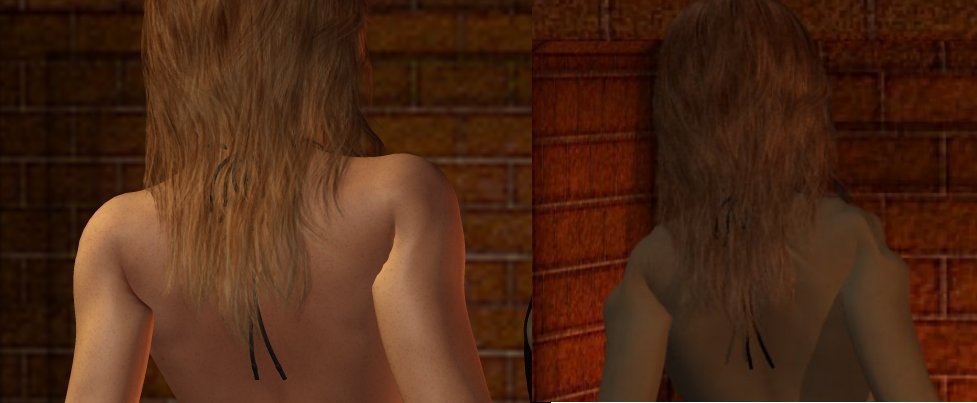
I've noticed that when I use V4 in Carrara, some of the poses cause her shoulders to do bizarre things that they don't do in Poser. The image on the left is V4 in Poser 6 and the image on the right is the exact same figure in the exact same pose in Carrara. Note the shoulders. Does this happen to anyone else?