
Renderosity Forums / Carrara
Welcome to the Carrara Forum
Forum Coordinators: Kalypso, Anim8dtoon
Carrara F.A.Q (Last Updated: 2026 Sep 09 4:39 am)
Visit the Carrara Gallery here.

Subject: Palm tree scene


Hi wscottaart,
To get a clearer understanding of what is going on, uncheck the "Filter Simple Shaders from tree". This will show exactly what is going on between the two channels that are being combined in the color branch of the shader tree. The difference is one of personal taste. All of the mixing options are found under the "Operators" option in the shader pull-down type.
Just as in Photoshop, the Overlay, Add, Subtract, etc. give your different ways to combine what you have going on with the two layers/branches that are within the mixer option.
Mark

Privacy Notice
This site uses cookies to deliver the best experience. Our own cookies make user accounts and other features possible. Third-party cookies are used to display relevant ads and to analyze how Renderosity is used. By using our site, you acknowledge that you have read and understood our Terms of Service, including our Cookie Policy and our Privacy Policy.
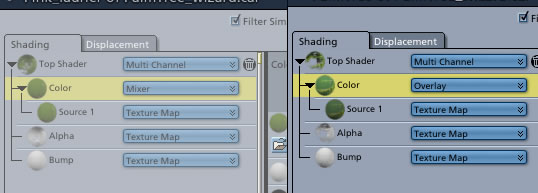
I was studying shaders trying to get a grasp on how to use them effectively. In the Palm scene the palm tree uses overlay in the color channel (using carrara pro 5). The other plant in the scene" Pink Laurier" uses a mixer in the color channel. Can someone explain why they are different , and does it even matter. Why would one choose one way and not another?