Filter: Safe | Sat, Jul 18, 11:16 PM CDT

Renderosity Forums / Carrara


Welcome to the Carrara Forum

Forum Coordinators: Kalypso, Anim8dtoon

Carrara F.A.Q (Last Updated: 2026 Jul 11 2:50 am)


Visit the Carrara Gallery here.

Carrara Free Stuff here.

 
Visit the Renderosity MarketPlace - Your source for digital art content!


Subject: proper texture map view


derekhhh ( ) posted Sun, 09 December 2007 at 11:19 PM · edited Sun, 31 May 2026 at 3:46 AM

Hi,
I am very new to this program.  I have my model which I imported (I imported it as a 3DS).  When I pick a mesh in the model I click  on Edit Mesh.  Then in shading tab, I clik on Color and choose TExture map.  Then I choose the appropriate tga file.
But the texture doesn't show up right.  Am I just not doing this right?
Thanks for the help


Hoofdcommissaris ( ) posted Mon, 10 December 2007 at 2:14 AM

Attached Link: Link to UV Mapper

file_395239.png

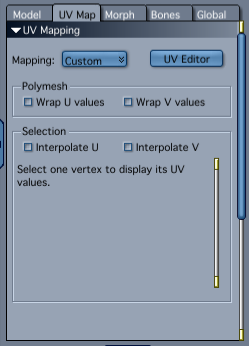
There is a whole world out there, called UV mapping. This is the part where is written how the texture will be placed on the model. You are not too specific about how the texture is 'not right', so it is hard to tell what exactly is the matter. When you double click the mesh, you will be taken to the 'Model Room', where you can select the whole object or (which can be the case if the creator of the 3DS file made them) shading domains. Specific parts of the object can have different shaders assigned to them. Via the UV Map tab, you can edit the way the texture is placed, but this is not always easy. A lot of people use the excellent (free) UVMapper utitily for this, because that is easier in it's manipulation. You might have to read into this subject to get a hold of it. But it is important when working with bitmap textures and models that are more complicated than spheres and cubes.


Privacy Notice

This site uses cookies to deliver the best experience. Our own cookies make user accounts and other features possible. Third-party cookies are used to display relevant ads and to analyze how Renderosity is used. By using our site, you acknowledge that you have read and understood our Terms of Service, including our Cookie Policy and our Privacy Policy.