
Renderosity Forums / Carrara
Welcome to the Carrara Forum
Forum Coordinators: Kalypso, Anim8dtoon
Carrara F.A.Q (Last Updated: 2026 Sep 09 4:39 am)
Visit the Carrara Gallery here.

Subject: WIP - Landscape

Hey Tkane,
I do think the scale of the trees is not quite right, they should be smaller I think and there color should vary more. Maybe have 3 or 4 different trees in the replicator. Other than this your image is pretty nice , I like the lighting in your first attempt the best though.
For your other issue about not getting the 10,000 trees , there is an issue when using a shader with black and white to control where the trees go . It is like if you want the trees to cover 50% of the terrain then you roughly can only place 50% x 10,000trees , so you can only get 5000 trees. This gets worse when you want a small area only to get trees .
What you can do is Create and Edit a new master of your terrain , then convert your new terrain to a vertex mesh and use the Paint brush select tool in the Vm room to select where you want the trees to go. Give this selection of polygons a Shading domain name .
Then in the replicator window , use the new terrain as the source object and use the Limit to Shading domain and select your Shading domain you just created in the vm room. Now your trees should be densly populated and get much closer to the 10,000 trees.
Hope this helps.
Mike

Maybe a couple of reference images to help with the scale. Mountains are big and from that distance, you will be unlikely to make out individual trees at that resolution.

If you get a lot closer, you start to see the trees.

Good luck,
Eric Winemiller
Digital Carvers Guild
Carrara and LightWave
plug-ins

Privacy Notice
This site uses cookies to deliver the best experience. Our own cookies make user accounts and other features possible. Third-party cookies are used to display relevant ads and to analyze how Renderosity is used. By using our site, you acknowledge that you have read and understood our Terms of Service, including our Cookie Policy and our Privacy Policy.
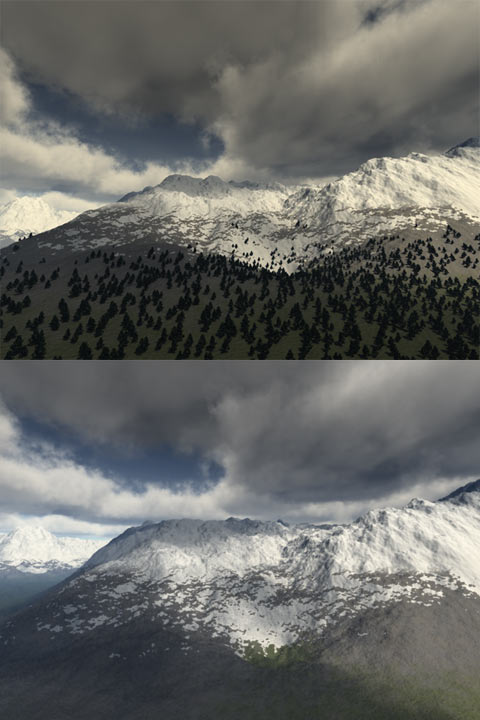
I'm trying to get the hang of volumetric clouds and terrains (creating and shading). The bottom image is actually the first one I kicked out. The top one I adjusted the sunlight slightly and tried to add trees. I pretty happy with the clouds and the terrain itself is not too bad. I think the texture needs more work. Somehow, the trees just don't seem right - I think it's the scale. I did find it a liitle odd that when replicating the trees if I jacked it up to 10,000 objects, it could only place about 3,500 even though I set the spacing for zero. So I duplicated the surface replicator 2x to fill in the trees a little better.Anyway, I'm looking to any comments or suggestions to make this look better.
Thanks.