Filter: Safe | Mon, Jun 1, 11:50 PM CDT

Renderosity Forums / Cinema 4D


Welcome to the Cinema 4D Forum

Forum Moderators: CHMedia Forum Coordinators: Kalypso

Cinema 4D F.A.Q (Last Updated: 2024 Aug 27 11:07 am)

C4D Gallery Speed Modeling Sessions C4D Freestuff
 
 
Checkout the Renderosity MarketPlace - Your source for digital art content!


Subject: Modeling a braid parametrically


pjz99 ( ) posted Tue, 30 September 2008 at 1:50 AM · edited Mon, 01 June 2026 at 11:49 PM

Have you ever tried to model a braid?  I've been looking into how to do this and I found a couple of methods, but they involved manually setting point values for the spline - very nasty stuff and not easy to adjust.  I really wanted to do this using the Formula spline to do the heavy lifting.  Here's what I came up with.

First, consider the structure of a braid:
http://members.aol.com/StanDCmr/braid.html#Top

Linked from the above page by Stan Pope:

My Freebies


pjz99 ( ) posted Tue, 30 September 2008 at 1:52 AM

file_414700.jpg

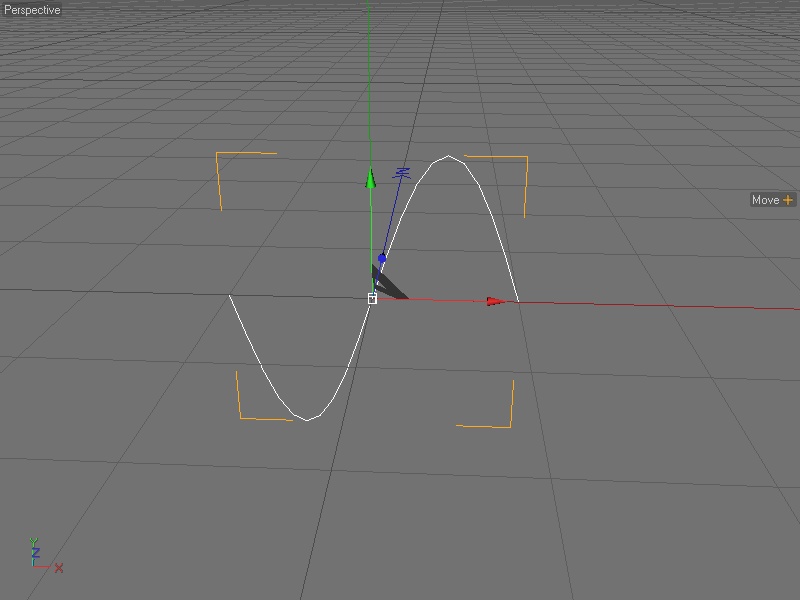
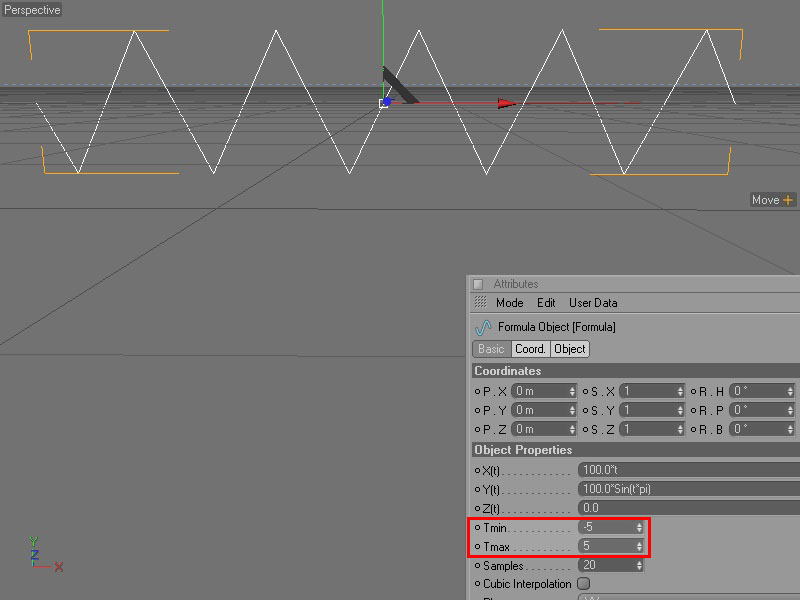
This is a Formula spline with default settings.  The formula plugged into the Y parameter actually gives us something pretty close to what we are looking for, although its range is only one wave.  The formula is:

100.0Sin(tpi)

I do wish I'd payed attention in my math classes.  At any rate it isn't that necessary to have a fundamental understanding of the formula, only what it does.  In this case it very conveniently produces a curve that is perfect for this purpose.
My Freebies


pjz99 ( ) posted Tue, 30 September 2008 at 1:59 AM · edited Tue, 30 September 2008 at 2:03 AM

file_414701.jpg

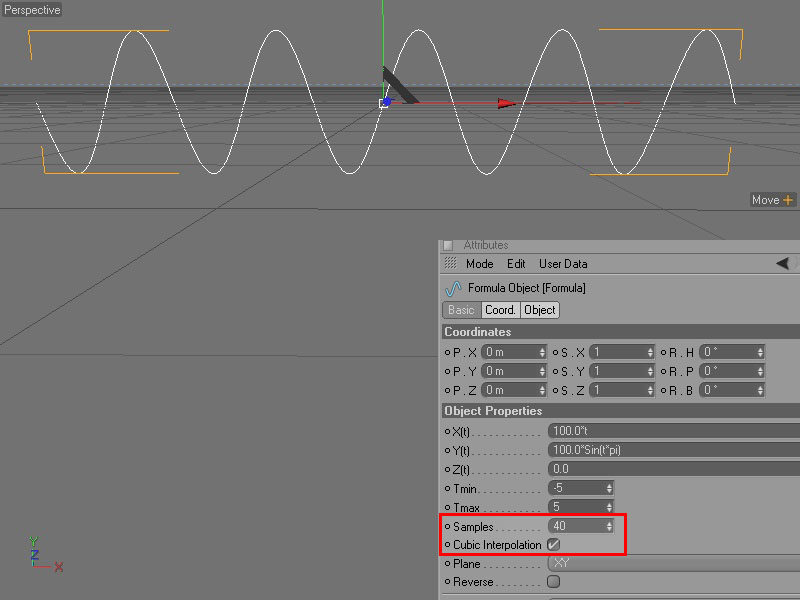
Let's expand the range - basically, the period of the wave is extended from a range of -1 / +1, to -5 / +5.  Tmin is the value for the start of the curve, and Tmax is the value for the end - so X will range from 100 * -5, or -500, to 100 * 5, or +500, giving us a spline that is 1000 units in size on the x-axis.  Unfortunately the spline becomes all jagged - since Samples is still at default, the spline is being drawn with 20 control points, and there is no interpolation going on to smooth the curve.  Increase samples or enable Cubic interpolation, or both.

My Freebies


pjz99 ( ) posted Tue, 30 September 2008 at 2:04 AM · edited Tue, 30 September 2008 at 2:12 AM

file_414704.jpg

This is what the curve looks with samples turned up a bit and with Cubic interpolation enabled.

My Freebies


pjz99 ( ) posted Tue, 30 September 2008 at 2:12 AM

file_414703.jpg

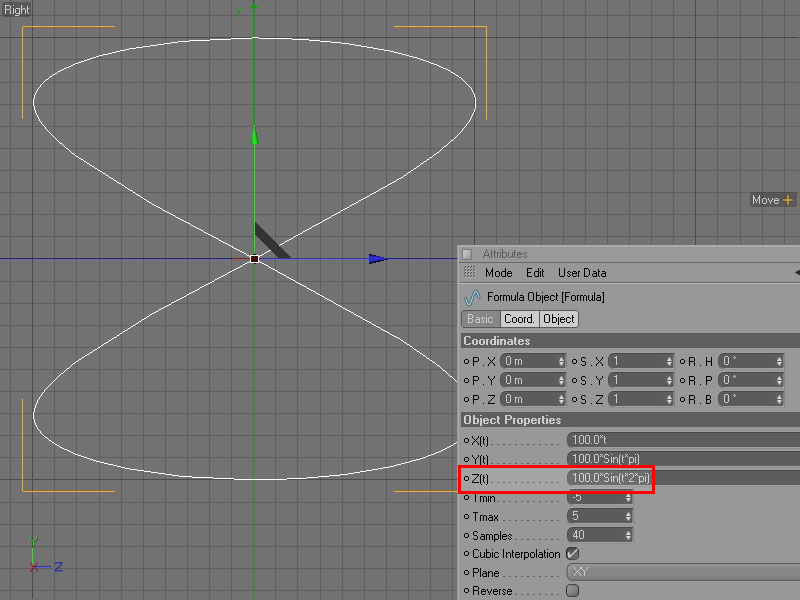
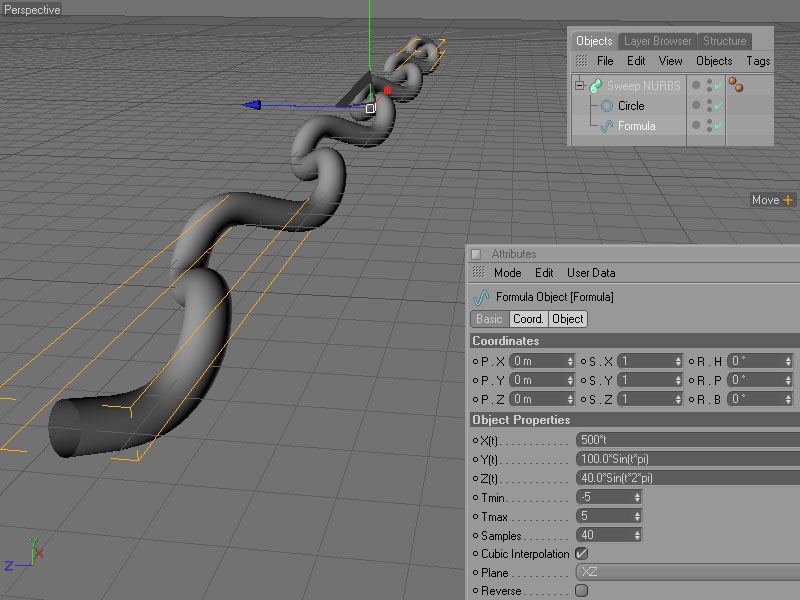
Unfortunately, at this point the curve is strictly two dimensional, and we need to disturb it along the Z-axis in order to create a proper braid.  While you could make the spline editable and start pushing and pulling control points, that's very messy.  What we need is a formula plugged into the Z parameter of the Formula spline, to make the values of the Z coordinates match the shape we want.  The length-wise cross section of a braid is a figure eight - that is, each strand of the braid loops one way, and then the other.  I racked my poor atrophied mathbrain and realized that the original sine wave formula already plugged in by default is nearly what we want, with a small change:

100.0Sin(t2*pi)

This gives us a reasonable figure eight cross section like so.
My Freebies


pjz99 ( ) posted Tue, 30 September 2008 at 2:17 AM

file_414705.jpg

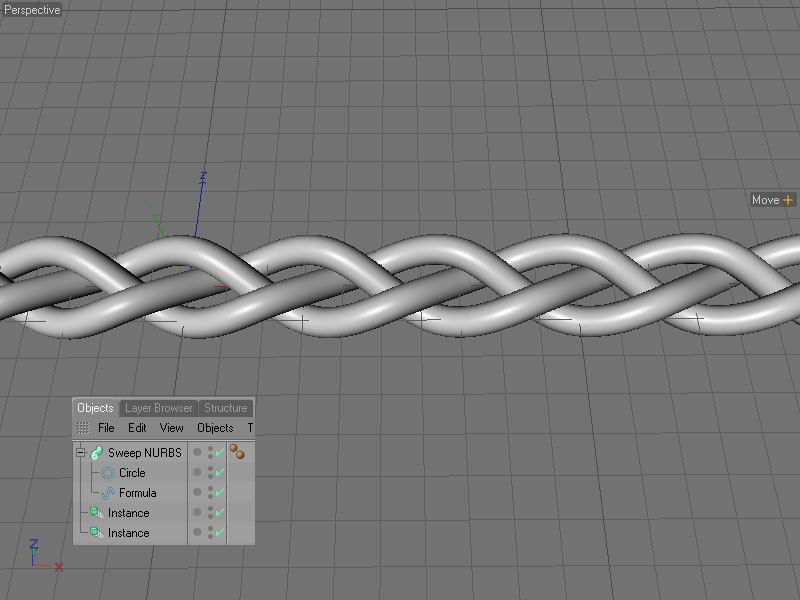
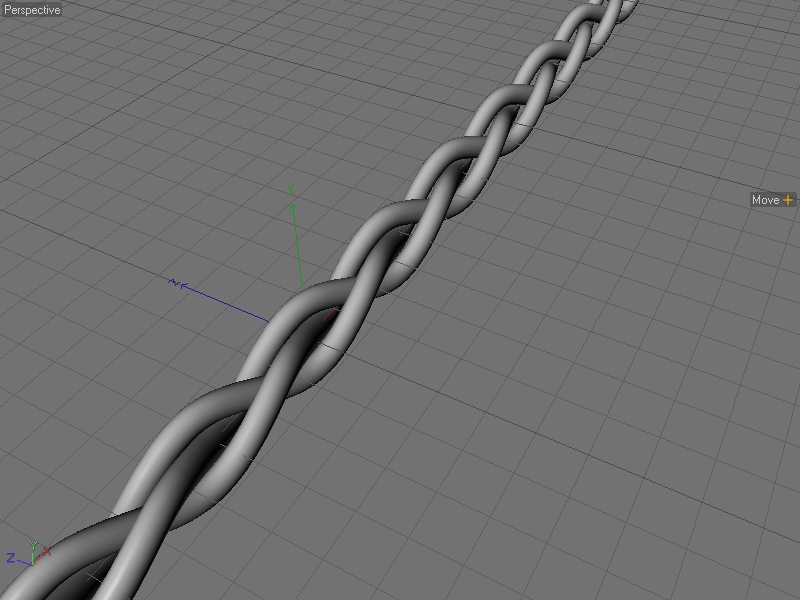
And here is our curve in a SweepNURBS, with a circle primitive added as the shape to extrude.

My Freebies


pjz99 ( ) posted Tue, 30 September 2008 at 2:23 AM

file_414706.jpg

And here is a simple couple of instances added, with the first instanced moved to x: 333 and the second moved to x: 666.  I'm sure there is a mathematical reason why those are the correct values to move the 2nd and 3rd strands to, but my mathbrain is out of gas at this point.  IDEALLY, I'd figure out how to modify the formulae for separate 2nd and 3rd strands to do this correctly, or even better, a smarter person would tell me what I should have done.  Since my goal is to convert this structure to polygons at some point and weld it onto something else, this is not bad to start with.

My Freebies


pjz99 ( ) posted Tue, 30 September 2008 at 2:26 AM · edited Tue, 30 September 2008 at 2:28 AM

file_414707.jpg

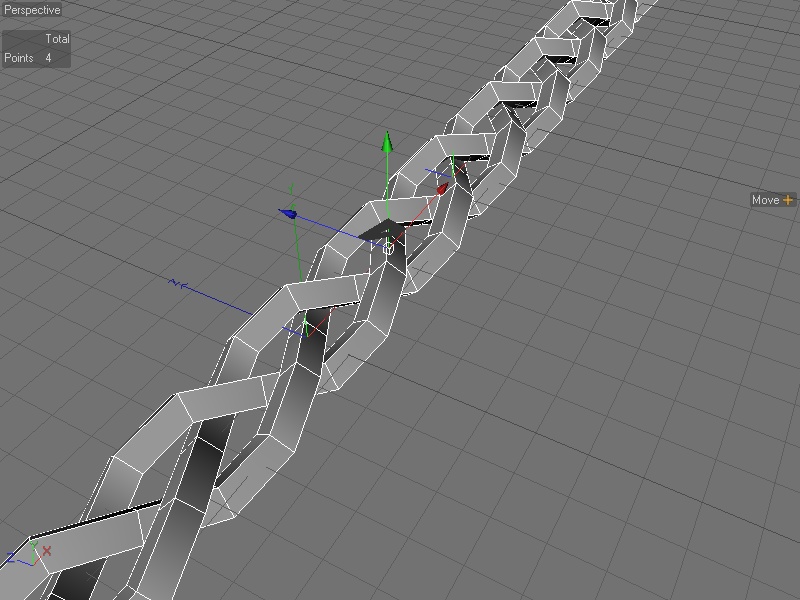
Since the whole structure is still parametric, it is very easy to control and adjust - e.g. you want to have a low polygon structure like so.  Just make the circle primitive that the SweepNURBS is extruding into an editable spline, and change the point interpolation (Intermediate Points setting) to NONE.  Also change the point interpolation settings for the Formula spline.  This is a little organic and requires some experimentation depending on the shape you're looking for, to find a smooth enough curve that is still a lower polygon count.

My Freebies


pjz99 ( ) posted Tue, 30 September 2008 at 2:32 AM

file_414708.jpg

A couple of variations obtained by fiddling with the extrude shape (ellipse instead of circle) and a tweak of the Y parameter of the formula.  If we were doing this with setting point values manually this would be a real pain.

My Freebies


pjz99 ( ) posted Tue, 30 September 2008 at 2:34 AM

file_414709.jpg

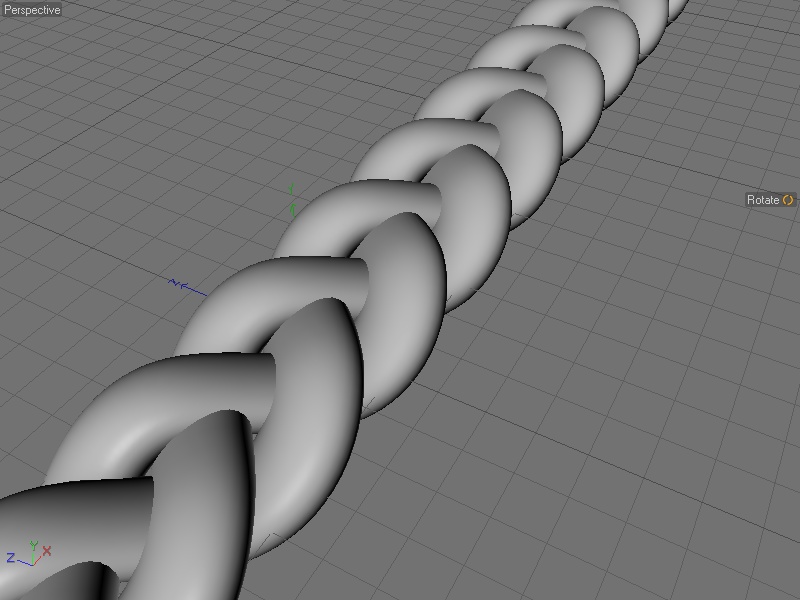
... and a fat braid, more like hair might be, although the structure is intersecting itself.

Hope this helps, have fun :)

My Freebies


tantarus ( ) posted Tue, 30 September 2008 at 2:36 AM

Attached Link: http://www.codeworkers.de/reeperx/

Try Reeper plug in :)

Tihomir


Open your mind and share the knowledge!


pjz99 ( ) posted Tue, 30 September 2008 at 2:42 AM

Reeper is a pretty neat plugin, but it does not do braids as far as I can tell.  Thanks for the link though, I'll make some use of that :)

My Freebies


tantarus ( ) posted Tue, 30 September 2008 at 3:36 AM

Keep experimenting, very interesting results :)

Tihomir


Open your mind and share the knowledge!


cartesius ( ) posted Tue, 30 September 2008 at 4:44 AM

Interesting results indeed!

/Anders


Gallery | Store | dogday-design.se


Tanchelyn ( ) posted Tue, 30 September 2008 at 5:48 AM

Thanks for sharing. It looks very interesting.

There are no Borg. All resistance is fertile.


kyhighlander59 ( ) posted Tue, 30 September 2008 at 6:37 AM

You might be able to expand this into a plugin.


strata ( ) posted Tue, 30 September 2008 at 11:11 AM

 Thanks tantarus for the link to reeperx. :) Strata

“The scientists of today think deeply instead of clearly. One must be sane to think clearly, but one can think deeply and be quite insane.” Nikola Tesla


pjz99 ( ) posted Tue, 30 September 2008 at 7:06 PM

file_414749.jpg

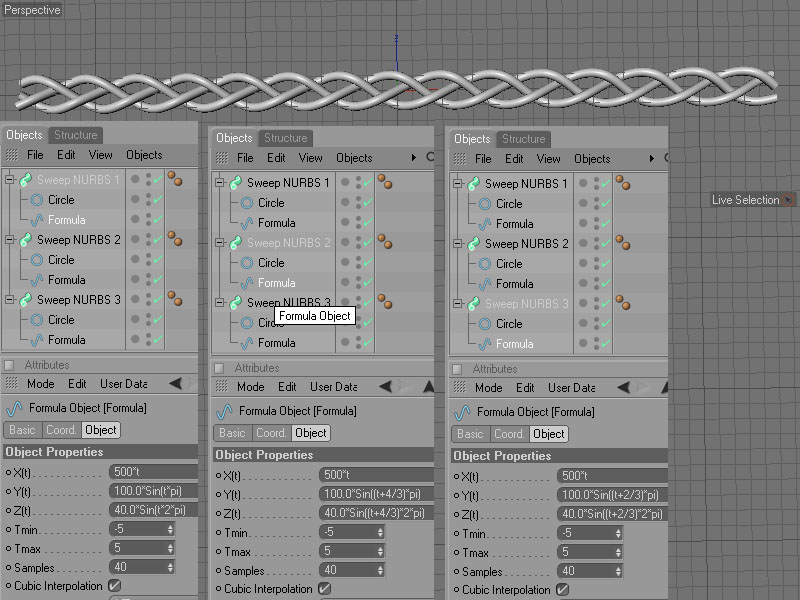
These are the formulae to use if you want the least amount of wasted geometry, although since they're now separate formulae it's harder to adjust the whole structure - even better would be some method of passing values between the separate formula splines, but this is good enough for my purposes.

My Freebies


Privacy Notice

This site uses cookies to deliver the best experience. Our own cookies make user accounts and other features possible. Third-party cookies are used to display relevant ads and to analyze how Renderosity is used. By using our site, you acknowledge that you have read and understood our Terms of Service, including our Cookie Policy and our Privacy Policy.