













Look, Ma! No Lights! by MrGorf

Close
Hover over top left image to zoom.
Click anywhere to exit.
Members remain the original copyright holder in all their materials here at Renderosity. Use of any of their material inconsistent with the terms and conditions set forth is prohibited and is considered an infringement of the copyrights of the respective holders unless specially stated otherwise.
No AI - This artwork was created entirely by hand or with traditional digital tools.
Description
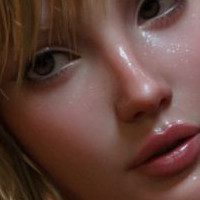
This image contains no actual lights. Zero. Nil. Nada.
I was experimenting with Poser 8's indirect lighting. To my surprise and delight, using the Ambient channel does in fact turn objects into a passable light source! If you are looking for a super soft, broad, and not especially bright light source, consider using this technique. It is much less "expensive" computationally than an array of lights or (in some software) an area light.
What I did here was essentially surround the girl with a half-cylinder with an ambient value of white. There is also a square up above set to a pale orange. Both have ambient values of 1.0. THAT'S IT. Turn on indirect lighting, and you're good to go.
Of course, some adjustment may be required as these faux lights are not especially bright. I tried using ambient values greater than 1.0, but that was leading to, what do photographers call it, the "black sun" phenomenon... Areas so white, they're black!!
It's worth noting that the objects making the light don't actually have to be in the image. Put them just out of view and no one will know your secret... Also worth noting is that since there are no real lights, there are no actual shadows either. You've just got to trust fate on that one, I guess.

Comments (13)
Fascinating!
I love the Girl. You did an excellent job with the lighting. Cool stuff.
Seems to work very well !!
Wow. im gonna have to try this,oh and very good render,love it.
Well, you really made my favorite model (I just LOVE G4) look really good with this technique. Seems like I saw something in one of the forums about this technique - I think it was Bagginsbill and someone else were discussing this - I can't remember exactly. I've used this on a couple small primatives to give them a glowing effect, but I'm going to have to play with this technique if once I get through all the current family medical crises, and get back to playing with Poser. Very cool stuff!
Yes, goods lights, but that's very similar to a Vray lighhts GI, i think....
Oh, that is very cool! Gives a nice effect, too!
Wonderful work and she is my fav as well!
Many thnx for the lighting tip, I recently bought PP 2010 I guess the same info would be OK... BTW. The Girl rocks!!! :0)
Awesome work.
There's a lot you can do with this, too. Once I got IDL, I never went back to Ambient Occlusion. Ever. Indirect Lighting is much more realistic, especially when coupled with gamma correction.
Looks good! Something to keep in mind for when I get around to upgrading Poser (or simply adding a more recent version to my arsenal) or playing around in other software. Lighting's still something I need to improve upon, probably more than most other things, so anything to help get better results without taxing my mind further...
Magnificent artwork. Excellent!