















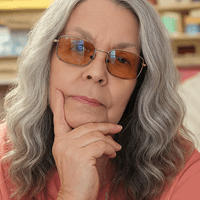
First time fully Photo Shop: by Faery_Light

Close
Hover over top left image to zoom.
Click anywhere to exit.
Members remain the original copyright holder in all their materials here at Renderosity. Use of any of their material inconsistent with the terms and conditions set forth is prohibited and is considered an infringement of the copyrights of the respective holders unless specially stated otherwise.
No AI - This artwork was created entirely by hand or with traditional digital tools.
Description
Okay, it's a little different than my usual. No Poser this time, all Photo Shop.
Yep, the first fully painted fully in Photo Shop 7, with my little mouse, portrait.
I put a real photgraph side by side and worked that way using the real as a guide.
First I filled the face area with a flesh shade, used burn, dodge and smudge to get the features, added color to the hair area and used burn, dodge, smudge again for texture. same with clothes (using new layers for each) worked to get the look I wanted then added noise to the face for skin texture, added a texture to clothes and when satisfied, I flattened the whole image.
And I know it needs a ton of work but I had fun!
A huge thank you to kenernest63 for tips on this technique to create robes. I just wanted to take it to the limits and see what I could do. :)
Any suggestions for improvement most welcome.
Thanks for viewing.

Comments (4)
OK, you asked for some helpful improvement comments, so here i go, but I'm no pro, like tjohn or Ravnheart (who both are blow me away with their talent, but hey!) :- Invest in a graphics tablet. You dont need an amazing one right away, you can pick one up for $30 on ebay. :- You cannot add a generic 'Noise' to give skin texture. This isn't poser any more! You only get skin texture through subtle highlighting and attention to surface detail. No filter or plugin will give you that. The same goes for the clothes. That repetitive pattern really shows, and it doesnt work. Indicate differences in texture by using a finer default brush to add shadow. :-the glasses look like they have been cut and pasted on. If they have, you could attempt to use a blur on the edges, and if they haven't, you really need to work into them some more. :-overall, the picture is very flat and lacks detail. you need to look more closely at the original picture for reference, and add more variety in shade! these things take time! well anyhoo, im no expert (not even close) i just thought i'd share my thoughts with you.
This looks like a challenge..its probably a good idea to try one of these as i cant imagine starting from scratch...Excellent!and it doesnt look easy...!!!
Excellent first try!
Hey, I know you ;-) Wonderful first try. I deleted my first ever so you are very brave! This painting stuff aint for sissies either. It's harder on the pc for me than in real life. With time though, you'll be kick butt good!