
Renderosity Forums / Poser - OFFICIAL
Welcome to the Poser - OFFICIAL Forum
Forum Moderators: RedPhantom Forum Coordinators: Anim8dtoon
Poser - OFFICIAL F.A.Q (Last Updated: 2026 Oct 03 4:20 pm)

Subject: how do you apply an image map to the Ground Plane in P7?


My python page
My ShareCG freebies

Privacy Notice
This site uses cookies to deliver the best experience. Our own cookies make user accounts and other features possible. Third-party cookies are used to display relevant ads and to analyze how Renderosity is used. By using our site, you acknowledge that you have read and understood our Terms of Service, including our Cookie Policy and our Privacy Policy.
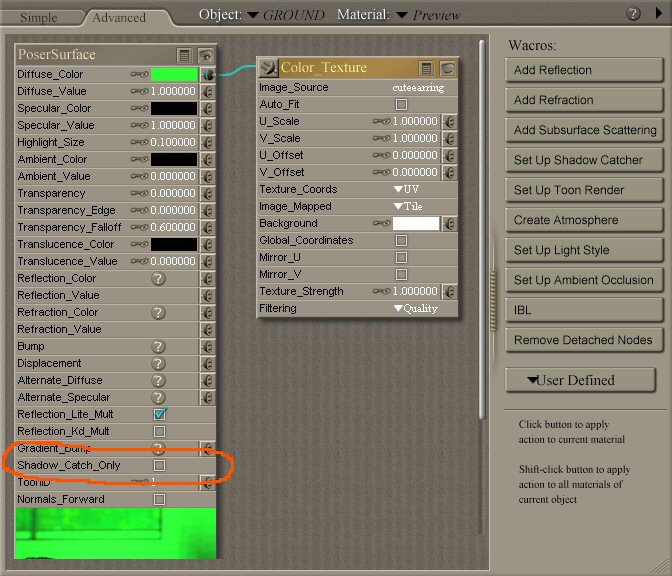
I've just got Poser 7, I'm pretty good figuring out new software but this is doing my nut. I am just trying to apply an image map to the Ground Plane. Simple, eh? So why the frell doesn't it appear in the actual render? The map itself DOES appear in the preview window, mapped correctly (viewed as Texture Shaded), but when I render it all I see is shadows cast by the objects on the Ground Plane; the ground itself isn't there. I have applied the map in both the Simple and Advanced Material options but it still refuses to appear in the render. What the hell am I doing wrong? I can't even get it to render the DEFAULT image map!
Oh, and while I'm at it, why the hell do the help files fail to load? The actual HTML pages are in their correct folders but when I click the '?' on any window I get some stupid "cannot load" error message. As I recall, the help files in Poser 4 never loaded, either. Typical.
And am I the only one to take close to 4 hours to install Poser 7? My PC ain't no slouch but damn, they seriously need to rethink how the installation is packed, even at 1.7GB I think it could be speeded up.
rant over
Cheers,