
JoeBlack opened this issue on Mar 26, 2007 · 3 posts
JoeBlack posted Mon, 26 March 2007 at 3:23 PM
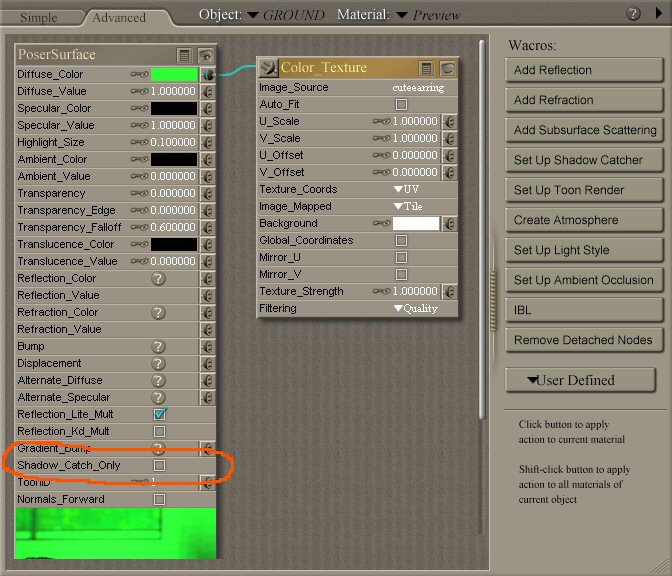
I've just got Poser 7, I'm pretty good figuring out new software but this is doing my nut. I am just trying to apply an image map to the Ground Plane. Simple, eh? So why the frell doesn't it appear in the actual render? The map itself DOES appear in the preview window, mapped correctly (viewed as Texture Shaded), but when I render it all I see is shadows cast by the objects on the Ground Plane; the ground itself isn't there. I have applied the map in both the Simple and Advanced Material options but it still refuses to appear in the render. What the hell am I doing wrong? I can't even get it to render the DEFAULT image map!
Oh, and while I'm at it, why the hell do the help files fail to load? The actual HTML pages are in their correct folders but when I click the '?' on any window I get some stupid "cannot load" error message. As I recall, the help files in Poser 4 never loaded, either. Typical.
And am I the only one to take close to 4 hours to install Poser 7? My PC ain't no slouch but damn, they seriously need to rethink how the installation is packed, even at 1.7GB I think it could be speeded up.
rant over
Cheers,

ockham posted Mon, 26 March 2007 at 3:28 PM
JoeBlack posted Mon, 26 March 2007 at 4:59 PM
Ah, thanks smacks forehead!.