|
The best word to describe this program is
awesome. Genuine Fractals 4 Print Pro is a Photoshop plugin that
through the use of fractal technology can enlarge an image by 600%
and in conjunction with Photoshop's bicubic resampling technique by
800%. And the best way to describe is to look at images.
In order to see all the images uniformly, I kept
all of them at 300 dpi and viewed them in Photoshop CS at print
size. (View>Print Size)
The first image was 10MB. It was an 8" x
5" at a dpi of 300. Its pixel measurements were 2400 x 1500
pixels. Of course, this was too big an image to use. So keeping the
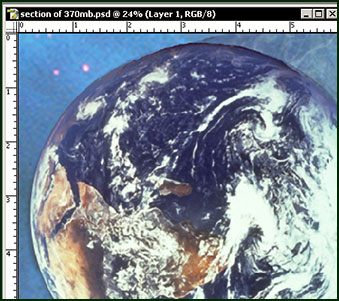
size the same (View>Print Size), I screen captured a portion of
it.
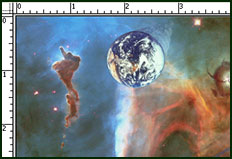
With the 10 MB image in Photoshop, I did
File>Automate>GF PrintPro. I, then, enlarged it by 600%. This
image turned out to be 370MB. Below is the screen capture of a tiny
portion of the resultant image.
All the Genuine Fractals plugins are resolution
independent so you can have a "master" file of a few MB
and be able to increase the size of this file by as much as 800%
without loss of quality. All the images here were increased by 500%
or 600% and initially printed on an older Epson 1270 printer at
1440 x 1440 on Epson heavyweight paper. The detail was
excellent.
Genuine Fractals can be used with files from a
digital camera as well as used to output to a large format or
offset printer. LizardTech, the company behind Genuine Fractals,
states that using Genuine Fractals one can crop a picture and save
it to the Genuine Fractals scalable and resolution independent
format of .stn. Saving to this format, one can save storage space
of up to 100% for lossless and 500% for visually lossless which
creates a file size of 1/5 the original size.
If file space is not an issue, one can also save
to other graphic file formats.
There are two current (March 2005) and recently
released versions of Genuine Fractals - Genuine Fractals 4 and
Genuine Fractals 4 PrintPro. The product comparison is from
LizardTech's website.
Product
Comparison
Â
|
Genuine Fractals Version
->
|
Genuine
Fractals
PrintPro 4.0
|
Genuine
Fractals
4.0
|
|
Create-Edit-Print
|
Yes
|
Yes
|
|
Preview imagery before
encoding
|
+
|
+
|
|
Resize and crop .STN
images
|
+
|
+
|
|
Photoshop and Photoshop
compatible API plug-in
|
+
|
+
|
|
Print imagery at any printer
resolution
|
+
|
+
|
|
Convert
& Encode
|
Yes
|
Yes
|
|
Renders in different color
modes
|
+
|
+
|
|
RGB
|
8-bit
16-bit
|
8-bit
16-bit
|
|
CMYK
|
8-bit
16-bit
|
|
Grayscale
|
8-bit
|
8-bit
|
|
Encodes in 2 modes (lossless
& visually lossless)
|
+
|
+
|
|
Convert any standard image file
format to .STN
|
+
|
+
|
|
View
|
Yes
|
Yes
|
|
View Images
|
+
|
+
|
|
Platform
|
Yes
|
Yes
|
|
Windows 2000/XP Home Edition
& XP Pro Edition
|
+
|
+
|
|
Mac
OS 10.2 and higher
|
+
|
+
|
System Requirements:
Windows
- Windows® 2000 or XP®
- Adobe Photoshop 7.0 or later
Macintosh
- Mac OS 10.2 or later
- Adobe Photoshop 7.0 or later
- Mac OS 10.2 or later
- Adobe Photoshop 7.0 or later
There are a number of excellent new features in
this version. I remember the rather cumbersome way, in an earlier
version, I had to save all files as .stn files before I could scale
them. In Genuine Fractals version 4, all the standard graphic file
types that work in Photoshop are scalable. The beauty of the .stn
file format is that it will save files in smaller sizes. Other new
or improved features in Genuine Fractals 4.0 are:
- Improved scaling workflow within Adobe Photoshop
- Intuitive user interface
- Faster scaling and access speeds
Genuine Fractals 4.0 new is USD $159 and the
upgrade price is USD $39. The price for Genuine Fractals Print Pro
4.0 is USD $299 and the upgrade price is USD $59. One can download
it or a purchase a CD. The upgrade price will vary depending on the
version owned. Click on Purchase to
see the various options. I am always impressed when a company is willing
to offer a trial version of the product, especially the latest
version. To download a trial version, click on Trial
. When I had used Genuine Fractals many years ago,
I purchased it to blow up images because few of us had enough ram
to create monster images in Photoshop and few of us had enough
storage space. This time, however, I am reviewing it from a
different perspective.
The first image (see above) proved that I could
take a 10 MB .psd file and enlarge it to a 370 MB .psd file. Once I
printed a section of it, I knew that this product still had the
ability to enlarge images of a certain size. However, I wanted to
know whether this product could enlarge a very small file so I
could use it for Vue and Poser images. Happily, the answer is a
resounding YES.
For those individuals with 3D programs and
Photoshop 7 or CS, this relatively inexpensive programs should save
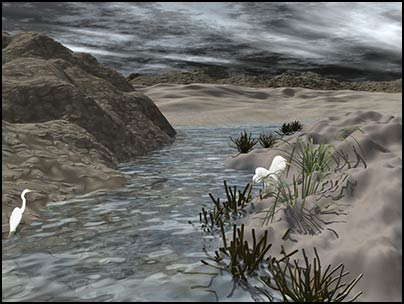
a lot of time and frustration in rendering. The image below is half
the size of the one I used as the source image. It is only 400 x
300 pixels since the original was too large to put on the screen in
a review. The original size of the image was 800 pixels x 600
pixels or 2.66" x 2" @ 300dpi and was 1.37 MB.
After using Genuine Fractals, the image was 4000
pixels x 3000 pixels or 13.33" x 10"' @ 300dpi and was
34.3 MB. This is an enlargement of 500%. Although screen resolution
can appear to lie, these images, as I stated before, were all
printed. This Image called Before the Storm was created in
Vue 5 Esprit and Photoshop CS.
This program is also very useful if you have
created an image for use on the internet and it is similar in size,
for example, to the one mentioned above (800 pixels x 600pixels at
72 dpi) and now you want to create a good print of it. As I have
demonstrated, it can be done through the use of Genuine Fractals
4.
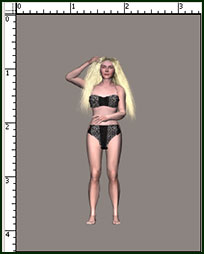
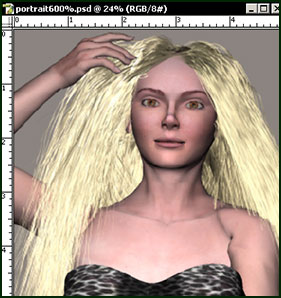
The last image is from Poser 5. The image was
rendered in Poser 5 at 1024 pixels x 1316 pixels which is equal to
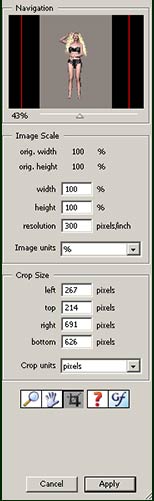
3.412" x 4.387" at 300 dpi. After it was brought into
Photoshop and cropped in Genuine Fractals 4 PrintPro, it was 443
pixels x 434 pixels or 1.477" x 1.447" @300 dpi; its size
was 563K. If anyone had asked me could I enlarge this 600% and
still get a good image, I would have said no. However, I would have
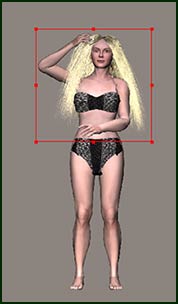
been wrong. Using Genuine Fractals 4 PrintPro, after I cropped it,
I enlarged it to 2658 pixels x 2604 pixels or 8.86" x
8.68" at 300 dpi with an image size of 19.8 MB.
Genuine Fractals 4 also has a cropping feature
whereby you can do all your cropping from within the program. The
three screens below show the progress of an image.
| As Initially Seen in
Photoshop |
Genuine Fractals 4 PrintPro |
Genuine Fractals 4 Cropping |
 |
 |
 |
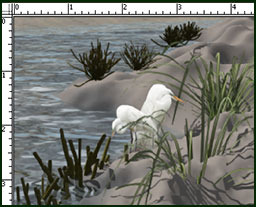
There was enough information in the 563K file to
print an excellent image on my older Epson 1270 at 1440. Had I not
seen this with my own eyes, I would not have believed it possible,
and people who know me know that I am not easily satisfied. Below
is a piece of the 19.8 MB file.
I feel that this program is an excellent addition
to any tool box. Whether you are a Photoshop fanatic and want to
create mural size pictures, want to conserve hard drive space, or
are a 3D devotee and don't have the time to wait for rendering or
enough memory or machine, this program is a must. For more
information go to the LizardTech's website. |




Comments