
Renderosity Forums / Poser - OFFICIAL
Welcome to the Poser - OFFICIAL Forum
Forum Moderators: RedPhantom Forum Coordinators: Anim8dtoon
Poser - OFFICIAL F.A.Q (Last Updated: 2026 Oct 03 4:20 pm)

Subject: Animating a Displacement Map


Turn on Animated for the displacement channel - it is the little icon left of the value of displacement in the PoserSurface node
If you set it to Animated, a dial will appear in the properties of the prop and you can animate using that dial. You can do this for any material node which has that little icon besides the value. The name is constructed from the material zone name, the node name and the order number in that node

Basic approach - large high res ground plane. Plug in a Wave2d node into displacment with u/v pos set to one corner and then as wimvdb says animate the phase node or use the frame number in the variables number to change phase (not sure units seem quite small). One node by itself won't look too good so thought is to add together several wave2d nodes with varying origin, amplitude and frequence to create more interesting effect (one wave2d node to be the main wave and the others to cut up the surface)
Beware using displacement maps will slow down the render quite a bit and add a water material won't improve things.
Seem to remember this has been covered before so worth a forum search if not already done.

I know three ways to animate a displacement map to get animated water, but the forum keeps deleting critical parts of my posts.
One method uses a sequentially numbered series of JPEG displacement maps, placed in a folder. Use a movie node to drive the displacement. Instead of an AVI, load the first JPEG into the movie node (you can do this, as of P9/Pro2012 SR3).
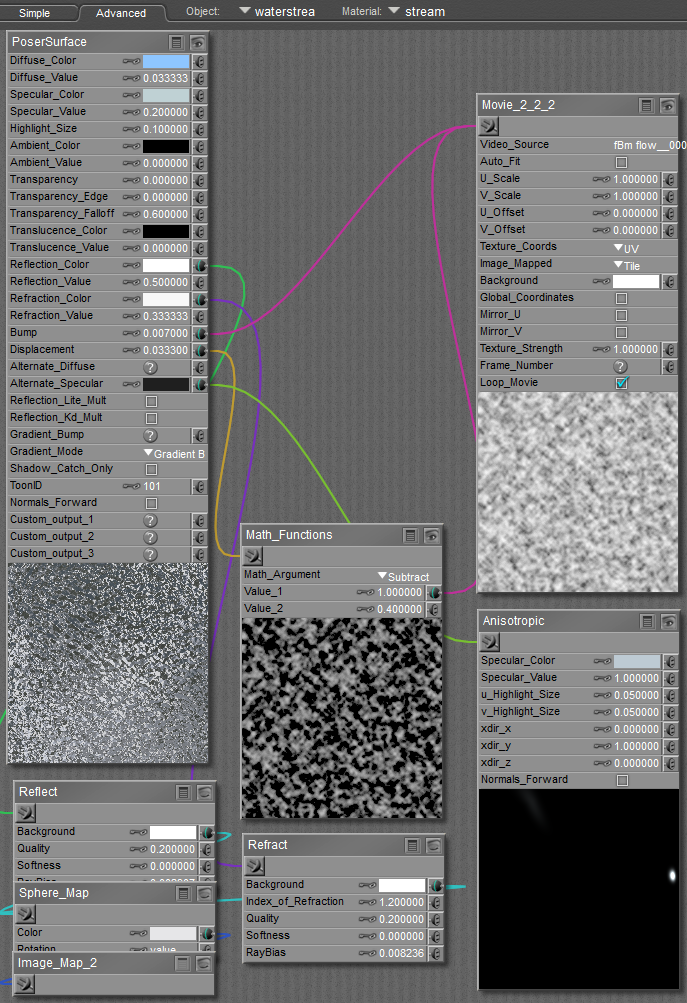
Links to demos in my Photobucket - best I can do, because the forum is screwed up.

animated water demo 2 (note foreground pool)
.
Poser 12, Poser 13, Poser 14, in feet.
OSes: Win7Prox64, Win7Ultx64, Win11
Silo Pro 2.5.6 64bit, Silo 2025.1, Vue Infinite 2014.7, Genetica 4.0 Studio, UV Mapper Pro, UV Layout Pro, PhotoImpact X3, GIF Animator 5
Oh, you could download the Eldar house enviro; it has running waterstreams, plus the waterfall uses the matrix method, and the pool's concentric ring ripples use math-animated U,V scale & offset. It's three zips; you'll need all three.
Poser 12, Poser 13, Poser 14, in feet.
OSes: Win7Prox64, Win7Ultx64, Win11
Silo Pro 2.5.6 64bit, Silo 2025.1, Vue Infinite 2014.7, Genetica 4.0 Studio, UV Mapper Pro, UV Layout Pro, PhotoImpact X3, GIF Animator 5

If I want to make an open ocean or a sea, with waves does the same methods above apply? Cheers
Custom built computer 128 gigs RAM,4 Terabyte hard drive, NVIDIA RTX 4060 TI 16 GIG Gig,12 TH Generation Intel i9, Dual 4K 3840 x 2160 LG Screens, 0/S Windows 11, networked to a Special 12th Generation intel I9, RTX 3060 12 Gig, Windows 11,64 gigs RAM, Dual Phillips Screens, 2 Terabyte SSD Hard Drive plus 1 Terabyte Hard Drive,3rd Computer intel i7,128 gigs ram, Graphics Card NVIDIA RTX 3060 Gig,1 Terabyte Hard Drive, OS Windows 11 64 Bit Dual Samsung Syncmaster 226bw Screens.Plus INFINITY Laptop 64 Bit,64 gigs RAM.Intel i9 chip.Windows 11 Pro and Ultimate. 4 x 2 Terrabyte Hard Drives and 2 x 2 Terrabyte external USB Hard drives. All Posers from 4 to Poser 2010 and 2012, 2014. Poser 11 and 12, 13, Hexagon 2.5 64 Bit, Carrara 8.5 Pro 64 bit, Adobe Photoshop CS4 Creative Production Suite. Adobe Photoshop CC 2024, Vue 10 and 10.5 Infinite Vue 11 14.5 Infinite plus Vue 15 and 16 Infinite, Vue 2023 and 2024, Plant Catologue, DAZ Studio 4.23, iClone 7 with 3DXchange and Character Creator 3, Nikon D3 Camera with several lenses. Nikon Z 6 ii and Z5. 180-600mm lens, 24-70 mm lens with adapter.Just added 2x 2 Terrabyte portable hard drives.
Yes; it is only a matter of scale. The two demo animations posted show choppy ripples (the first example) and rounded swells (the second fish pond example). The displacement map sequences are asymmetrically seamlessly tiled and looped in time, so I can cover huge areas by simply increasing the tiling factor.
For open seas, I would use a two-stage displacement; a large-scale gross shape effect, and a finer small scale effect for detail. You could procedurals for one and maps for the other. Or, you may be able to re-use the same map set at large scale with high displacement and again at small scale with only a low amount of displacement.
You would benefit from going through this thread on sea waves by bagginsbill; it is more geared toward using procedurals to drive the displacement. You asked about using maps to animate water displacement, so that's what I explained. But don't disregard using procedurals.
Poser 12, Poser 13, Poser 14, in feet.
OSes: Win7Prox64, Win7Ultx64, Win11
Silo Pro 2.5.6 64bit, Silo 2025.1, Vue Infinite 2014.7, Genetica 4.0 Studio, UV Mapper Pro, UV Layout Pro, PhotoImpact X3, GIF Animator 5

Privacy Notice
This site uses cookies to deliver the best experience. Our own cookies make user accounts and other features possible. Third-party cookies are used to display relevant ads and to analyze how Renderosity is used. By using our site, you acknowledge that you have read and understood our Terms of Service, including our Cookie Policy and our Privacy Policy.
I have been following a tutorial on How to make water in Poser. It was for Poser 5 and 6! Since I now have Poser Pro 2014/Game, Is it possible to animate a displacement map so I can create an animated ocean? Or any other advice would be appreciated. Cheers
Custom built computer 128 gigs RAM,4 Terabyte hard drive, NVIDIA RTX 4060 TI 16 GIG Gig,12 TH Generation Intel i9, Dual 4K 3840 x 2160 LG Screens, 0/S Windows 11, networked to a Special 12th Generation intel I9, RTX 3060 12 Gig, Windows 11,64 gigs RAM, Dual Phillips Screens, 2 Terabyte SSD Hard Drive plus 1 Terabyte Hard Drive,3rd Computer intel i7,128 gigs ram, Graphics Card NVIDIA RTX 3060 Gig,1 Terabyte Hard Drive, OS Windows 11 64 Bit Dual Samsung Syncmaster 226bw Screens.Plus INFINITY Laptop 64 Bit,64 gigs RAM.Intel i9 chip.Windows 11 Pro and Ultimate. 4 x 2 Terrabyte Hard Drives and 2 x 2 Terrabyte external USB Hard drives. All Posers from 4 to Poser 2010 and 2012, 2014. Poser 11 and 12, 13, Hexagon 2.5 64 Bit, Carrara 8.5 Pro 64 bit, Adobe Photoshop CS4 Creative Production Suite. Adobe Photoshop CC 2024, Vue 10 and 10.5 Infinite Vue 11 14.5 Infinite plus Vue 15 and 16 Infinite, Vue 2023 and 2024, Plant Catologue, DAZ Studio 4.23, iClone 7 with 3DXchange and Character Creator 3, Nikon D3 Camera with several lenses. Nikon Z 6 ii and Z5. 180-600mm lens, 24-70 mm lens with adapter.Just added 2x 2 Terrabyte portable hard drives.