
savannahleopardgecko opened this issue on Apr 15, 2025 · 18 posts
savannahleopardgecko posted Tue, 15 April 2025 at 6:35 AM
Has anyone else had this glitch in Poser after updating to Sequoia 15.4? I haven't been updating my Mac for some time now and just recently updated to Sequoia 15.4 and now I have these floating areas in Poser that will sometimes go away if I hover over them, but usually don't. It covers up most of the controls and makes it very difficult to get anything done. Does anyone know how to fix this?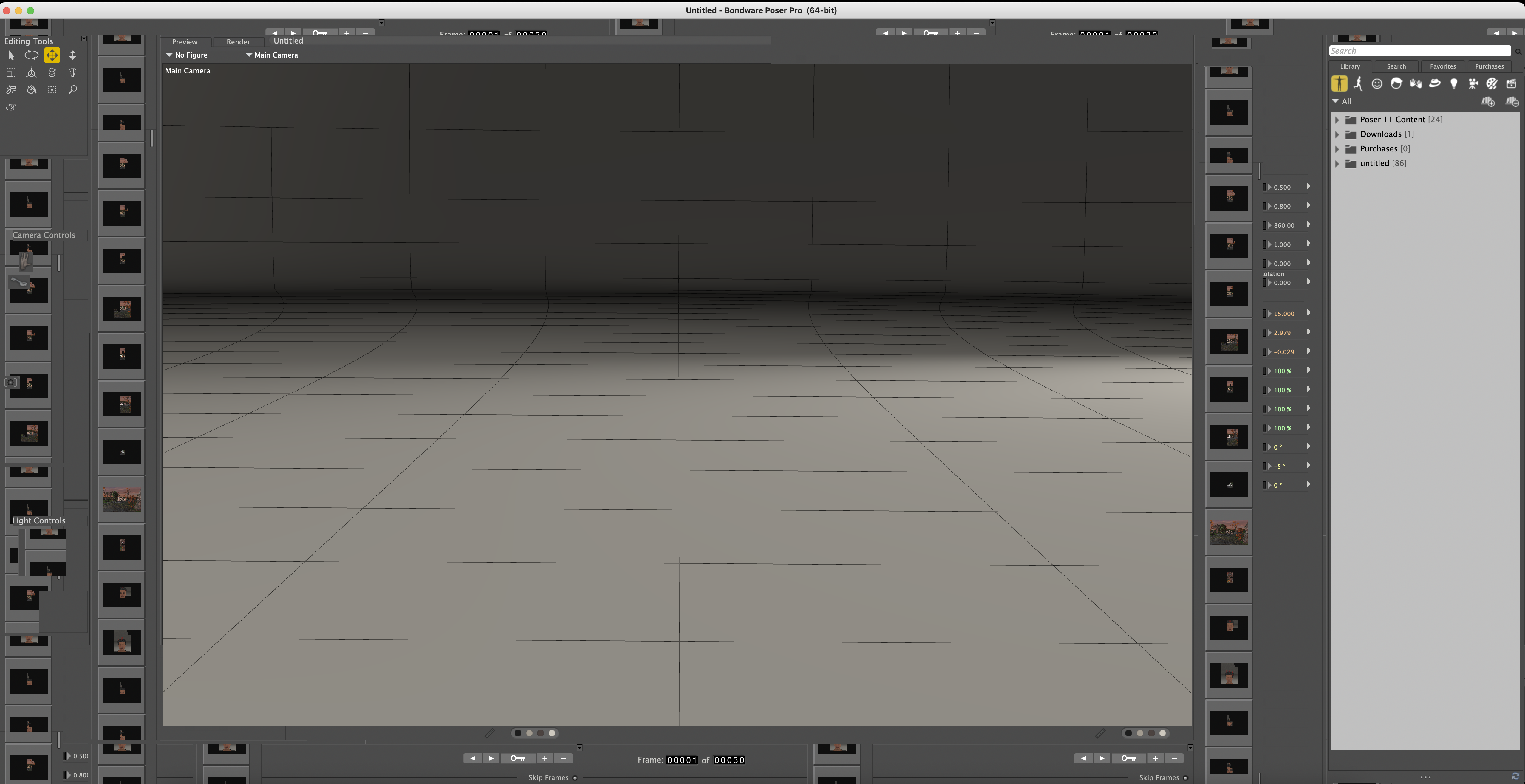

hborre posted Tue, 15 April 2025 at 10:17 AM
There is another thread about how the latest MAC update is playing havoc with Poser. That is the reason why Bondware is no longer supporting MAC's. Apple keeps breaking something every time there is an update.

feecozen posted Tue, 15 April 2025 at 4:44 PM
Which is why I haven't "upgraded" my macOS in years. I thought that might be the reason Bondware dropped the Mac, not that Apple could care. BTW, it's "Mac," not MAC (Media Access Control). Just a pet peeve. :)There is another thread about how the latest MAC update is playing havoc with Poser. That is the reason why Bondware is no longer supporting MAC's. Apple keeps breaking something every time there is an update.

RAGraphicDesign posted Wed, 21 May 2025 at 12:54 PM
I work on an iMac with the old Mojave system (10.14. 5) with Poser 11 Pro.
It would be interesting to know if any Mac users are using Poser 13 with the new Mac systems.
hborre posted Wed, 21 May 2025 at 3:16 PM
Bondware has suspended updating Poser for Macs due to consistent incompatibility issues with iOS upgrades. Don't expect Poser 14 to be available for Mac machines.
RAGraphicDesign posted Thu, 22 May 2025 at 3:28 AM
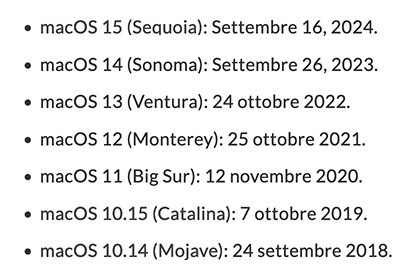
..but what about Poser 13...? According to the users' testimonies, does it work on Ventura 13..?Bondware has suspended updating Poser for Macs due to consistent incompatibility issues with iOS upgrades. Don't expect Poser 14 to be available for Mac machines.
hborre posted Thu, 22 May 2025 at 8:48 AM
I have seen complaints about Poser 13 not working properly under the new iOS upgrade.
RAGraphicDesign posted Thu, 22 May 2025 at 9:22 AM
hborre posted at 8:48 AM Thu, 22 May 2025 - #4496369
Is there a forum dedicated to these issues?I have seen complaints about Poser 13 not working properly under the new iOS upgrade.
hborre posted Thu, 22 May 2025 at 10:14 AM
No more Mac support | Renderosity
There is another link from nerd3d within the post with further explanation.
RAGraphicDesign posted Thu, 22 May 2025 at 10:34 AM
inquire posted Sat, 19 July 2025 at 2:06 PM
I’m running pose 11 pro on Mac S Sequoia, 15.5, and yes, it is very glitchy. I can’t seem to control the camera. I can’t click on something in the viewport and try to move it. So basically it isn’t usable, unless it’s something I’m doing very wrong.
inquire posted Sun, 20 July 2025 at 2:13 PM
I
inquire posted Sun, 20 July 2025 at 2:14 PM
Does poser 13 run acceptably well on Sequoia?

Y-Phil posted Sun, 20 July 2025 at 3:12 PM
Poser's last 13 version runs smoothly on Sequoia 15.5, on an M2.Does poser 13 run acceptably well on Sequoia?
𝒫𝒽𝓎𝓁
(っ◔◡◔)っ
👿 Win11 on i9-13900K@5GHz, 64GB, RoG Strix B760F Gaming, Asus Tuf Gaming RTX 4070 OC Edition, 1+2 TB SSD's, 6+4TB HD
👿 Mac Mini M2, Tahoe 26.5, 16GB, 500GB SSD
👿 Nas 10TB
👿 Poser 13 and 14 ❤️
inquire posted Fri, 08 August 2025 at 4:55 AM
I think there is an update to poser 11 that I never applied because it was working OK. I’m on a Macintosh. How do I apply an update?
Also, what about the new browser version of poser? If I can’t get poser working on a Macintosh, how well would the browser version serve? Can I use my characters on my hard drive and get a render?
hborre posted Fri, 08 August 2025 at 6:25 AM
There is another thread in the forum about PoserPlay, but unfortunately, you still need Poser to prep your content for online rendering. The process is rather lengthy and is not geared toward individuals who are already versed on the existing program.

RedPhantom posted Fri, 08 August 2025 at 8:15 AM Site Admin
The latest version of Poser 11 is 11.3.818. If you don't have a copy of the install file, you can contact https://support.posersoftware.com/ to get one. Have your serial number handy. I think you may need it. To install it, just run the program. It will ask if you want to uninstall the current version first. That's up to you.
For a newer version, there is a free trial of Poser 13 available. You can see if that works for you.
The link to Poserplay is here https://play.posersoftware.com/ and you can find the forum here https://www.renderosity.com/forums/12601/poserplay if you want to check that out.
Available on Amazon for the Kindle E-Reader Monster of the North and The Shimmering Mage
Today I break my own personal record for the number of days for being alive.
Check out my store here or my free stuff here
I use Poser 13 and win 10

false1 posted Sun, 04 January 2026 at 2:06 PM
I'm rehashing an old thread.
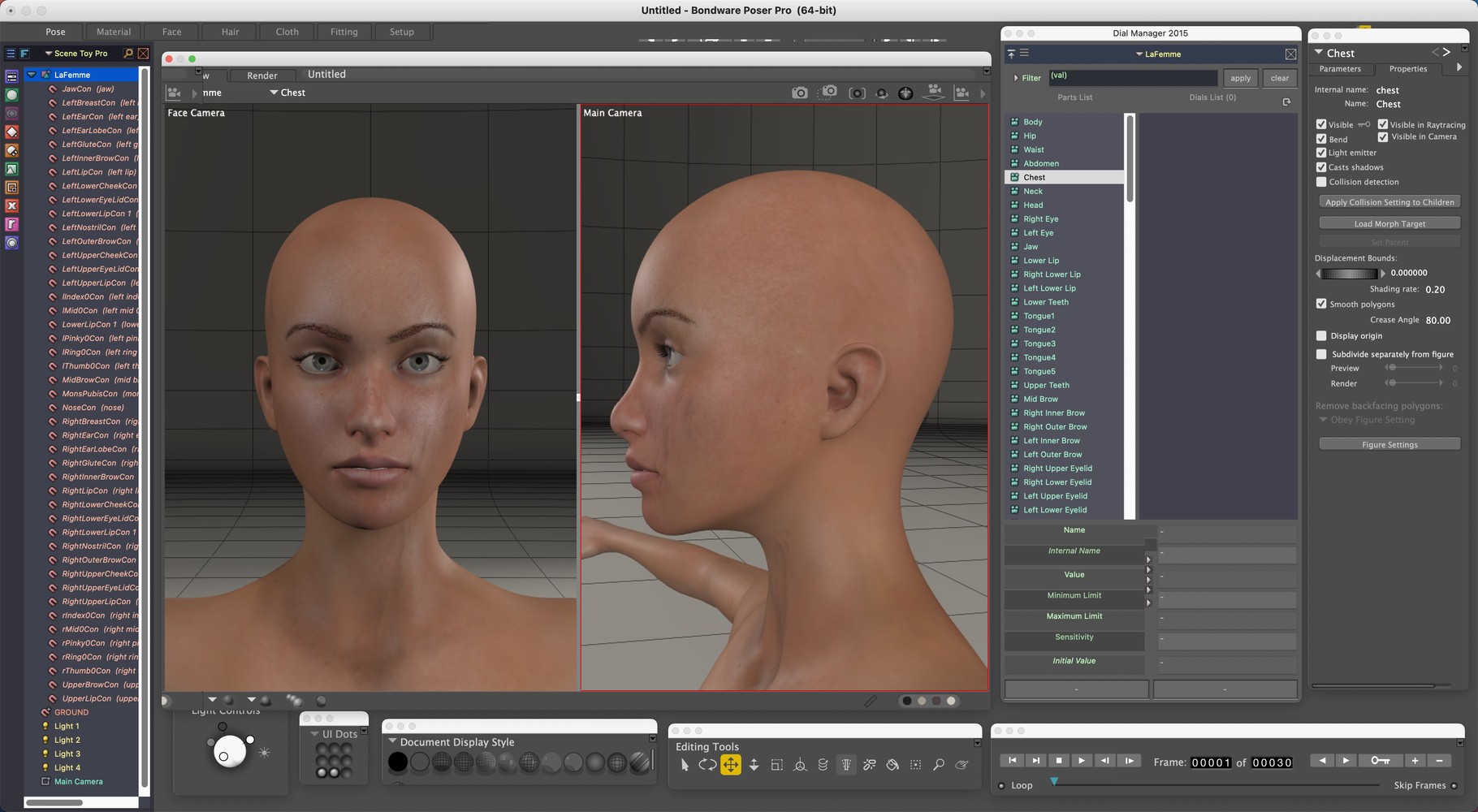
I have the same problem as the original poster. Poser 11 on M1 Mac running Sequoia. I noticed that my addons didn't have a display problem. I'm using Dial Manager, Scene Toy and Library Manager is on a second screen. I also noticed that each of the various tools displayed correctly when undocked. So I painstakingly pulled each from docked to floating with docking ability turned off, arranged them, and created a UI dot. The dot works but I still have to rearrange the tools and addons when I first open the program. Maybe this will help someone else.
I only use Poser for morphing and exporting older content that doesn't work in Daz. It ends up in Blender for layout. I don't believe I need the other rooms besides the Pose room. I might try the same trick with the Materials room but it gave me issues off the bat and I may not need it.
I'm glad I made the move to Blender years ago, seeing that Bondware is discontinuing Mac support. At least all the content I collected over the years can still be put to use. I considered buying the final Mac compatible Poser version but they'd have to lower the price quite a bit for me to consider it. Oh well, it's been fun, but everything must change.
________________________________