
ominousplay opened this issue on Mar 17, 2005 · 16 posts
ominousplay posted Thu, 17 March 2005 at 10:05 AM
I am trying to decide which to use, morph targets or bones for eyelids, hands, facial expressions, mouth open/close, etc. Morph targets are so easy in CP4 that I tend to want to use targets for anything small, and bones for the main parts of the body to really do use bones... Any ideas? And I've seen some great eyelids... any tutorials?
Never Give Up!

Sardtok posted Thu, 17 March 2005 at 4:04 PM
Well, I would use morph targets for eyelids, as I think it would be unnecessary to rig them with bones, but bones would also get the job done. For hands, use bones and not morph targets, as morph targets move polygons, not rotate them around an axis, so bones would do what you want there. Facial Expressions is a typical morph thing, but I guess there are areas where you might want to use bones, but a lot of the facial expressions we make are done with muscles that don't move bones (can't remember what they are called). Opening and closing the mouth is usually done with a jaw bone, but you have to be careful and set the influences correctly here, then morphs for the lip movements.
ominousplay posted Thu, 17 March 2005 at 4:07 PM
I'm thinking along the same lines... Thanks.
Never Give Up!
kelley posted Thu, 17 March 2005 at 7:31 PM
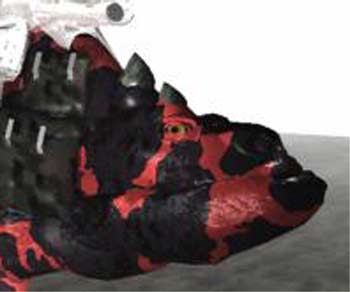
The picture of Beast is not his best, but the eyelids, I think, work fine.

noviski posted Thu, 17 March 2005 at 8:20 PM
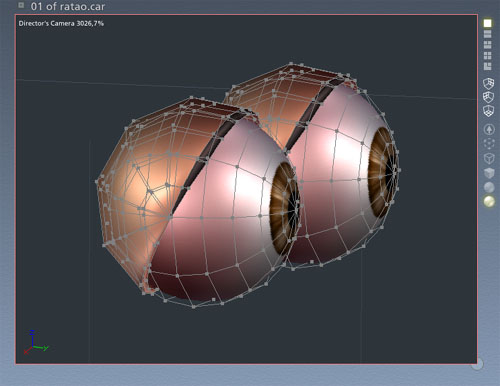
Create another sphere for the eyelid:
X, Y, Z = 0,58
Delete the lower half. Select the object, add some thicknes (0,02 in) and put on the same position as you see on the image. After that, put it to fill the eyeholes on the models face. Create the skeleton, work with weights and...thats all! :-)
bluetone posted Fri, 18 March 2005 at 9:27 AM
A nice introduction to a quick eyeball/eyelid combo, but when it comes to the animation, (the point of this thread,) your entire advise is: "Create the skeleton, work with weights and...thats all!" HUH!? Where's the detail. I, for one, would LOVE if someone were to do a full WIP/Tut on boning/morphing et. al. Since Eovia seems to be VERY lax about HOW to do something in their program, I would hope the experts here could elaborate on the subject some. Please? :D
Message edited on: 03/18/2005 09:29
noviski posted Fri, 18 March 2005 at 3:53 PM
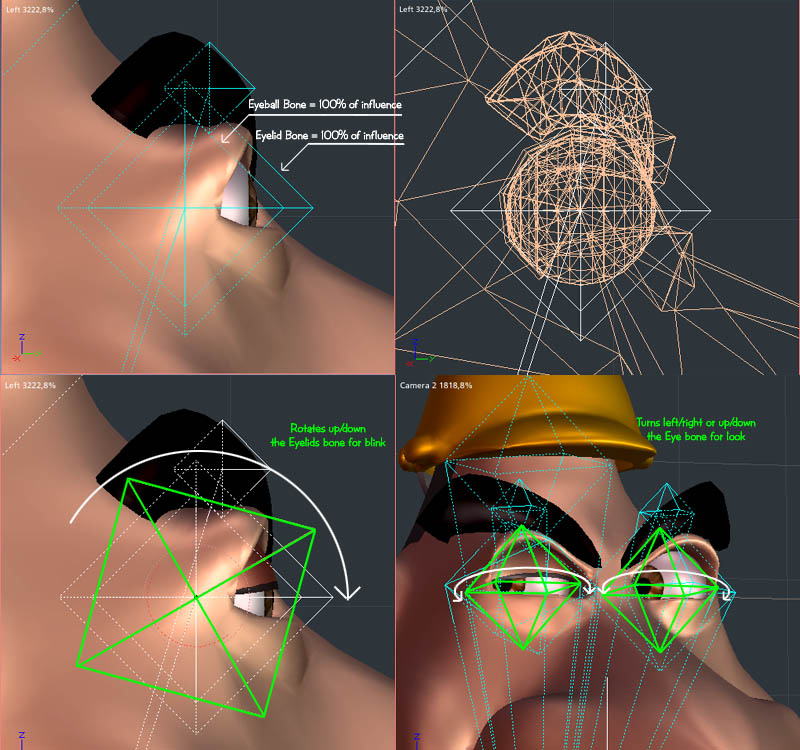
bluetone posted Fri, 18 March 2005 at 5:17 PM
Sorry if I came off a little pissy... not feeling well today, but have to work anyway. :( Thanx for the info! Would it be possible to show the constraints & tree for this character? (I know! What a pain I am!) I'm not clear on how your bones are related so that when you rotate the eyelid, it doesn't through the whole head out of wack. (Thanx again!)
ominousplay posted Sat, 19 March 2005 at 11:00 PM
Wow. thanks for asking bluetone, and thanks for showing noviski. Noviski, you do a great job at showing with picts, man, that's the way I learn. I gotta see it. Looks like the hardhat and eyebrows also are attached to bones, and the hat tilts? and the eyebrows raise, lower, and twist? Bluetone, I think you can, in vertex modeler, set how many much of the mesh is influenced by the particular bones. You highlight the mesh where you want influenced and then add or subtract bones. For the eyes... just the eye bone and the base bone? I think the base bone is always needed, but I might be wrong. r.
Never Give Up!
noviski posted Sun, 20 March 2005 at 8:25 AM
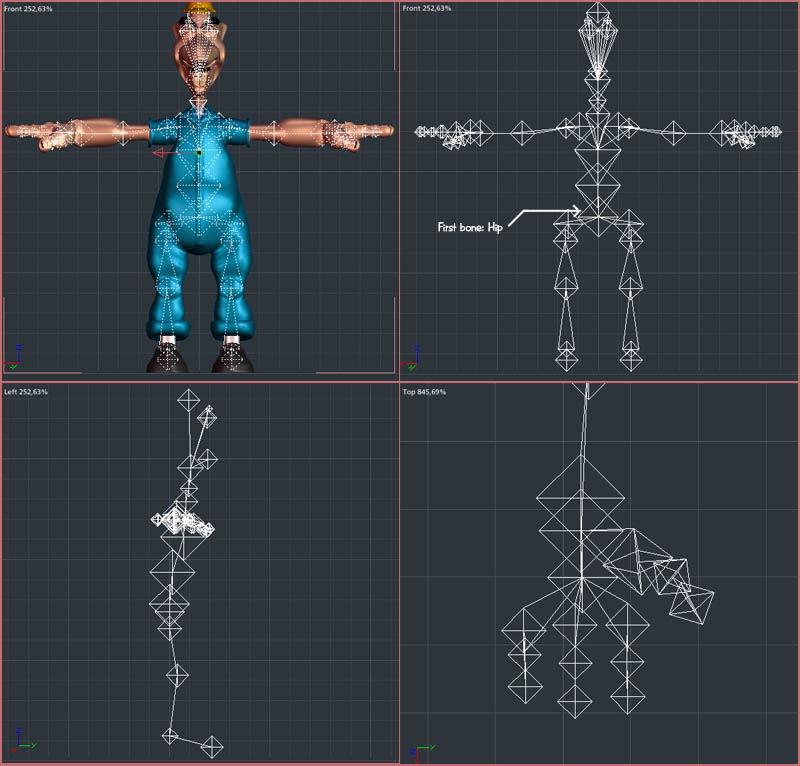
bluetone wrote:
"I'm not clear on how your bones are related so that when you rotate the eyelid, it doesn't through the whole head out of wack."
To avoid this, bluetone, I allways name the part of the mesh before attach the bone, selecting all the polygons of the head, for an example, and naming it. After attach the skeleton, is much more easy select the polygons by the name and work with the weight of the bone.
noviski posted Sun, 20 March 2005 at 8:30 AM
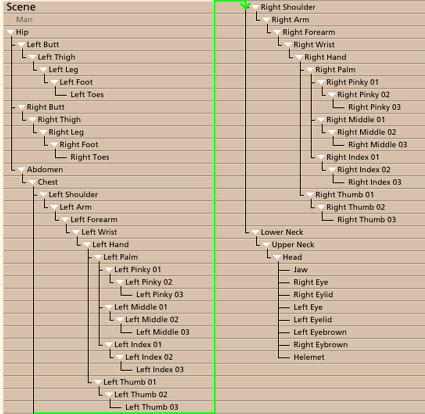
Thank you!
bluetone posted Mon, 21 March 2005 at 9:06 AM
OK! Thanx! So the 'eyelid' and the 'eye' rotate around their center instead of rotating around the connection to the last bone, (in this case the 'head' bone,) which the arm bones and the like do.
noviski posted Mon, 21 March 2005 at 10:46 AM
Exactly, bluetone! You go it! The eye and the eyelid rotate around the same axis. Thats for garantee when you rotate the eyelid, it is covering totally the eye surface (I dont know if I could explain it in English, but I think it is). ;-)
ominousplay posted Mon, 21 March 2005 at 11:59 AM
Noviski, thanks again for your tutorials! One question. You have put so much time into this model here, do you use the same mesh for other figures so you don't have to go through the entire process again? It's not just making a model, it's the zones, bones, etc.
Never Give Up!
noviski posted Mon, 21 March 2005 at 7:29 PM
Im glad to help, ominousplay.
I use the same hands in most of the models (so the bones). Ocasionally I use the legs and foots too, but the head, chest and other parts I allways starts from "zero".
noviski posted Mon, 21 March 2005 at 7:35 PM
One more thing: I think is, the eyelids of this tutorial are more efficient for big eyes. For small eyes(like my little bat model and the amazing kelleys model on this topic) the ideal are morphs.