
Truestar opened this issue on Apr 04, 2022 · 9 posts
SpookieLilOne posted Mon, 04 April 2022 at 10:43 PM
For the sake of not taking up ALL the space on my hard drive, my DS content is on my external drive.
I am including screenshots. You want the folders where ever you place them to be mapped
Daz 3D> Studio> My Library so when you do the next step they work properly.

Once you have saved your items you will want to link them within DS.
So in DS go to Edit>Preferences
Once in preferences go to the content tab
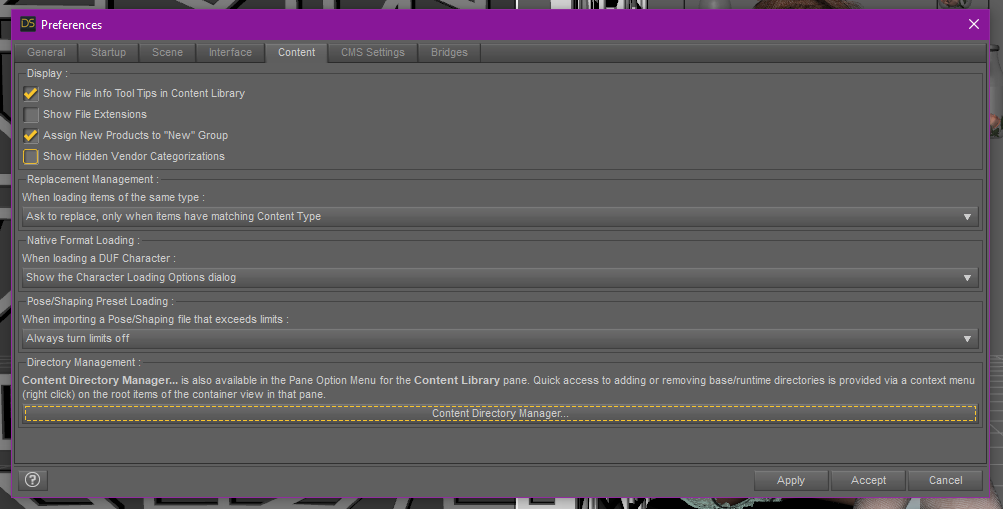
Click on Content Directory Manager at the bottom,
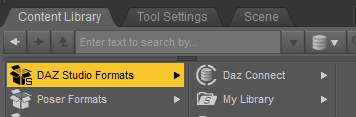
Then choose Daz Studio Formats

next click add and it a window will pop up like to select a directory.

navigate to where you have decided to save your content and click Select Folder
it will take you back to the content directory manager.
Click accept
and now that content will be located in your DAZ Studio Formats under my library.
*~*Jamie*~*
"Life is just a dream on the way to death." ~The Crow: City of Angels