
Anim8dtoon opened this issue on Jun 08, 2026 · 4 posts
Anim8dtoon posted Mon, 08 June 2026 at 9:26 PM Forum Moderator
Hi Poser peeps,
I've got a question for you and that is, how do I create .mc6 files to place in the Materials library? I bought a merchant resource and haven't the foggiest idea of how to convert the .jpg or .png textures to .mc6 format. Thanks in advance for your help with this!

hborre posted Mon, 08 June 2026 at 9:42 PM
It's not a conversion. The .mc6 file is a material collection for a figure or prop that transcends all the material zones. Add your texture to the figure/prop in the Material Room and click on the + sign at the bottom of the Library window. The pop-up window will allow you to select what file you want to create.

bwldrd posted Mon, 08 June 2026 at 9:51 PM
in the material room, after you've assigned your textures .. Open the library window go to the material tab,
1 Click a folder you want to save the material to, then click the + button.
It will give a popup that asks single material, or collection.
Give a name in the Set Name box.
2 Select collection and click the choose materials button
It will pop up a window to select the materials.
3 Select the materials you want to save.
4 Click OK.
5 Click Ok (again).
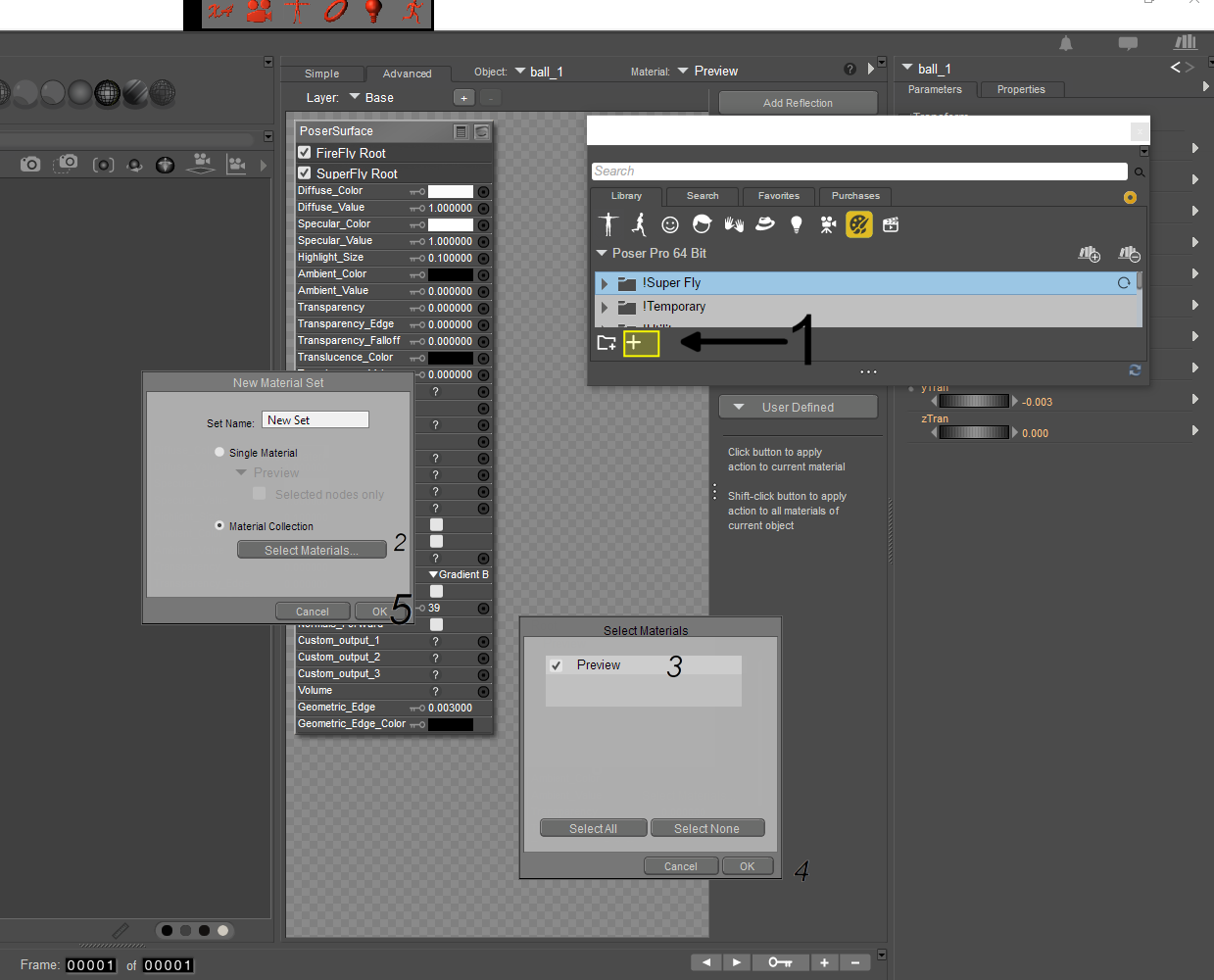
If you have file compression turned on in your preferences, it will save as (name).mcz otherwise it will be (name).mc6
--------------------------------------------------------------------------------
Consider me insane if you wish, but is your reality any better?
Anim8dtoon posted Tue, 09 June 2026 at 6:35 PM Forum Moderator
Hborre and bwldrd, thank you both so much! I appreciate it a lot!