
genwile opened this issue on Jun 05, 2026 · 11 posts
genwile posted Fri, 05 June 2026 at 6:12 AM
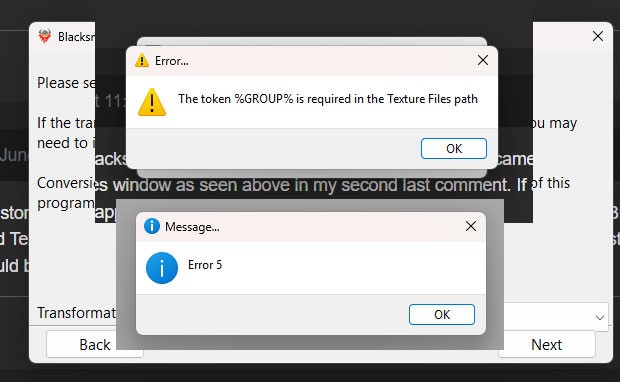
After downloading the free version of Blacksmiths Texture Transformer v8 I have been trying to transform V4 to LaFemme textures. I am able to do everything till I get to the transform step where I am getting an error window telling me “ GROUP” requires Texture Fields and then another window error window with Error 5.
Could someone please help and tell me what I am doing wrong .

Deecey posted Fri, 05 June 2026 at 7:10 AM
Checking into it. One question ... are you using the standalone Texture Transformer app, or the one that comes with Blacksmith 8?
genwile posted Sun, 07 June 2026 at 4:09 AM
I still don’t what I’m doing wrong with Blacksmith 8 Texture Transformer v8 I’ve done all the possible folders and places to put the textures in. Can I get if possible a step by step example excessive showing where all cr2s and folders go?
Deecey posted Sun, 07 June 2026 at 9:00 AM
One more question for you ...
Are you using the V4 to LaFemme transformer that comes with Blacksmith version 8, or the one that is in the store?
If you're having issues with the one from the store, I will be submitting an update soon. Also, this update will also include support for V4 to LaFemme 2.
If you're having problems with the one that is furnished with Blacksmith 8 itself, I didn't do those originally, so you may need to submit a support ticket for that one.
genwile posted Sun, 07 June 2026 at 11:19 PM
I am using the V4- La Femme from the store with Blacksmith version 8. I also tried the V4 to Dawn that came with the Blacksmith 8 and am still having problems with both, always getting the %GROUP% required Texture Files window as seen above in my second last comment. If a step by step instruction sheet as example telling exactly where to put what or the like is available that would be much appreciated.

jancory posted Mon, 08 June 2026 at 3:10 PM
i get those error messages if i leave out the -%GROUPS%-%CHANNELS% part of the textures files name in the last window; make sure those words stay in your path name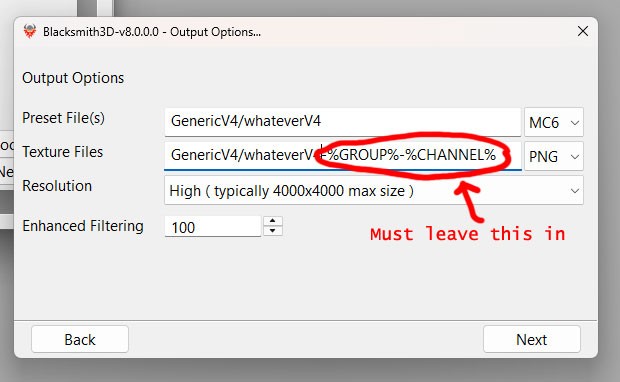
still lost in the wilderness
Poser 13 Superfly pretty much only these days
genwile posted Tue, 09 June 2026 at 5:12 AM
Hooray I got it going. Thank you so much “jancory” from MAKE ART I appreciate your input and the solution to problems I have had using Blcksmith 3D I got it going through Blacksmith and the standalone versions. It will make life easy to be able to convert textures, particularly V4 to La Femme as I work in Poser most of the time.
Thank you again.
jancory posted Tue, 09 June 2026 at 5:18 AM
you're welcome, glad i could help! it's a great tool once it works!
still lost in the wilderness
Poser 13 Superfly pretty much only these days
Deecey posted Tue, 09 June 2026 at 2:45 PM
Thanks for your reply, jancory. I was working on a tutorial so got sidetracked.
Yes, Texture Transformer is great. While adding support for LF2 and LH2 I improved the transfer quality and am slowly testing each package and making sure they all work. V4 updates, as well as M4 support, will be coming first.
Again, I'm working as fast as I can, given my health limitations. I thank you all so much for your patience.
jancory posted Tue, 09 June 2026 at 3:09 PM
appreciate everything you've done so far; take your time
still lost in the wilderness
Poser 13 Superfly pretty much only these days

Singular3D posted Wed, 10 June 2026 at 1:05 AM
Looking forward to see your outcome. Love these tools and extensions.Thanks for your reply, jancory. I was working on a tutorial so got sidetracked.
Yes, Texture Transformer is great. While adding support for LF2 and LH2 I improved the transfer quality and am slowly testing each package and making sure they all work. V4 updates, as well as M4 support, will be coming first.
Again, I'm working as fast as I can, given my health limitations. I thank you all so much for your patience.