
TentCabin opened this issue on Feb 12, 2026 · 6 posts
TentCabin posted Thu, 12 February 2026 at 10:12 AM
Would someone be able to explain how to bring a JPG image
into Poser 14?

Kalypso posted Thu, 12 February 2026 at 10:36 AM Site Admin
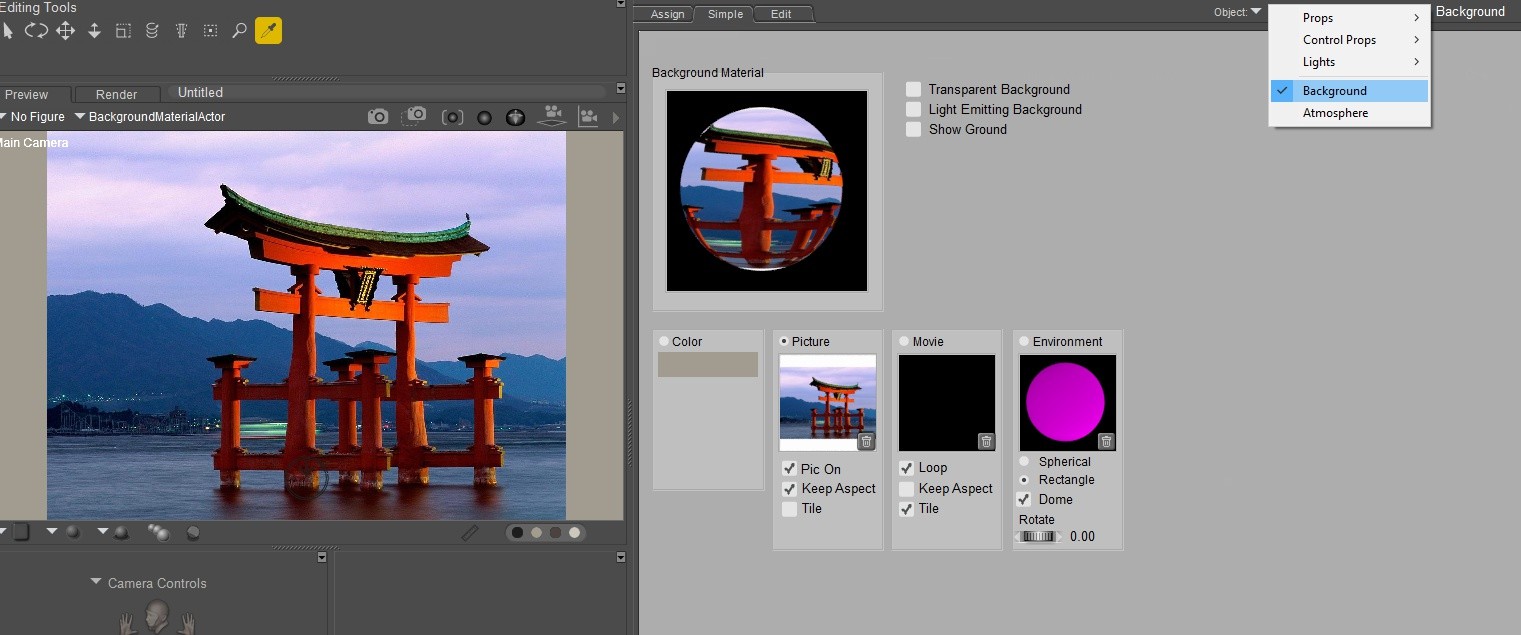
Do you mean import a jpg image as a background? All you need to do is go to the material room and select the background, then select the Simple tab. Make sure you have picture selected and just navigate to where you have the image and open it. This will then show in the background of your display.
TentCabin posted Thu, 12 February 2026 at 10:55 AM
Yes, I meant to say import thank you I'm now making progress.
Now I'm wondering how to get my background image to show up behind Andy. Your
screen shots were very helpful.
Thank you

hborre posted Thu, 12 February 2026 at 12:12 PM
You need to check Light Emitting Background in order to see the image. Also, hide the Ground prop.
TentCabin posted Thu, 12 February 2026 at 12:31 PM
Thank you, now I can see it.

PendraiaFaeCreations posted Thu, 12 February 2026 at 4:04 PM
Good question. Thanks for the info...