
adp001 opened this issue on Dec 06, 2025 · 13 posts
adp001 posted Sat, 06 December 2025 at 3:57 AM
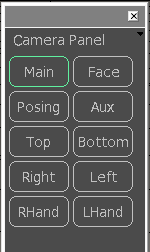
After a long time, my first new/old Python script: PoserCams
Poser's camera management (on the left screen-side) is a bit outdated for my taste.
My script creates a panel with buttons, each button representing one of the cameras.
Left-clicking on a button switches to the corresponding camera-view.
Right-clicking displays the parameters for the corresponding camera.
The panel can be docked in the Poser window.
The downside: docking doesn't seem to work properly from time to time, and I can't figure out why. However, this may be due to the fact that Poser doesn't run on Windows for me. It would be nice if someone could provide some feedback on this.
Unzip the contents of the zip file into a separate folder and start the “main.py” file.
adp001 posted Sat, 06 December 2025 at 4:05 AM
Forgot the link:
http://adp.spdns.org/PoserCams.zip
Attention: No https! Your browser may warn you. But there is no reason because this is only a download, not an active web page.
I have to re-install my website over the weekend (from older backups, probably no complete restore). SSL will be back then.

jancory posted Sun, 07 December 2025 at 11:18 AM
this is handy! thank you for sharing this. works great!
i have docking problems too. P13 latest, Win11.
the panel doesn't show me any dock options. since i normally disable drag/drop it's not a problem for me but if i accidentally drag it too close to the edges of the workspace P13 *poof disappears* without any crash message. i can make this repeat. happens with disable docking turned off or on.
with the workspace smaller than full screen i can drag the panel completely off if i'm quick about it & it still functions in the scene. but if i linger near the edges P13 goes grey then disappears.
maybe you could just dump the docking part of the code?
otherwise functions great. extremely useful. i'm just careful how i position it.
is there any way to make this auto-load? and maybe a smidgen shorter or even resizable?
thanks again. and welcome back! missed you!
still lost in the wilderness
Poser 13 Superfly pretty much only these days
adp001 posted Sun, 07 December 2025 at 11:44 AM
Thanks for feedback!
I'm actually working on that at the moment. I think I will leave it by the old way for the moment. Update comes in an hour or so.
jancory posted Sun, 07 December 2025 at 11:46 AM

hborre posted Sun, 07 December 2025 at 11:52 AM
I agree. The docking option crashes P14. Omit the docking option and leave it free-floating. It is small enough to be ported anywhere on the screen.
Is there any way to integrate the Parameters/Properties panel and make it change every time you select a camera?
You forgot Front and Back cameras?
adp001 posted Sun, 07 December 2025 at 12:59 PM
Version with the old method for docking
http://adp.spdns.org/PoserCams_V02.zip
adp001 posted Sun, 07 December 2025 at 1:07 PM
hborre posted at 11:52 AM Sun, 7 December 2025 - #4502055
For Parameters press the right mousebutton.I agree. The docking option crashes P14. Omit the docking option and leave it free-floating. It is small enough to be ported anywhere on the screen.
Is there any way to integrate the Parameters/Properties panel and make it change every time you select a camera?
You forgot Front and Back cameras?
Add (or remove) the buttons you like in "_Cams.py", Line 29. You can even rearrange the cams in this string if you like.
This is the original line:
BTN_NAMES = "Main Face Posing Aux Top Bottom Right Left RHand LHand".split()Shadow cams won't work.
With Front and Back Camera:
BTN_NAMES = "Main Face Posing Aux Top Bottom Right Left RHand LHand Front Back".split()
adp001 posted Sun, 07 December 2025 at 4:18 PM
Anyone with P11 who can and will test the script?
jancory posted Mon, 08 December 2025 at 7:20 AM
had to install P11 (new rig) but here's what i get:
version 1 doesn't load at all
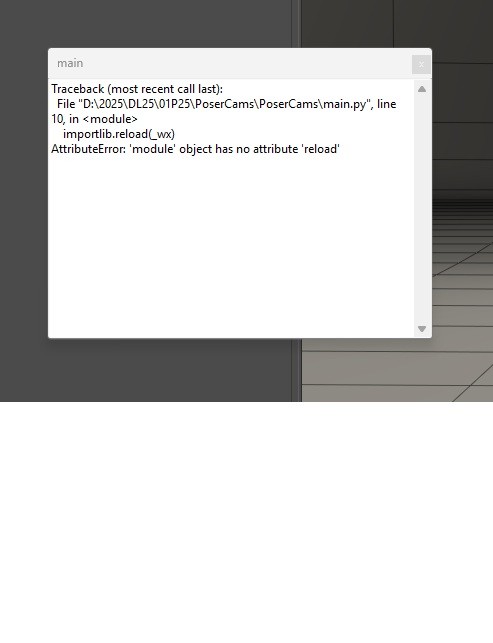
version 2 loads, docked with no undocking options, works properly but gives this error message whenever i move the panel (which stays docked, doesn't freefloat)
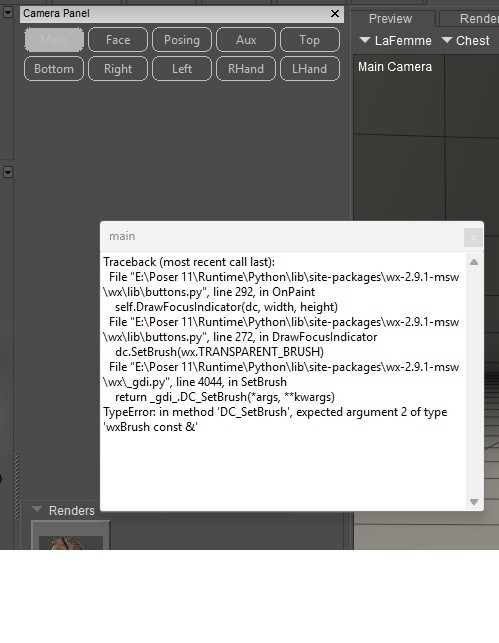
hope this helps! both were loaded via Run Python Script
still lost in the wilderness
Poser 13 Superfly pretty much only these days
adp001 posted Mon, 08 December 2025 at 8:06 AM
Thanks a lot!
I think I can change the draw function to work on all versions.
Thanks again! Will post the new version later. Have to deal with some private issues first :)
jancory posted Mon, 08 December 2025 at 8:20 AM
glad i was able to help
btw the edit you posted to add/rearrange cameras works great
still lost in the wilderness
Poser 13 Superfly pretty much only these days
adp001 posted Tue, 09 December 2025 at 4:42 AM
Ups! Didn't press the send button yesterday :)
http://adp.spdns.org/PoserCams_V03.zip