
mmitchell_houston opened this issue on May 24, 2024 · 19 posts
mmitchell_houston posted Fri, 24 May 2024 at 11:13 PM
I have a HUGE scene and it's causing me problems (slow refresh, sluggish response time, glacial renders).
The background mountains PROP (not rigged figure) do not need to be highly detailed.
Could I use Hexagon (or another app) to decrease the poly count of the OBJ file and swap them out? Would that work? Or will it mess up the textures or other things?
If this is a bad path, is there something else I could do?
- - - - - - - - - -
System: Lenovo Legion Pro 7 16IRX9H Laptop | Windows 11 Professional | 32GB RAM | 14th Gen Intel® Core™ i9-14900HX | Nvidia RTX 4090 Laptop GPU 16GB 9728 CUDA Cores
mikemitchellonline.blogspot.com | Poser Noir Comics Tutorial | Illustrations Honored by Renderosity

RedPhantom posted Sat, 25 May 2024 at 7:16 AM Site Admin
You could try to reduce the polygons and see how it would affect the texture map. I would save it as a different obj though to avoid any issues. Then I would add the new mountains to my scene and remove the old ones, copying any shaders first of course.
I've also found hiding most things in the scene works well to improve response time. That won't help with render times, but response times while working with the scene drastically improve. I'd also look at other things in your scene and look at those polys. I find trees are another source of slowdown. (I'm assuming with mountains, it's an outdoor scene) Unfortunately, those seem to need to be high poly.
Available on Amazon for the Kindle E-Reader Monster of the North and The Shimmering Mage
Today I break my own personal record for the number of days for being alive.
Check out my store here or my free stuff here
I use Poser 13 and win 10

EVargas posted Sat, 25 May 2024 at 9:34 AM
I believe Blender (free) can decimate while keeping the UVs (so you don't have to deal with fixing textures/materials).
One approach could be:
1. Open the prop file in a text editor (notepad++ or similar), If geometry is not embedded inside you should find a reference to the OBJ/OBZ file;
2. Go to that location, usually at "Runtime:Geometries" or something;
3. Make a backup of the original OBJ/OBZ, to restore back later if you want. If it was OBZ use Poser script/utilities menu to decompress as OBJ;
4. Now you import the original in Blender, apply the decimate modifier in a way that preserves the UVs (see for example https://medium.com/@ilkyal3d/how-to-preserve-uvs-when-using-decimate-modifier-1bc769b64618);
5. Once done export as OBJ overwriting the original and you are good to go.
Other references: https://www.youtube.com/watch?v=cwldHToYGt4

Zaycrow posted Sat, 25 May 2024 at 12:29 PM
Take a look at Groups.
mmitchell_houston posted Sat, 25 May 2024 at 10:18 PM
RedPhantom posted at 7:16 AM Sat, 25 May 2024 - #4485268
I've also found hiding most things in the scene works well to improve response time. That won't help with render times, but response times while working with the scene drastically improve. I'd also look at other things in your scene and look at those polys. I find trees are another source of slowdown. (I'm assuming with mountains, it's an outdoor scene) Unfortunately, those seem to need to be high poly.
THANKS. Hiding stuff does help with the response time! Yup... lots of trees. Hiding them REALLY helped. I even removed a cliff that I kinda liked, but wasn't really essential to the composition. That cut some polygons from the scene.
- - - - - - - - - -
System: Lenovo Legion Pro 7 16IRX9H Laptop | Windows 11 Professional | 32GB RAM | 14th Gen Intel® Core™ i9-14900HX | Nvidia RTX 4090 Laptop GPU 16GB 9728 CUDA Cores
mikemitchellonline.blogspot.com | Poser Noir Comics Tutorial | Illustrations Honored by Renderosity
mmitchell_houston posted Sat, 25 May 2024 at 10:18 PM
I don't understand what you mean. Could you please elaborate?Take a look at Groups.
- - - - - - - - - -
System: Lenovo Legion Pro 7 16IRX9H Laptop | Windows 11 Professional | 32GB RAM | 14th Gen Intel® Core™ i9-14900HX | Nvidia RTX 4090 Laptop GPU 16GB 9728 CUDA Cores
mikemitchellonline.blogspot.com | Poser Noir Comics Tutorial | Illustrations Honored by Renderosity
mmitchell_houston posted Sat, 25 May 2024 at 10:24 PM
EVargas posted at 9:34 AM Sat, 25 May 2024 - #4485274
THANKS! I really appreciate the time you took to write out such detailed instructions. Last night I did something similar to what you wrote, but I used Hexagon (already had it installed). It worked on the polys, but blew the UVs away and I couldn't really get any textures to work well after that. I'll read the references you sent me and see if Blender can work for me.I believe Blender (free) can decimate while keeping the UVs (so you don't have to deal with fixing textures/materials).
My approach was different in that I duplicated the cr2 file, renamed it and then edited it in Notepad++ to reference the newly created low-res copy of the OBJ file. This approach allowed me to experiment without mucking up the older versions of the file and prop. As I noted in a post above, though, the UVs were blown away and I wound up trying other approaches to simplify the scene.
Dang those trees!
If I cannot get this to work, I'm going to give the Blender method a shot.
Thank you again VERY MUCH!
- - - - - - - - - -
System: Lenovo Legion Pro 7 16IRX9H Laptop | Windows 11 Professional | 32GB RAM | 14th Gen Intel® Core™ i9-14900HX | Nvidia RTX 4090 Laptop GPU 16GB 9728 CUDA Cores
mikemitchellonline.blogspot.com | Poser Noir Comics Tutorial | Illustrations Honored by Renderosity
RedPhantom posted Sun, 26 May 2024 at 6:47 AM Site Admin
Another trick to keep in mind. if the trees are located in places where the tops won't show, you can use just trunks. It's all the leaves that raise the polygons.
Available on Amazon for the Kindle E-Reader Monster of the North and The Shimmering Mage
Today I break my own personal record for the number of days for being alive.
Check out my store here or my free stuff here
I use Poser 13 and win 10

JAFO posted Sun, 26 May 2024 at 11:38 AM
Poser\ main menu\ object\ reduce polygons.
Y'all have a great day.
Zaycrow posted Wed, 05 June 2024 at 1:25 PM
Object/Create Grouping. That will add a group in your Hierarchy editor and you can drag and drop content from your scene in that Group - or Groups. Then you can hide that group(s) from the scene. I use it all the time for big scenes.
To decimate a figure - Figure/Reduce polygons.
To decimate an Object - Object/Reduce polygons
mmitchell_houston posted Thu, 13 June 2024 at 7:54 PM
Zaycrow posted at 1:25 PM Wed, 5 June 2024 - #4485770
Oh good grief, how did I miss those options? I seriously need to spend a day just going through all of the menu settings and confirming that I know what's what.Object/Create Grouping. That will add a group in your Hierarchy editor and you can drag and drop content from your scene in that Group - or Groups. Then you can hide that group(s) from the scene. I use it all the time for big scenes.
To decimate a figure - Figure/Reduce polygons.
To decimate an Object - Object/Reduce polygons
That being said... I used that option to reduce polygons, and it did, but it didn't seem to improve performance much. I clearly need to investigate what's going on in this scene in more detail.
- - - - - - - - - -
System: Lenovo Legion Pro 7 16IRX9H Laptop | Windows 11 Professional | 32GB RAM | 14th Gen Intel® Core™ i9-14900HX | Nvidia RTX 4090 Laptop GPU 16GB 9728 CUDA Cores
mikemitchellonline.blogspot.com | Poser Noir Comics Tutorial | Illustrations Honored by Renderosity
mmitchell_houston posted Thu, 13 June 2024 at 7:55 PM
This is a forest scene with a large expanse of area shown. I'm seriously considering hiding all of the trees, rendering them separately, and then adding them in post-production. I've been messing around with this scene for far too long.Another trick to keep in mind. if the trees are located in places where the tops won't show, you can use just trunks. It's all the leaves that raise the polygons.
- - - - - - - - - -
System: Lenovo Legion Pro 7 16IRX9H Laptop | Windows 11 Professional | 32GB RAM | 14th Gen Intel® Core™ i9-14900HX | Nvidia RTX 4090 Laptop GPU 16GB 9728 CUDA Cores
mikemitchellonline.blogspot.com | Poser Noir Comics Tutorial | Illustrations Honored by Renderosity

FVerbaas posted Thu, 27 June 2024 at 9:48 AM Forum Coordinator
Render batches of these trees, grouped by distance from camera, on transparent background and use them as billboard props.

bingomion posted Sun, 19 April 2026 at 6:22 AM
I recently installed a fresh v13 and well... there is no Figure -> Reduce polygons menu option.
I guess both figure and object reduction was removed in v12 (why???) and only object reduction was brought back???
What a PITA! why cripple Poser like this?
RedPhantom posted Sun, 19 April 2026 at 6:53 AM Site Admin
The reason given was that it didn't work well. I can believe that. Every time I used it, it wielded 1 or 2 lip verticies together so the figure couldn't open its mouth properly.
Available on Amazon for the Kindle E-Reader Monster of the North and The Shimmering Mage
Today I break my own personal record for the number of days for being alive.
Check out my store here or my free stuff here
I use Poser 13 and win 10
bingomion posted Sun, 19 April 2026 at 7:02 AM
Poser 12.0.88 - 2020-07-01
Remove unseen polys disabled until it can be improved
Noooooooooooo!
Again, it was working!! it wasn't the worlds best reduction and hidden polygon algorithms but they just have to be good enough, and they were! So removing them is a HUGE PITA!! Wow okay, well I guess I'm going back to v11 and hope that it can still "call home" for a good time to come!
I'm starting to see why people say poser 2014 pro was the best Poser version! Geeeeeeeeze!!
bingomion posted Sun, 19 April 2026 at 8:47 AM
RedPhantom posted at 6:53 AM Sun, 19 April 2026 - #4505485
The reason given was that it didn't work well. I can believe that. Every time I used it, it wielded 1 or 2 lip verticies together so the figure couldn't open its mouth properly.
Aaah, then you up the polygon number until it doesn't or it's acceptable? I don't think anyone is expecting perfect topology decimation, not in Poser anyway lol
But we know why it was removed, being "game dev" and "de-cluttering" the menu?
Removing the game dev stuff, the face room, cloth room, old 3D formats and whatever else.... with everything that got removed, a little bit of fun and practicality went with it.
So, now I wouldn't consider Poser v12+ game dev friendly at all.... but older Poser 11 and 2014 are great game dev tools!
The elephant in the room is the Extra license on the store, having removed the game dev features from Poser 12, who is the Extra license for if it's not for game devs?? Maybe 3D or VR work/industry related scenarios? but I think that's even more specialised than "serious" game dev. Anyway , I am really confused and amazed at the disconnect and dissonance.... I get Poser and Renderosity were two different things but it's been 5 years they've been together now? and yet IMO they are further apart now... maybe I'm just missing something?
RedPhantom posted Sun, 19 April 2026 at 1:36 PM Site Admin
I've tried increasing the polygon number. I've even gone higher than the original figure.
Here's what I got
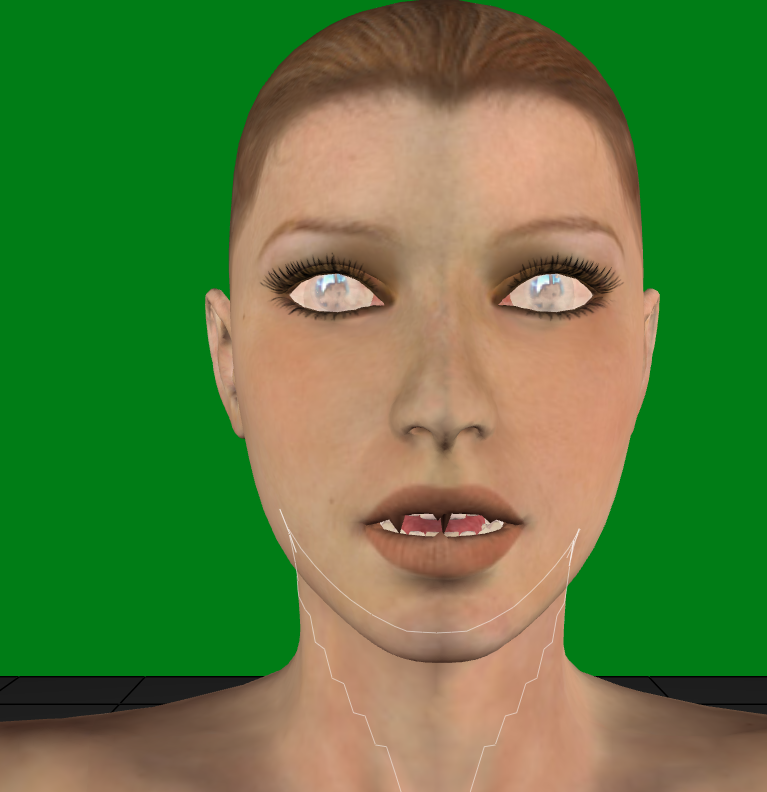
I can just see an NPC giving side quests with that mouth.
And you don't have to worry about using an older version of P11 and hoping it works. The latest version of P11 has the reduce polys on figures feature
Available on Amazon for the Kindle E-Reader Monster of the North and The Shimmering Mage
Today I break my own personal record for the number of days for being alive.
Check out my store here or my free stuff here
I use Poser 13 and win 10
noxiart posted Sun, 03 May 2026 at 12:50 AM
The sticky lip polygons are causd by Poser's attempt to "project" morphs from one object to another.
But it also happens when you transfer morphs between nearly identical high res meshes.
Poser USED to transfer morphs the same way the good ol' MorphManager does: By copying the ACTUAL morphs as text files into the newly created cr2 file.
(This of course doesn't work between meshes with differnt topology, like when you reduced polygons. Then projection is a must.)
But even between meshes of identical topology, you now get "sticky lips", because most Poser figure have intersecting topology, and the projection can't tell what polygons are the upper lip and what are the lower lip.
It would have been nice to install a switch, so the user could decide what exact method to use: Transfer the actual morphs or create new ones via projection.
As things are, I still have to keep MorphManager around to transfer morphs once I modified a figure and resaved it to the library. It's quite a hassle, but then, things were never "easy" with Poser. ;-)
*
BTW, if you HAVE to use the projection method because the mesh geometry has been modified, you CAN fix sticky lips and other problems using the Morphbrush quite easily.
Use the smoothing brush, but be VERY, VERY carefull and delicate. You want to modify thise one or two offending vertices only! Use a very small diameter (Or set it to single polygons only) and a very low stenght.
*
And, yes, Poser 11 is still the most powerfull of all Poser versions. I own Poser 12 and 13, but I haven't even installed them on my workhorse machine.