
Renderosity Forums / DAZ|Studio
Welcome to the DAZ|Studio Forum
Forum Moderators: wheatpenny Forum Coordinators: Lobo3433
DAZ|Studio F.A.Q (Last Updated: 2026 May 23 6:41 pm)


Subject: Can someone help me understand how to install content manually?


Unfortunately, that particular Library folder is not the unique folder that is the default for DAZStudio. If you use the DAZ Install Manager (DIM) then that would be the designated folder to install your content, even manually. The default DAZ Library should be under Documents>DAZ 3D>Studio>My Library. All the content folders go there.

For the sake of not taking up ALL the space on my hard drive, my DS content is on my external drive.
I am including screenshots. You want the folders where ever you place them to be mapped
Daz 3D> Studio> My Library so when you do the next step they work properly.

Once you have saved your items you will want to link them within DS.
So in DS go to Edit>Preferences
Once in preferences go to the content tab
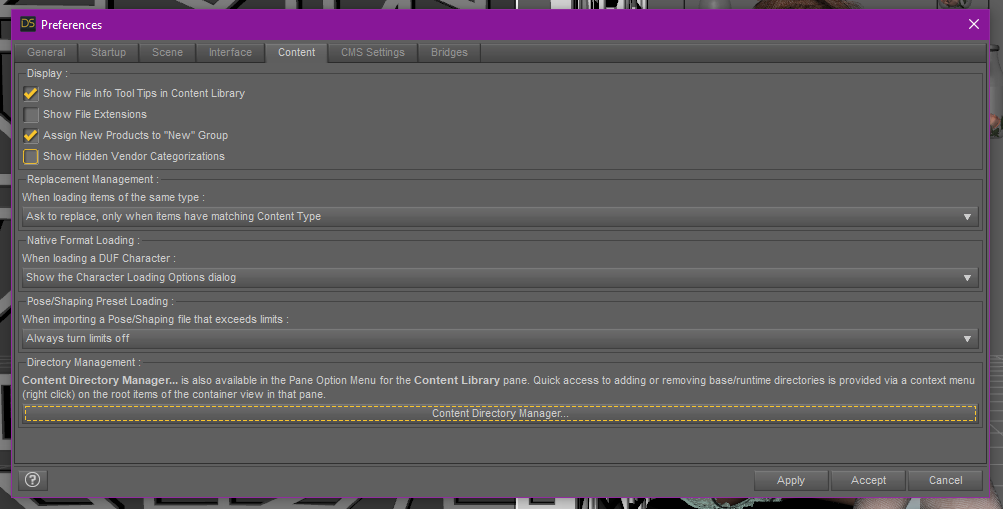
Click on Content Directory Manager at the bottom,
Then choose Daz Studio Formats

next click add and it a window will pop up like to select a directory.

navigate to where you have decided to save your content and click Select Folder
it will take you back to the content directory manager.
Click accept
and now that content will be located in your DAZ Studio Formats under my library.
*~*Jamie*~*
"Life is just a dream on the way to death." ~The Crow: City of Angels
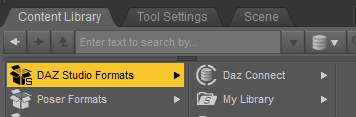
On second thought, if you haven't been able to locate your Library folder, open DAZStudio and click on the Content Library tab. Navigate to the DAZ Studio Format in the hierarchy and hover your mouse cursor over My Library, a pop-up link will appear showing you the path of where the Library is located.

This may or may not be helpful. I have two drives on my system C: and E:. My system and programs reside on C:. I never store data on my C: drive in my profile. All of my data resides on E:. This makes backups and system re-loads simpler.
On E:, I have a directory called "E:\DAZStudio\DS4Content" which is where I install content from DAZ, Renderosity, ShareCG, etc. After setting up your content directory, you need to "tell" DS about it using the "Edit-Preferences" menu selection (see attached).
When you download a .zip or .rar content from Renderosity or ShareCG, unzip it into a temporary directory, then navigate down the tree until you see content folders like data, People, Runtime. etc. Move these folder to your content directory (in my case "E:\DAZStudio\DS4Content").
I have DAZ Central setup to download my content purchases to a temporary directory. After downloading, I move the content to "E:\DAZStudio\DS4Content". Setting this up has become quite complicated. It used to be very simple a couple of years ago.
First...THANK YOU!!!
So, there was a huge amount of data to unpack there but I now have what I was looking for and new questions.
Hovering over "My Library" I saw ...user/Marc/Documents/DAZ 3D/Studio/My Library
Navigating to .../Documents/DAZ 3D/Studio", I saw /My Daz Connect Library/data/cloud"
But that directory was empty
Under "My Library" is a link: "My DAZ 3D Library" and hovering over showed "...user/Marc/Documents/My DAZ 3D Library"
But, navigating to "...user/Marc/Documents", I only see the DAZ 3D" directory mentioned above. No "My DAZ 3D Library" as expected.
Finally, under "My Library" and "My DAZ 3D Library" is a Second "My DAZ 3D Library"
Hovering over that shows the location: C:/DAZ 3D/Applications/Data/DAZ 3D/My DAZ 3D Library
So, there was a huge amount of data to unpack there but I now have what I was looking for and new questions.
Hovering over "My Library" I saw ...user/Marc/Documents/DAZ 3D/Studio/My Library
Navigating to .../Documents/DAZ 3D/Studio", I saw /My Daz Connect Library/data/cloud"
But that directory was empty
Under "My Library" is a link: "My DAZ 3D Library" and hovering over showed "...user/Marc/Documents/My DAZ 3D Library"
But, navigating to "...user/Marc/Documents", I only see the DAZ 3D" directory mentioned above. No "My DAZ 3D Library" as expected.
Finally, under "My Library" and "My DAZ 3D Library" is a Second "My DAZ 3D Library"
Hovering over that shows the location: C:/DAZ 3D/Applications/Data/DAZ 3D/My DAZ 3D Library
Now, this is a huge amount of data sitting in C: root! And DAZ does not seem to allow for content management on install.
So, I looked into moving the data, but the "move" tools in Content Directory Manager only moves up or down in the existing locations. So, how do I move my data to a new directory on my E Drive? Do I have to create a new location in the app and then move the data?
And, does the data automatically move when I do that?
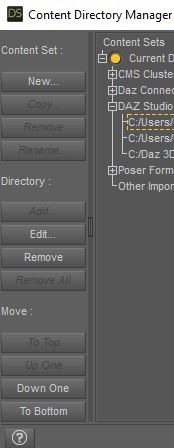
Also, which of the following directories should I move?
CMS Cluster Directory: C:/Users/Marc/AppData/Roaming/DAZ 3D/cms
DAZ Connect Data: C:/Users/Marc/Documents/DAZ 3D/Studio/My Daz Connect Library
DAZ Studio Formats: C:/Users/Marc/Documents/DAZ 3D/Studio/My Library
C:/Users/Public/Documents/My DAZ 3D Library
C:/Daz 3D/Applications/Data/DAZ 3D/My DAZ 3D Library
Poser Formats: C:/Users/Marc/Documents/DAZ 3D/Studio/My Library
C:/Users/Public/Documents/My DAZ 3D Library
C:/Daz 3D/Applications/Data/DAZ 3D/My DAZ 3D Library
I have setup my DAZ Content, so that none of it is stored on the C: drive in my private profile. I do this because:
1. If I update or reload Windows, I do not have to worry about wiping out my content.
2. Is easier to manage directory permissions and do backups.
For my answers "DriveLetter:\" means any drive except C:\.
CMS Cluster Directory: C:/Users/Marc/AppData/Roaming/DAZ 3D/cms - DriveLetter:\DAZStudio\cms
DAZ Connect Data: C:/Users/Marc/Documents/DAZ 3D/Studio/My Daz Connect Library - DriveLetter:\DAZStudio\DS4Content
DAZ Studio Formats: C:/Users/Marc/Documents/DAZ 3D/Studio/My Library
C:/Users/Public/Documents/My DAZ 3D Library - Leave alone, should be empty.
C:/Daz 3D/Applications/Data/DAZ 3D/My DAZ 3D Library - Leave alone.
Poser Formats: C:/Users/Marc/Documents/DAZ 3D/Studio/My Library - I have no Poser content anymore. I used to use DriveLetter:\Poser\Poser7.
C:/Users/Public/Documents/My DAZ 3D Library
C:/Daz 3D/Applications/Data/DAZ 3D/My DAZ 3D Library
Use file explorer (the folder icon) to move your content to its desired directory.
One more thing - The DAZ content directory can get quite large, which is why I do not recommend storing it on C:. If you run out of room on C:, you might not be able to boot your system. It is a good rule of thumb to keep your data (DAZ, Financial, Personal, etc.) and operating system/programs on separate physical drives.

Privacy Notice
This site uses cookies to deliver the best experience. Our own cookies make user accounts and other features possible. Third-party cookies are used to display relevant ads and to analyze how Renderosity is used. By using our site, you acknowledge that you have read and understood our Terms of Service, including our Cookie Policy and our Privacy Policy.