
structure opened this issue on Jun 27, 2019 · 94 posts
structure posted Thu, 27 June 2019 at 4:56 PM Forum Coordinator
So I think with the advent of a new dawn for poser, this forum could use a sticky thread where snakeheads can supply snippets of poser python code that others may find useful, or indeed, be able to improve upon. Let me start the ball Rolling - the following is a complete library that I have built / collected over the years ( there are more to follow ) Some of the code was written by others, edited by myself and is now here - for the use of all of you fellow coders should you choose to.
Locked Out

FVerbaas posted Thu, 25 July 2019 at 2:31 PM Forum Coordinator
Also do not forget the examples that come with Poser. They could do with more documentation but are a great reference.
FVerbaas posted Tue, 30 July 2019 at 9:44 AM Forum Coordinator
A simple function to copy matrerial collections between figures and props. if the target (a prop or a figure) has a material defined with a name that also appears in the materials list of the source, that material definition (shader) in the target will be overwritten by the material of the source.
def copyMaterialDefinitions(source, target):
    srcmats = source.Materials()
    tgtmats = target.Materials()
    for srcmat in srcmats:
        matnam = srcmat.Name()
        srcmat.SaveMaterialSet(matnam)
        try:
            target.Material(matnam).LoadMaterialSet(matnam)
        except:
            pass
structure posted Sun, 01 September 2019 at 8:35 AM Forum Coordinator
Nice routine! thanks
Locked Out
FVerbaas posted Mon, 06 January 2020 at 12:04 PM Forum Coordinator
I tried some of the dialogs class yesterday because I needed some of the functions. I assume the site formatting has ironed some things away here and there:
D_paths = re.findall(r'XDG_DESKTOP_DIR="([^"]*)', data)
structure posted Mon, 06 January 2020 at 12:07 PM Forum Coordinator
FVerbaas posted at 6:07PM Mon, 06 January 2020 - #4375651
I tried some of the dialogs class yesterday because I needed some of the functions. I assume the site formatting has ironed some things away here and there:
- the definition of 'types' in GetFile triggers a complilation error and indentaiton error.
- in 'get_desktop_path', 're' is not defined in
D_paths = re.findall(r'XDG_DESKTOP_DIR="([^"]*)', data)
add
Import re
Locked Out
structure posted Mon, 06 January 2020 at 4:21 PM Forum Coordinator
the backslashes were not showing ( I forget about that in this forum ) so I have added a double backslash to enable them to be visible
Locked Out
structure posted Tue, 07 January 2020 at 9:42 PM Forum Coordinator
A dictionary of poser Figures by geometry:
Locked Out
structure posted Sun, 05 April 2020 at 11:11 PM Forum Coordinator
replacing all backslashes in a list of paths
def replaceBackslashinList( Thislist, bs, fs ):return list(map(lambda x: x.replace( bs, fs), Thislist) )myList = replaceBackslashinList(myList, "\\", "/")
Locked Out
structure posted Fri, 10 April 2020 at 7:04 PM Forum Coordinator
Copy to Clipboard
without wx :
from subprocess import check_callclass clipboard:def copy2clip(self, txt):cmd='echo '+txt.strip()+'|clip'return check_call(cmd, shell=True)
Locked Out

adp001 posted Thu, 14 May 2020 at 9:36 AM
Simple method to save some typing while dealing with dicts:
class MyDict(dict):
    def __getattr__(self, item):
        if not item.startswith("_"):
            return self.get(item)
        return super(self.__class__, self).__getattribute__(item)
Instead of MyDict["keyword"]you can simplly write MyDict.keyword.
adp001 posted Thu, 14 May 2020 at 9:41 AM
Above dict replacement delivers None for not existent elements. If you want original behaviour, use this a bit slower class:
class MyDict(dict):
    def __getattr__(self, item):
        if not item.startswith("_") and item in self:
            return self.get(item)
        return super(self.__class__, self).__getattribute__(item)
adp001 posted Sat, 16 May 2020 at 8:41 AM
I often use the following little function if I have to script something with Poser meshes. I do that outside of Poser, because I often need a debugger to follow what the script is doing step by step in critical parts.
With Poser-Python:
import numpy as NP

try:
    import poser

    INSIDEPOSER = True
except ImportError:
    # "POSER_FAKE" is a Python lib to allow your editor to know about Poser
    # for scripting outsite of Poser (code completition, type checking, highlighting).
    # Author: adp001
    # Direct download: http://adp.spdns.org/FakePoserLib3.zip
    import POSER_FAKE as poser

    INSIDEPOSER = False

# Pickle is used to save|load the complete geometry instead of a slow obj loader.
try:
    import cPickle as pickle
except ImportError:
    import pickle


# Returns python list (assume given poly is tri or quad):
f_forcequad = lambda _poly: list(_poly) if len(_poly) == QUAD else list(_poly) + [_poly[-1]]

VERSION = float(poser.Version()) if poser.Version()[0].isdigit() else 11
NP_PRECISION = NP.float32 if int(VERSION) <= 11 else NP.float

def save_figure(fig, filename):
    """
        Saves verts, tverts, polys (4 vertices as float), polysets (4 indices crossreferencing verts),
        tpolys (2 vertices as float), tpolysets (2 indices creossreferencing tverts), material names
        and a material indexlist for cross-reference.
        All collected arrays from current figure are pickled into a file.

        :param fig: Poser figure
        :param filename: Path and filename
        :type fig: poser.FigureType
        :type filename: basestring
    """
    if INSIDEPOSER:
        # Get unimesh of current figure (unmorphed, unposed)
        poser_geom = fig.UnimeshInfo()[0]
        assert isinstance(poser_geom, poser.GeomType)
        geom = MyGeom(
                verts=NP.array([[v.X(), v.Y(), v.Z()] for v in poser_geom.Vertices()], NP_PRECISION),
                tverts=NP.array([[v.U(), v.V()] for v in poser_geom.TexVertices()], NP_PRECISION),
                polys=NP.array([f_forcequad([[v.X(), v.Y(), v.Z()] for v in p.Vertices()])
                                for p in poser_geom.Polygons()], NP_PRECISION),
                polysets=NP.array([f_forcequad(poser_geom.Sets[p.Start():p.Start() + p.NumVertices()])
                                   for p in poser_geom.Polygons()], NP.int32),
                tpolys=NP.array([f_forcequad([[v.U(), v.V()]
                                              for v in p.TexVertices()]) for p in poser_geom.TexPolygons()],
                                NP_PRECISION),
                tpolysets=NP.array([f_forcequad(poser_geom.Sets[p.Start():p.Start() + p.NumVertices()])
                                    for p in poser_geom.TexPolygons()], NP.int32),
                matindex=NP.array([p.MaterialIndex() for p in poser_geom.Polygons()], NP.int32),
                matnames=[m.Name() for m in poser_geom.Materials()]
        )
        p = poser.TexPolygonType()

        with open(filename, "wb") as fh:
            pickle.dump(geom, fh, pickle.HIGHEST_PROTOCOL)

        return geom
    return None
This saves all those collected data in a file (pickled).
adp001 posted Sat, 16 May 2020 at 8:45 AM
Class "MyGeom" is actually a dict. But in my case it is what I mentioned before:
class MyGeom(dict):
    def __getattr__(self, item):
        if not item.startswith("_") and item in self:
            return self.get(item)
        return super(self.__class__, self).__getattribute__(item)
adp001 posted Sat, 16 May 2020 at 8:50 AM
To load the data back if you are scripting outside of Poser:
try:
    import cPickle as pickle
except ImportError:
    import pickle

with open(filename, "rb") as fh:
    geom = pickle.load(fh)
(Make sure there is access to the class you saved the file with – maybe it's better to use plain dict in the Poser script part)
Now you can get from the dict what you need and ignore/discard the rest.
adp001 posted Sat, 16 May 2020 at 8:54 AM
I extraced the Poser part from a whole script and forgot to copy 2 declarations:
TRI, QUAD = 3, 4
Sorry for that.
adp001 posted Sat, 16 May 2020 at 9:03 AM
Something useful when dealing with Numpy:
try:
    # Try to make Numpy show numbers in this format:
    float_formatter = "{:.4f}".format
    NP.set_printoptions(formatter={'float_kind': float_formatter})
except TypeError as err:
    # Numpy to old. But "precision" should work.
    NP.set_printoptions(precision=4)
adp001 posted Sat, 16 May 2020 at 9:06 AM
Some "constants" I often use:
# Poser <= version 11 seems to work with 32-bit float precision (Numpy standard is 64-bit)
VERSION = float(poser.Version()) if poser.Version()[0].isdigit() else 11
NP_PRECISION = NP.float32 if int(VERSION) <= 11 else NP.float
NP_VERT_ZERO = NP.array((0, 0, 0), NP_PRECISION)

# Simplification to deal with some names used as indices
X, Y, Z = range(3)
A, B, C, D = range(4)
QUAD = 4
TRI = 3
(Because Poser does not know constants, I write them in Uppercase to remember)
adp001 posted Sat, 16 May 2020 at 9:13 AM
Polys can have 3 or 4 vertices (TRI or QUAD). Numpy arrays must have a constant length. So it is common behaviour to set the 4th entry for a TRI equal to the third entry (isTri == (p[3] == p[4]) )
adp001 posted Sat, 16 May 2020 at 9:15 AM
And a real fast function to compute the distance between 2 verts:
def distance_e(v, u):
    # Distance with Numpy "einsum"
    # https://semantive.com/blog/high-performance-computation-in-python-numpy-2/
    z = v - u
    return NP.sqrt(NP.einsum('i,i->', z, z))
adp001 posted Sat, 16 May 2020 at 3:10 PM
The function to save the figure is pretty slow, because a whole lot of function calls to Poser are needed when collecting the indices. Use the following and it is pretty fast:
        vsets = poser_geom.Sets()
        tsets = poser_geom.TexSets()
        geom = MyGeom(
                verts=NP.array([[v.X(), v.Y(), v.Z()] for v in poser_geom.Vertices()], NP_PRECISION),
                tverts=NP.array([[v.U(), v.V()] for v in poser_geom.TexVertices()], NP_PRECISION),
                polys=NP.array([f_forcequad([[v.X(), v.Y(), v.Z()] for v in p.Vertices()])
                                for p in poser_geom.Polygons()], NP_PRECISION),
                polysets=NP.array([f_forcequad(vsets[p.Start():p.Start() + p.NumVertices()])
                                   for p in poser_geom.Polygons()], NP.int32),
                tpolys=NP.array([f_forcequad([[v.U(), v.V()]
                                              for v in p.TexVertices()]) for p in poser_geom.TexPolygons()],
                                NP_PRECISION),
                tpolysets=NP.array([f_forcequad(tsets[p.Start():p.Start() + p.NumTexVertices()])
                                    for p in poser_geom.TexPolygons()], NP.int32),
                matindex=NP.array([p.MaterialIndex() for p in poser_geom.Polygons()], NP.int32),
                matnames=[m.Name() for m in poser_geom.Materials()]
        )

VedaDalsette posted Tue, 16 June 2020 at 9:29 AM
I''m no snakehead, and I'm not sure if this is even a good thing to do, but I'm always changing the shadow strength for lights, so I modified someone's script (can't remember whose). This script is useful to me, because, when there are a lot of lights, the displayed log tells me what I've changed already.
# Change Shadow Intensity of Selected Lights #import poser scene = poser.Scene() actor = scene.CurrentActor()
def doIt(): dialog = None dialog2 = None actor = scene.CurrentActor("GROUND") dialog = poser.DialogSimple.AskActor("Please select a light.") actor = scene.CurrentActor(dialog) if actor.IsLight(): print "n ",actor.Name() dialog2 = poser.DialogSimple.AskFloat("Type a value from 0 to 1.") if dialog2 == None: print "n Please type in a value from 0 to 1." doIt() else: if float(dialog2) < 0: print "n Please type in a value from 0 to 1." doIt() elif float(dialog2) > 1: print "n Please type in a value from 0 to 1." doIt() else: print "n You want ",dialog2," shadow intensity for ",actor.Name() actor.ParameterByCode(poser.kParmCodeDEPTHMAPSTRENGTH).SetValue(float(dialog2)) print "n Update done." scene.SelectActor(scene.Actor("GROUND")) another() else: print "n You didn't select a light." doIt()
def another(): message = "Select another light?" dialog = None dialog = poser.DialogSimple.YesNo(message) if dialog == 1: print "n Yes, another light." doIt() else: print "n No, no more lights." return
doIt()
W11,Intel i9-14900KF @ 3.20GHz, 64.0 GB RAM, 64-bit, GeForce GTX 4070 Ti SUPER, 16GB.
Old lady hobbyist. All visual art or fiction is "playing with dolls."
VISIT MY ALBUMSFOR COMICS: https://www.renderosity.com/users/VedaDalsette/gallery/albums
You can also get to my comics from my book website: https://www.vdbooks.com.
structure posted Sun, 19 July 2020 at 9:47 PM Forum Coordinator
Updated version of the above code
# -*- coding: utf-8 -*-
# Change Shadow Intensity of Selected Lights

import poser
import wx
scene = poser.Scene()
title = "Shadow Intensity Editor"

def chooselights( title = "", prompt = "", OptionList = [], parent = None ):
    if OptionList == []: return False
    dialog = wx.MultiChoiceDialog( parent, prompt, title, OptionList )

    if dialog.ShowModal() == wx.ID_OK:
        selections = dialog.GetSelections()
        strings = [OptionList[x] for x in selections]
        if selections == []:
            selections = False
        return ( selections )

    else:
        return ( False )

    dialog.Destroy()

def gettextentry( title = "", message = "", parent = None ):

    TE_dialog = wx.TextEntryDialog( parent, message, title, "", style=wx.OK)
    TE_dialog.SetValue("")

    return TE_dialog.GetValue() if TE_dialog.ShowModal() == wx.ID_OK else False

def okcancel( title = "", alertmessage = "", okonly = False, parent = None ):

    if okonly:
        style = ( wx.OK|wx.ICON_INFORMATION|wx.STAY_ON_TOP )
    else:
        style = ( wx.OK|wx.CANCEL|wx.ICON_INFORMATION|wx.STAY_ON_TOP )

    ok_dialog = wx.MessageDialog( parent, alertmessage, title, style )

    return True if ok_dialog.ShowModal() == wx.ID_OK else False

lights = []

for light in scene.Lights():
    lights.append( light.Name() )

lights = chooselights( title, "Please select which lights to edit.", lights )
if lights:
    try:
        value = float( gettextentry( title, "Please enter your value ( 0 - 1 )" ) )
    except:
        value = 0

    for light in lights:
        scene.Lights()[light].ParameterByCode( poser.kParmCodeDEPTHMAPSTRENGTH ).SetValue( value )
if you wish to edit each light individually, change the script to the following :
lights = []
for light in scene.Lights():
    lights.append( light.Name() )

lights = chooselights( title, "Please select which lights to edit.", lights )
if lights:
    for light in lights:
        try:
            value = float( gettextentry( title, "Please enter your value ( 0 - 1 )" ) )
        except:
            value = scene.Lights()[light].Value()
        scene.Lights()[light].ParameterByCode( poser.kParmCodeDEPTHMAPSTRENGTH ).SetValue( value )
Locked Out
structure posted Wed, 12 August 2020 at 8:28 AM Forum Coordinator
A simple lights class
class poserlights:
    def processlights( self, code = 0 ):
        if not isinstance( code, int):
            return

        lights = scene.Lights()

        if not code > 1:
            # LightsOnOff
            [light.SetLightOn(code) for light in lights]

        elif code == 2:
            # toggle lights
            [light.SetLightOn(not light.LightOn()) for light in lights]

        else:
            # Delete Lights
            [light.Delete() for light in lights]

        scene.DrawAll()

import poser
scene = poser.Scene()
l = poserlights()

# turn lights off
l.processlights(0)

# turn lights on
l.processlights(1)

# toggle lights
l.processlights(2)

# delete lights
l.processlights(3) (any number above 2)
Locked Out
structure posted Wed, 12 August 2020 at 7:16 PM Forum Coordinator
Dealing with figure IK
Locked Out
structure posted Wed, 12 August 2020 at 7:49 PM Forum Coordinator
Use a tuple as a dictionary key
theDict = { (0,1,2,3) : "This is a test" }print(theDict[ tuple(range(0,4))])which gives this outputThis is a testkeys=theDict.keys()test=(0,3)for item in test:for key in keys:if item in key:print(theDict[tuple(key)])which also gives this outputThis is a test
Locked Out
structure posted Fri, 14 August 2020 at 12:35 PM Forum Coordinator
call a function using a string as a variable.
output
You are in the get_all_scene_materials function
You are in the get_item_materials function
Locked Out
structure posted Sun, 23 August 2020 at 1:18 PM Forum Coordinator
create your UI with no stay_on_top style
Locked Out
structure posted Sat, 29 August 2020 at 2:34 PM Forum Coordinator
Locked Out
structure posted Sun, 08 November 2020 at 10:23 AM Forum Coordinator
Locked Out
adp001 posted Sat, 05 December 2020 at 3:23 PM
Or in short (and without the use of a library):
has_ext = lambda path: path.rfind(".") != -1

hasext("myown/directory/file")
# says: False
hasext("myown/directory/file.txt")
# says: True
adp001 posted Sat, 05 December 2020 at 3:57 PM
Or, to make a simplyfied version of what os.path.splitext() does (needs os imported because we need the path seperator):
hasext = lambda path: path[path.rfind(os.sep) if os.sep in path else 0:].rfind(".") != -1
P.s.: I love it fast and dirty ;)
adp001 posted Sat, 05 December 2020 at 4:37 PM
In real life I assume no extension is more than 5 characters (not where it matters for my scripts). So I simply use:
if "." in path[-5:]...
or as a function:
hasext = lambda path: "." in path[-5:]
I assume this is the faster possible form and fine for 99.9% of cases a script has to handle files.
structure posted Tue, 08 December 2020 at 3:56 PM Forum Coordinator
adp001 posted at 3:55PM Tue, 08 December 2020 - #4406505
Or in short (and without the use of a library):
this is awesome, I always forget about lambda, thanks.
Locked Out
adp001 posted Tue, 08 December 2020 at 8:21 PM
structure posted at 8:18PM Tue, 08 December 2020 - #4406737
this is awesome, I always forget about lambda, thanks.
Keep in mind that this version can give a false response if you have pathes with an "." in it. This is why I prefer "." in path[-5:].
structure posted Mon, 21 December 2020 at 6:37 AM Forum Coordinator
list the contents of a folder in date order - new to old or old to new ( dealers choice )
Locked Out
structure posted Fri, 25 December 2020 at 9:13 AM Forum Coordinator
get Poser's install directory from the windows registry While this is actually mostly redundant
thanks to Poser's AppLocation() it does show how to access the registry to read keys / data.
import winreg as regclass _REGISTRY:def _find_poser_win(self, version):poser = r"SOFTWARE\\Poser Software\\Poser\\Poser %d" % versionwith reg.OpenKey(reg.HKEY_LOCAL_MACHINE, poser) as key:if poser.endswith(str(version)) and key:return(reg.QueryValueEx(key, "InstallDir")[0])# example codeinstalldirs = []for version in (10, 11, 12):print(f"testing Poser {version}")try:installdir = _REGISTRY()._find_poser_win(version)except:installdir = "Not Installed"if not installdir in installdirs:installdirs.append(installdir)print(installdir)
Locked Out
structure posted Mon, 04 January 2021 at 8:58 AM Forum Coordinator
Check if a module exists before trying to import it.
Locked Out
structure posted Mon, 25 October 2021 at 3:35 AM Forum Coordinator
store dictionary names in a list, and retrieve them as a printable string
Locked Out
structure posted Mon, 25 October 2021 at 6:24 AM Forum Coordinator
Find a word / phrase in any file without loading the file into memory;
Locked Out
structure posted Tue, 26 October 2021 at 12:11 AM Forum Coordinator
get machine current ID and BIOS serial number
Locked Out
structure posted Tue, 26 October 2021 at 2:24 AM Forum Coordinator
sort dictionary by value
Locked Out
structure posted Tue, 26 October 2021 at 2:11 PM Forum Coordinator
simple beep function
Locked Out
structure posted Tue, 02 November 2021 at 12:27 PM Forum Coordinator
Locked Out
adp001 posted Tue, 02 November 2021 at 3:50 PM
A shorter and less complicated version:
import os
import re
def get_library_pathes():
version = int(poser.Version().split(".")[0])
fname = os.path.join(os.environ["APPDATA"],
"Poser" if version < 11 else "Poser Pro", str(version),
"LibraryPrefs.xml")
re_libs = re.compile(r"<ContentFolder.*?folder=\"([^\"]+)\"")
with open(fname, "r") as fh:
for line in fh:
res = re.search(re_libs, line)
if res:
yield res.group(1)
if __name__ == "__main__":
for entry in get_library_pathes():
print(entry)
adp001 posted Wed, 03 November 2021 at 2:31 AM
Not so seldom we have situations in which an occurring error is tollerable. Typically we wrap such a situation in a try/except clause.
But this can also be done differently, if we use an appropriate class:
class ignore_error(object):
    def __init__(self):
        pass

    def __enter__(self):
        return self

    def __exit__(self, exc_type, exc_val, exc_tb):
        return True
with ignore_error():
    actor = poser.Scene().Actor("not existing actor")
without causing an error.
Note that the entire block after "ignore_error" is ignored in case of an error. Like the part that follows a "try".
adp001 posted Wed, 03 November 2021 at 2:44 AM
A slightly extended version prevents only allowed exceptions:
class ignore_error(object):
    def __init__(self, *args):
        self.tolerable = args

    def __enter__(self):
        return self

    def __exit__(self, exc_type, exc_val, exc_tb):
        return exc_type in self.tolerable if len(self.tolerable) else True


with ignore_error(NameError, poser.error):
    actor = poser.Scene().Actor("not existing actor")
(The construct is called "Context Manager", by the way).
adp001 posted Wed, 03 November 2021 at 2:49 AM
As you can see above, the editor still doesn't work properly. The indentations are completely off when they are displayed. When I bring the text back into the editor, it looks completely right again.
Here again inserted as standard text:
class ignore_error(object):
def __init__(self, *args):
self.tolerable = args
def __enter__(self):
return self
def __exit__(self, exc_type, exc_val, exc_tb):
return exc_type in self.tolerable if len(self.tolerable) else True
with ignore_error(NameError, poser.error):
actor = poser.Scene().Actor("not existing actor")
structure posted Wed, 03 November 2021 at 2:59 AM Forum Coordinator
adp001 posted at 3:50 PM Tue, 2 November 2021 - #4429791
this line :A shorter and less complicated version:
import os
import re
def get_library_pathes():
version = int(poser.Version().split(".")[0])
fname = os.path.join(os.environ["APPDATA"],
"Poser" if version < 11 else "Poser Pro", str(version),
"LibraryPrefs.xml")
re_libs = re.compile(r"<ContentFolder.*?folder=\"([^\"]+)\"")
with open(fname, "r") as fh:
for line in fh:
res = re.search(re_libs, line)
if res:
yield res.group(1)
if __name__ == "__main__":
for entry in get_library_pathes():
print(entry)
does not appear to working - I have set version to 12 - but it keeps using poser pro as the folder name .
Locked Out
structure posted Wed, 03 November 2021 at 3:02 AM Forum Coordinator
adp001 posted at 2:49 AM Wed, 3 November 2021 - #4429830
looking forward to trying this outAs you can see above, the editor still doesn't work properly. The indentations are completely off when they are displayed. When I bring the text back into the editor, it looks completely right again.
Here again inserted as standard text:class ignore_error(object):
def __init__(self, *args):
self.tolerable = args
def __enter__(self):
return self
def __exit__(self, exc_type, exc_val, exc_tb):
return exc_type in self.tolerable if len(self.tolerable) else True
with ignore_error(NameError, poser.error):
actor = poser.Scene().Actor("not existing actor")
Locked Out
adp001 posted Wed, 03 November 2021 at 3:09 AM
version = int(poser.Version().split(".")[0]) if globals().get("poser", False) else 12
Should do the trick.
adp001 posted Wed, 03 November 2021 at 3:16 AM
Maybe this one is more robust:
fname = os.path.join(os.environ["APPDATA"], "Poser", str(version), "LibraryPrefs.xml")
if not os.path.exists(fname):
    fname.replace("Poser", "Poser Pro")
structure posted Wed, 03 November 2021 at 3:37 AM Forum Coordinator
adp001 posted at 3:16 AM Wed, 3 November 2021 - #4429836
that works fine thank youMaybe this one is more robust:
fname = os.path.join(os.environ["APPDATA"], "Poser", str(version), "LibraryPrefs.xml")
if not os.path.exists(fname):
    fname.replace("Poser", "Poser Pro")
How do we take into account, poser builds from 11.2 and poser builds past 12 - right now this is adequate for my needs, but do we just update it for every build?
do remember to edit the line
fname.replace("Poser", "Poser Pro")
to read
Locked Out
adp001 posted Wed, 03 November 2021 at 3:55 AM
In my opinion, a version number should not be assumed to be a float. Version numbers can also look like this: "12.3.0.3". This is where "float" fails severely.
My method is something like Python's "sys.version_info.major", where Python's version number contains several decimal points.
adp001 posted Wed, 03 November 2021 at 3:59 AM
How do we take into account, poser builds from 11.2 and poser builds past 12 - right now this is adequate for my needs, but do we just update it for every build?
Since we can't guess which scheme Bondware will follow for the version numbers and the resulting file structure, there is nothing left to do but wait until the case occurs that it doesn't work as it is anymore :)
structure posted Wed, 03 November 2021 at 4:11 AM Forum Coordinator
right - this would be a better methodIn my opinion, a version number should not be assumed to be a float. Version numbers can also look like this: "12.3.0.3". This is where "float" fails severely.
My method is something like Python's "sys.version_info.major", where Python's version number contains several decimal points.
Locked Out
adp001 posted Wed, 03 November 2021 at 5:27 AM
do remember to edit the line
fname.replace("Poser", "Poser Pro") to readfname = fname.replace("Poser", "Poser Pro")
Ups!
Maybe post a complete and tested version. I'm working out of the blue at the moment because I don't have a working Poser version here anymore.
structure posted Wed, 03 November 2021 at 5:29 AM Forum Coordinator
ok - will do that soonly - why no working poser?
Locked Out
structure posted Wed, 03 November 2021 at 5:35 AM Forum Coordinator
tested and working :
Locked Out
adp001 posted Wed, 03 November 2021 at 6:29 AM
structure posted at 5:29 AM Wed, 3 November 2021 - #4429845
Fine.ok - will do that soonly - why no working poser?
Rest: See sitemail.
adp001 posted Wed, 03 November 2021 at 4:01 PM
class ignore_error(object):
def __init__(self, *args):
self.tolerable = args
def __enter__(self):
return self
def __exit__(self, exc_type, exc_val, exc_tb):
return exc_type in self.tolerable if len(self.tolerable) else True
with ignore_error(NameError, poser.error):
actor = poser.Scene().Actor("not existing actor")
Made a mistake in:
def __exit__(self, exc_type, exc_val, exc_tb):
return exc_type in self.tolerable if len(self.tolerable) else True
the default result must be False, not True:
def __exit__(self, exc_type, exc_val, exc_tb):
return exc_type in self.tolerable if len(self.tolerable) else False
structure posted Thu, 04 November 2021 at 4:38 AM Forum Coordinator
adp001 posted at 2:49 AM Wed, 3 November 2021 - #4429830
class ignore_error(object):
def __init__(self, *args):
self.tolerable = args
def __enter__(self):
return self
def __exit__(self, exc_type, exc_val, exc_tb):
return exc_type in self.tolerable if len(self.tolerable) else True
with ignore_error(NameError, poser.error):
actor = poser.Scene().Actor("not existing actor")
Made a mistake in:
def __exit__(self, exc_type, exc_val, exc_tb):
return exc_type in self.tolerable if len(self.tolerable) else Truethe default result must be False, not True:
def __exit__(self, exc_type, exc_val, exc_tb):
return exc_type in self.tolerable if len(self.tolerable) else False
nice addition, this could be used in conjunction with contextlib.suppress
which captures all kinds of errors and ignores them.
in this simple example, I am trying to print a non-digit string as an integer,
and the output is suppressed.
without the contextlib.suppress in place the output is
TypeError: nothing to see here, move along is invalid
In the following amended example the output is printed as
nothing to see here, move along
I am unsure that I have found every type of python error, but here is an
almost comprehensive list of errors that contextlib.suppress can capture.
Locked Out
structure posted Thu, 04 November 2021 at 5:45 AM Forum Coordinator
Get poser AppLocation outside of poser ( WINDOWS ONLY ) (you need to add this to POSER_FAKE by adp001, a separate file would be the best option probably. e.g. in the poser fake folder, add Applocation.py)
Locked Out
structure posted Thu, 04 November 2021 at 6:07 AM Forum Coordinator
get poser templocation / prefslocation outside of poser (you need to add these to POSER_FAKE by adp001, separate files would be the best option probably. e.g. in the poser fake folder, add Templocation.py and PrefsLocation.py)
Locked Out
adp001 posted Fri, 05 November 2021 at 6:37 PM
nice addition, this could be used in conjunction with contextlib.suppress
which captures all kinds of errors and ignores them.
"contextlib.suppress" is not present in Python 2.7. And 2.7 is currently much more important than Python 3, because Poser 12 is only used by a few people.
Code that runs only under Python 3 should be explicitly marked. Otherwise beginners look for supposed errors where there are none.
adp001 posted Tue, 09 November 2021 at 6:11 AM
Function to trim/extend array, tuple, bytes or string to a fixed number of elements:
def trimmed(arg, nr_of_elements, f=None):
    return (arg + arg.__class__([f, ] * nr_of_elements)
            if isinstance(arg, (tuple, list))
            else (arg + arg.__class__((f or " ") * nr_of_elements)
                  if isinstance(arg, (str, bytes))
                  else [arg, ] + [f, ] * nr_of_elements))[:nr_of_elements]
("f" is what is used to fill missed elements; should be compatible with 'arg')
trimmed([1,2,3], 5) # returns list: [1, 2, 3, None, None]
trimmed((1,2,3), 5) # returns tuple: (1, 2, 3, None, None)
trimmed([1, 2, 3, 4, 5, 6, 7, 8, 9], 5) # returns list: [1, 2, 3, 4, 5]
trimmed("Sample", 10, ".") # returns string: "Sample...."
trimmed(b'123', 5, b'.') # returns bytes: b'123..'
trimmed(10, 5, 1) # returns [10, 1, 1, 1, 1]
trimmed(10, 5, [1, 2, 3]) # returns [10, [1, 2, 3], [1, 2, 3], [1, 2, 3], [1, 2, 3]]
trimmed([], 5, 1) # returns list: [1, 1, 1, 1, 1]
trimmed((), 5, 1) # returns tuple: (1, 1, 1, 1, 1)
adp001 posted Tue, 09 November 2021 at 7:03 AM
Some more about error handling. This time as decorator to "protect" functions:
def no_err(f):
    def _f():
        try:
            f()
        except Exception as err:
            pass
    return(_f)


@no_err
def test(*args, **kwargs):
    a = 3
    print(a) # ok
    print(a + b) # generates error
    print("unreachable because of error")
structure posted Sun, 14 November 2021 at 10:55 AM Forum Coordinator
Get the users Language (windows):
Locked Out
structure posted Sun, 14 November 2021 at 11:22 AM Forum Coordinator
possible alternative to ExecFile
Locked Out

Y-Phil posted Wed, 29 December 2021 at 12:46 PM
I don't know if this can help someone, but just in case...
These last months, I've been writing a toolbox with a few wxpython script to import, as the main script has more than 1100 lines. The problem with python is that once a module is imported, it remains in memory, and I've been searching a way to pop it out if there's an error in it, hence this method (I'm writing for Poser12):
import sys
try: sys.modules.pop('my_module')
except: pass
from my_module import MyClass
𝒫𝒽𝓎𝓁
(っ◔◡◔)っ
👿 Win11 on i9-13900K@5GHz, 64GB, RoG Strix B760F Gaming, Asus Tuf Gaming RTX 4070 OC Edition, 1+2 TB SSD's, 6+4TB HD
👿 Mac Mini M2, Tahoe 26.5, 16GB, 500GB SSD
👿 Nas 10TB
👿 Poser 13 and 14 ❤️

vholf posted Thu, 10 February 2022 at 10:57 PM
How about opening a repo in github and upload stuff there?, you can upload/update your own scripts and contribute to an organized repository of scripts.
structure posted Sat, 26 February 2022 at 8:04 AM Forum Coordinator
Y-Phil posted at 12:46 PM Wed, 29 December 2021 - #4432576
I don't know if this can help someone, but just in case...
These last months, I've been writing a toolbox with a few wxpython script to import, as the main script has more than 1100 lines. The problem with python is that once a module is imported, it remains in memory, and I've been searching a way to pop it out if there's an error in it, hence this method (I'm writing for Poser12):
Locked Out
structure posted Sat, 26 February 2022 at 8:06 AM Forum Coordinator
If someone has the time to do this, I would be open to adding scripts there.How about opening a repo in github and upload stuff there?, you can upload/update your own scripts and contribute to an organized repository of scripts.
Locked Out
Y-Phil posted Sat, 26 February 2022 at 11:15 AM
Well... Thank you for that nice trick! 😁Y-Phil posted at 12:46 PM Wed, 29 December 2021 - #4432576
I don't know if this can help someone, but just in case...
These last months, I've been writing a toolbox with a few wxpython script to import, as the main script has more than 1100 lines. The problem with python is that once a module is imported, it remains in memory, and I've been searching a way to pop it out if there's an error in it, hence this method (I'm writing for Poser12):import systry: sys.modules.pop('my_module')except: passfrom my_module import MyClass
nice, there is also another method :
import importlibimport moduleimportlib.reload(module)
𝒫𝒽𝓎𝓁
(っ◔◡◔)っ
👿 Win11 on i9-13900K@5GHz, 64GB, RoG Strix B760F Gaming, Asus Tuf Gaming RTX 4070 OC Edition, 1+2 TB SSD's, 6+4TB HD
👿 Mac Mini M2, Tahoe 26.5, 16GB, 500GB SSD
👿 Nas 10TB
👿 Poser 13 and 14 ❤️
structure posted Fri, 11 March 2022 at 1:56 AM Forum Coordinator
Locked Out
structure posted Sat, 19 March 2022 at 9:32 AM Forum Coordinator
Wait for Keypress (windows)
Locked Out
structure posted Sun, 20 March 2022 at 8:30 PM Forum Coordinator
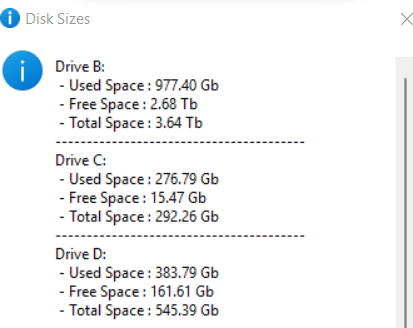
Convert bytes to Kb, Mb, Gb, or Tb
Locked Out
structure posted Sun, 27 March 2022 at 9:38 AM Forum Coordinator
convert a string of digits to numeric and remove even or odd numbers
Locked Out
structure posted Sun, 27 March 2022 at 11:22 AM Forum Coordinator
Install a missing module from inside a running python script, and rerun the script (using rich as an example )

Locked Out

EVargas posted Sat, 23 April 2022 at 7:42 PM
Hi guys, so here I go again trying to share something, hopefully not reinventing the wheel.
While learning (or trying) to use HDRI and setup scenes with cameras from multiple angles etc, I found myself accidentally moving the cameras a lot. I don't like saving cameras to the library, and I always missed a way to quickly lock/unlock its position/rotation. The native "object/lock" menu can do this, but the camera have to be selected in order for it to work. I want to simply lock/unlock the current ACTIVE camera, without worrying about selecting it in a list.
I searched G00gle and here but with no success I decided to go for it and, why not, learn some more python along the way. Here I share a few lines that help me a lot. These are two separate files that can be added to the python scripts window, or put in "(...)/Poser Software/Poser 12/Runtime/Python/poserScripts/ScriptsMenu/"
For some reason this only works with the user created cameras ("object/create camera"), but I don't bother with it since I always create a new camera for rendering anyway.
# Lock_Current_Cam.py
scene = poser.Scene()
cam = scene.CurrentCamera()
def lockCurrentCam():
for parName in ('xtran','ytran','ztran','xrot','yrot','zrot'):
camPar = cam.Parameter(parName)
camPar.SetMinValue(camPar.MinValue() - 1 * camPar.MinValue() + camPar.Value())
camPar.SetMaxValue(camPar.MaxValue() - 1 * camPar.MaxValue() + camPar.Value())
lockCurrentCam()
# ---------------------------------------
# Unlock_Current_Cam.py
scene = poser.Scene()
cam = scene.CurrentCamera()
def unlockCurrentCam():
for parName in ('xtran','ytran','ztran','xrot','yrot','zrot'):
camPar = cam.Parameter(parName)
camPar.SetMinValue(-10000)
camPar.SetMaxValue(10000)
unlockCurrentCam()
EVargas posted Sun, 24 April 2022 at 11:53 AM
Update here, when translating to the "def" syntax I forgot the "Force Limits", fixed below. Another good tip is to set a keyboard shortcut for both, it makes life a lot easier!
# -- -- -- -- -- Lock_Current_Cam.py -- -- -- -- --
scene = poser.Scene()
cam = scene.CurrentCamera()
def lockCurrentCam():
for parName in ('xtran','ytran','ztran','xrot','yrot','zrot'):
camPar = cam.Parameter(parName)
camPar.SetMinValue(camPar.MinValue() - 1 * camPar.MinValue() + camPar.Value())
camPar.SetMaxValue(camPar.MaxValue() - 1 * camPar.MaxValue() + camPar.Value())
camPar.SetForceLimits(1)
lockCurrentCam()
# -- -- -- -- -- Unlock_Current_Cam.py -- -- -- -- --
scene = poser.Scene()
cam = scene.CurrentCamera()
def unlockCurrentCam():
for parName in ('xtran','ytran','ztran','xrot','yrot','zrot'):
camPar = cam.Parameter(parName)
camPar.SetMinValue(-10000)
camPar.SetMaxValue(10000)
camPar.SetForceLimits(0)
unlockCurrentCam()
structure posted Mon, 25 April 2022 at 9:09 AM Forum Coordinator
evargas posted at 11:53 AM Sun, 24 April 2022 - #4437678
nice addition - thanksUpdate here, when translating to the "def" syntax I forgot the "Force Limits", fixed below. Another good tip is to set a keyboard shortcut for both, it makes life a lot easier!
# -- -- -- -- -- Lock_Current_Cam.py -- -- -- -- --
scene = poser.Scene()
cam = scene.CurrentCamera()
def lockCurrentCam():
for parName in ('xtran','ytran','ztran','xrot','yrot','zrot'):
camPar = cam.Parameter(parName)
camPar.SetMinValue(camPar.MinValue() - 1 * camPar.MinValue() + camPar.Value())
camPar.SetMaxValue(camPar.MaxValue() - 1 * camPar.MaxValue() + camPar.Value())
camPar.SetForceLimits(1)
lockCurrentCam()
# -- -- -- -- -- Unlock_Current_Cam.py -- -- -- -- --scene = poser.Scene()
cam = scene.CurrentCamera()
def unlockCurrentCam():
for parName in ('xtran','ytran','ztran','xrot','yrot','zrot'):
camPar = cam.Parameter(parName)
camPar.SetMinValue(-10000)
camPar.SetMaxValue(10000)
camPar.SetForceLimits(0)
unlockCurrentCam()
Locked Out
structure posted Wed, 27 April 2022 at 4:57 AM Forum Coordinator
Locked Out
structure posted Tue, 10 May 2022 at 4:35 AM Forum Coordinator
number outside chosen range? select the closest viable number to the chosen number.
Output :
Locked Out
structure posted Wed, 18 May 2022 at 2:57 PM Forum Coordinator
get screen resolution
Locked Out
structure posted Fri, 20 May 2022 at 2:25 AM Forum Coordinator
Mirror / reverse data:
INSTANCES for testing what your variable is. ( this is just for printing headings )
Locked Out
adp001 posted Fri, 20 May 2022 at 3:03 PM
According to the motto: Why simple when you can make it complicated :)
test this:
d = dict(a=1, b=2, c=3)
print(d.__class__.__name__)
structure posted Sat, 21 May 2022 at 1:51 AM Forum Coordinator
nice - thanksAccording to the motto: Why simple when you can make it complicated :)
test this:
d = dict(a=1, b=2, c=3)
print(d.__class__.__name__)
Locked Out
adp001 posted Sun, 22 May 2022 at 6:49 AM
Just for the records:
Python sets and dictionaries are unordered. So not sorted. For this reason there is no "reverse" for it. Because the order is random.
https://docs.python.org/3.8/library/stdtypes.html#set-types-set-frozenset
Exception for dictionaries: Class OrderedDict from lib collections.
adp001 posted Sun, 22 May 2022 at 7:00 AM
structure posted Sun, 22 May 2022 at 12:19 PM Forum Coordinator
in python 3 - reversing "ABRACDABRA"
returns : ARBADCARBA
Dictionaries are ordered and so can be reversed as is evidenced by
Locked Out
structure posted Tue, 31 May 2022 at 11:32 AM Forum Coordinator
creating a class for working with colors: (part I)
Locked Out
structure posted Fri, 03 June 2022 at 12:19 PM Forum Coordinator
Toggle lock keys * WINDOWS
importable script: ( I saved this in lib/site-packages under folder _toggle_keys)
Locked Out
structure posted Fri, 03 June 2022 at 12:57 PM Forum Coordinator
getting single characters from keystrokes and building a string from them * WINDOWS
Locked Out
Another thing: Strings are arrays of characters.
So, list(reversed("abcdefg") ) returns ['g', 'f', 'e', 'd', 'c', 'b', 'a']. list(s[::-1]) returns the same.