
kittykat98 opened this issue on Apr 22, 2016 · 10 posts
kittykat98 posted Fri, 22 April 2016 at 6:48 PM
Is there not a proper manual for Poser Pro 11? All I can find after installing everything is a bunch of minimalist html files that are basic. The manual in PP 2014 is pretty darn good and is in easy to use pdf format. My graphics computer is NOT online meaning that any web based manual is useless to me.

ssgbryan posted Fri, 22 April 2016 at 8:20 PM
There should be. They all come with manuals - always have. Did you download it?
Check in /Poser11 Content/Documentation
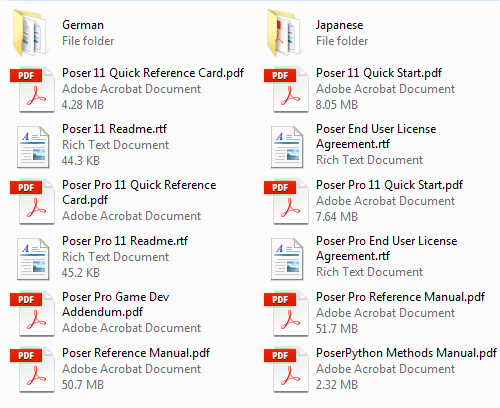
That is where my copy of the Poser Reference Manual and the PoserPython Methods Manual is.

seachnasaigh posted Sat, 23 April 2016 at 9:22 AM
On 64bit Win7Pro, the location is C:\Users\Public\Documents\Poser 11 Content\Documentation. This stuff will be in the content installer labeled Poser support files. When you run the DLM, make sure you install the support content.
Poser 12, Poser 13, Poser 14, in feet.
OSes: Win7Prox64, Win7Ultx64, Win11
Silo Pro 2.5.6 64bit, Silo 2025.1, Vue Infinite 2014.7, Genetica 4.0 Studio, UV Mapper Pro, UV Layout Pro, PhotoImpact X3, GIF Animator 5
kittykat98 posted Sat, 23 April 2016 at 1:18 PM
Aha! I had to reinstall the Poser Support .exe and give it permission to put stuff on the C drive. I normally install programs to a separate SSD and keep C for Windblows only. This version of Poser doesn't seem to like that and insists on installing stuff to a default area. During my initial install I probably didn't bother. Going to dive in and play with some dependent parameters, assuming PP11 doesn't crash every five seconds. Thanks for your help.

JAG posted Mon, 04 November 2019 at 10:02 PM
JUST AN UPDATE HERE: If you are using the Bondware 11.2 version installer, that location is not where the manual appears. In fact, after installation of both the primary and the support file, I had not file named "documentation" in that location whatsoever. When I finally found the PDF file it was here:
C:/Program Files/Poser Software/Poser 11/Poser References Manual.pdf
Hope that helps others. I don't know if they moved it after the 2019 acquisition or what. But the 11.2 did not have a documentation file in that location.

Rhia474 posted Mon, 04 November 2019 at 10:10 PM
Within the program when it's open, click Help menu. then the first link to the Poser Reference Manual. It will come up as a PDF. Click Download.

randym77 posted Tue, 05 November 2019 at 8:21 AM
There's a manual, but I don't think it's up to date. I suspect it's the manual SM originally included. For example, it has instructions on how to use Wardrobe Wizard, even though that is no longer included in Poser.

EClark1894 posted Tue, 05 November 2019 at 9:59 AM
randym77 posted at 10:49AM Tue, 05 November 2019 - #4369238
There's a manual, but I don't think it's up to date. I suspect it's the manual SM originally included. For example, it has instructions on how to use Wardrobe Wizard, even though that is no longer included in Poser.
Well, it was updated but not rewritten. Remember, this was an update to Poser 11, and when that came out, Wardrobe Wiazard was still included. In fact Paul and Pauline as far as I can tell were included with the support files. Also, 11.2 was a rebranding update basically just to put everyone on the Bondware license server, and put Poser under the Bondware product line. And if you look on the credits page it even acknowledges the 11.2 support team.
Rhia474 posted Tue, 05 November 2019 at 10:54 AM
I don't think there was enough time to rewrite the manual, to be fair. I got a note on an other thread earlier here that they were working on a complete rewrite for when the actual new version comes out. Until then, it's a rebrand, basically. It is accessible from the new version though and can be used.
EClark1894 posted Tue, 05 November 2019 at 11:11 AM
Even as it was, they missed a few thinks like changing some links or leaving Smith Micro in instead of Bondware. Jenn, Blake said the Dev team would look into it, so I wouldn't worry about it. Also, if you're having trouble telling the actual manual, from a reference card, look at the size of the file. 40 kb is a small file. A word document is only 4 kb. So, 50Mb is pretty big.