
Steve K. opened this issue on Feb 28, 2016 · 10 posts
Steve K. posted Sun, 28 February 2016 at 1:42 PM
I've been experimenting with Indirect Lighting (interior, not sky) vs. Ambient Occlusion only. If I get the lighting good for AO, then switch to Full Indirect, the scene gets way too bright. Also, I'm not sure AO is doing much more than no indirect lighting. Comments?

MarkBremmer posted Sun, 28 February 2016 at 2:55 PM
Ambient occlusion is a great way to fake indirect and significantly boost render times. I use it in combination with building a light grid, with the replicator, of bulb lights. (The bulbs in the light grid I'll have set to only .5 to 3% strength)
There is not substitute for a high fidelity Indirect lighting render, but you can get pretty close with smart AO. The payoff really comes into play if you are rendering an animation.

Kixum posted Sun, 28 February 2016 at 3:14 PM
Ambient Occlusion will reduce lighting in locations where objects get close together (like the corner of a room) to fake natural lighting. In general, it doesn't do a bad job but it won't handle any back scattering off surfaces and can get corners completely wrong depending on what you are trying to accomplish.
When you switch to regular indirect lighting, all the back scatter comes in to play which can be quite different depending on what's going on.
It's better to design your scene for the lighting you're going to use.
-Kix
Kixum posted Sun, 28 February 2016 at 3:49 PM
-Kix
Kixum posted Sun, 28 February 2016 at 3:53 PM
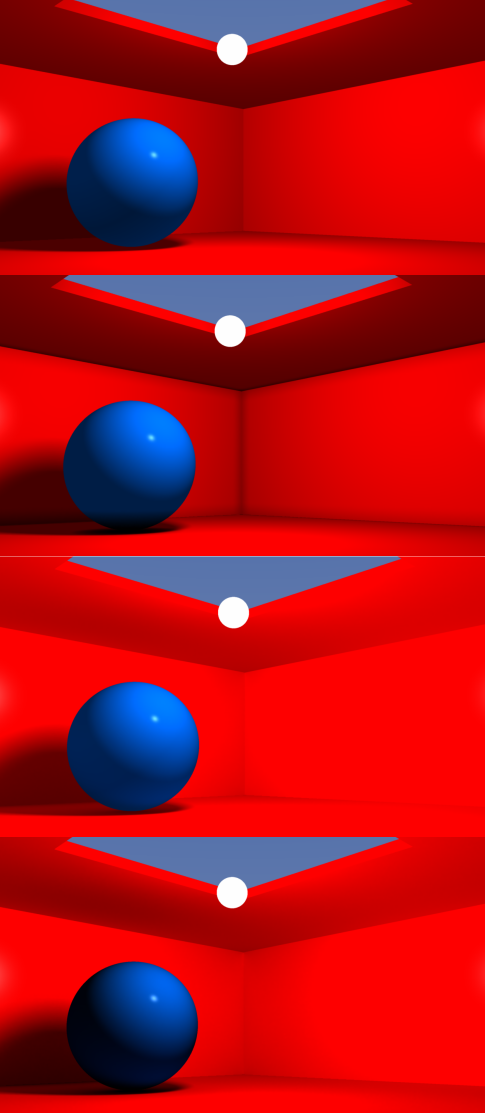
The above series of images goes as follows.
1.) An image setup with 1 light (shown where the white sphere is) and ambient lighting turned on. 2.) Same scene with ambient occlusion turned on. Looks sorta ok. The corners are darkened and there is darkness below the ball. 3.) Same scene as 2 but the only thing changed was indirect lighting changed to turn off ambient occlusion. Now it's too bright because not only is all the scattering being added but also the fake ambient lighting on top of that. 4.) Ambient lighting turned off (set to 0), indirect lighting turned up a little bit. Notice how the lighting is much more realistic. The shadows on the floor are correct as well as the scattering onto the blue sphere is also more natural. Lighting in the corners looks more natural and all the lighting behind the ball makes more sense.
-Kix
Kixum posted Mon, 29 February 2016 at 12:56 AM
Oh yeah, one more thing.
The light I'm using also has falloff set to 100% which helps with those corners as well.
-Kix
Kixum posted Mon, 29 February 2016 at 1:18 AM
-Kix
Kixum posted Mon, 29 February 2016 at 1:18 AM
-Kix
Kixum posted Mon, 29 February 2016 at 1:19 AM
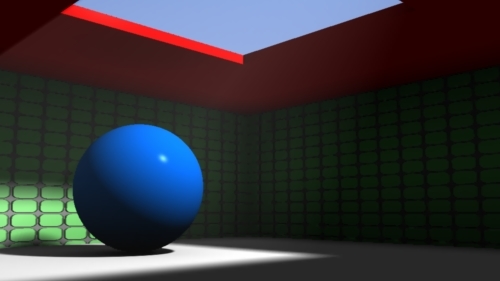
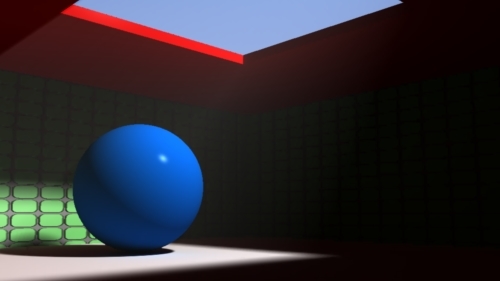
Two more renders which are a tad more enlightening. The first one has been setup with Ambient lighting using ambient occlusion. It rendered quite fast and looks pretty ok. The second render is GI lighting with no ambient light at all. Took about four times as long but has more realistic elements. Based on your goals, both are cool.
-Kix
Steve K. posted Mon, 29 February 2016 at 4:59 PM
Mark, Kix -
Many thanks for the detailed responses. As you might have guessed, I'm trying to get the render time down for my short animations. For 1280x720 frames, I'm getting ~8 minutes with full Indirect on a wide angle interior, and less than 30 sec with AO, a big difference in the two day 48 Hour contests. I hadn't thought about "light grids", but I have these Tim Payne light domes for Carrara but have not yet tried combinations with AO:
http://www.daz3d.com/carrara-skies-lightdomes-1
As I recall, they also have strengths around 1% for the three presets: 41, 141 or 641 lights. Not sure about the render times, lots of shadows to calculate?
So more experiments coming up.