
LuxXeon opened this issue on Sep 14, 2015 · 7 posts
LuxXeon posted Mon, 14 September 2015 at 5:51 PM
Click Here To Download From Freestuff
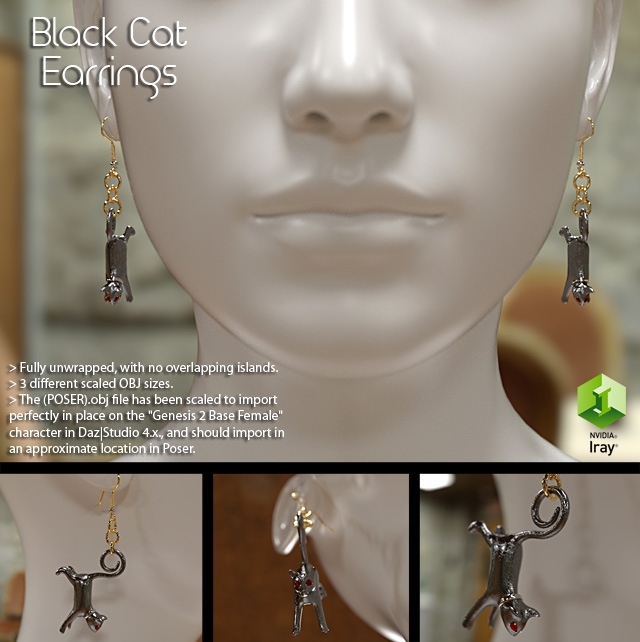
Elegant pair of Black Cat Earrings, including a left and right object selection. The pair together contains a combined total of 7,228 polygons, and 7,284 vertices (3,614 quads per earring). The models have been carefully UV Unwrapped, without overlapping edges, to prevent texture distortion. There are no texture maps provided with this set, but each earring has 8 distinct material zones, and can easily accept any seamless, metallic procedural material, in any software render engine.
*The (POSER).obj files have been scaled to import perfectly to the fit the "Genesis 2 Base Female" character in Daz|Studio 4.x., and should import in an approximate location in Poser. See the import instructions below for detailed information on how to import the appropriate models to the software.
All example renders were done with the Iray render engine, in Daz Studio, after importing the models with the recommended settings.
You are free to use or modify this model as you see fit, for your own rendering projects or scenes. As with all my freebies, the object can be used for both commercial and non-commercial renders. You may NOT, however, resell or redistribute the model or textures, or any derivative of them; individually, or as part of a package/set.
Alternatively, you can download this model from the following resource websites, which includes additional promo renders:
DAZ STUDIO USERS: The OBJ with (POSER) suffix was exported with a scale conversion that will allow the object to load with appropriate scaling into Poser 9 and above, or Daz Studio 4 and above, with Poser import preset settings. To import this file into Daz Studio, select File > Import, and find the "cyclideritual-earring_(POSER).OBJ". There is one model for the left side, and one for the right. In the OBJImportOptions dialogue box, select the Poser (1 Unit = 8 Ft) preset option in the "From:" dropdown menu. Scale should be set to 24384% automatically. If not, then please enter that value into the Scale field. Keep the Axis Conversion X=X, Y=Y, and Z=Z, with NO checkboxes in the Invert Direction options. Be sure Read Groups, UV Coordinates, Surfaces, and Material Library (.mtl) are all checked. The objects are designed to import in place on a default Genesis 2 Female character, in the default T-Pose position in the scene. Simply parent the earrings to the character's "head" node, once they are in position.
As with all my products, I stand behind my work. If you find any problems, or have a hard time using these models, please let me know.
______________________________________
My Store
My Free Models
My Video Tutorials
My CG Animations
Instagram: @luxxeon3d
Facebook: https://www.facebook.com/luxxeon