
headwax. opened this issue on Sep 17, 2013 · 28 posts
headwax. posted Tue, 17 September 2013 at 10:25 PM
http://www.daz3d.com/forums/viewthread/29066/
Hello gentleladies and gentleman, just a heads up that FractalDimensia through the brilliant use of Carrara has been unfortunate enough to be blessed with the honorary title of HOST for th new Carrara challenge :) He was also blessed with some substantial prizes courtesy of DAZ and AGE OF ARMOUR
This month's challenge is
The Twilight Zone (Challenge Theme #4)
we'd love it if you joined in the challenge.
The challenge is all about breaking your own limitations in how you use Carrara, it's also about helping others to better use Carrara, and perhaps to learn something yourself by asking for advice when necessary.
Apart from DAZ, this month's sponsor is PHILW . Well worth entering for a chance to win some of Phil's goodies. :) see http://www.daz3d.com/philw for Phil's work.
Special note: manstan, if you are still banned by the end of the challnege it would be my honor to post your entry in the challenge thread, and also your two needed wips in the wip thread.

manleystanley posted Wed, 18 September 2013 at 8:58 AM
Well considering, as far as I know, it's a permaban. I've been told I can't be trusted to play nice. Which basically means I can't be trusted not to point out DAZ screwing up.
Not sure if I can get my head in to this one, I've spent the last week fixing shaders in most of the scenes I've worked on; well over 100. As well as having to give up on 18 scenes where I used the now broke visiable option to build.
I'm still waiting for a simple yes or no from DAZ if they can give me a link to C8.1.1.8 that doesn't have the bugs introed in C8.1.1.12. A "no" just means pursuing other options because C8.1.1.12 introed some show stoper bugs for me.
manleystanley posted Wed, 18 September 2013 at 4:03 PM
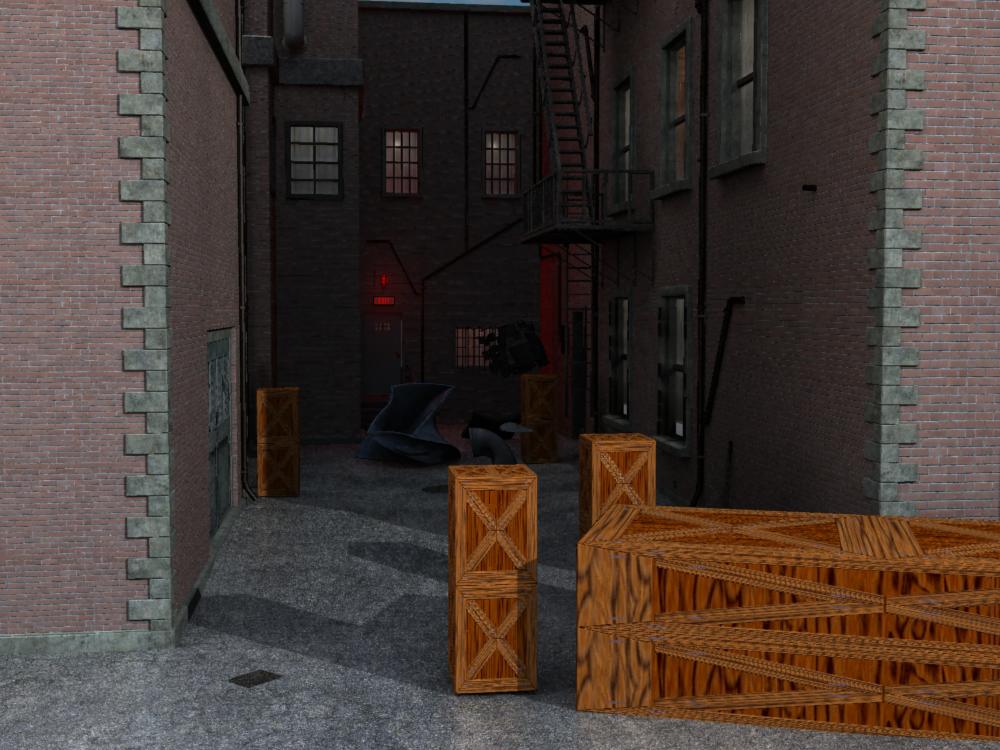
I was just playing around with stonemason's backally when this just started falling together and working well.
So far 3 items bent and twisted, 3 items exploded. But these are just applied features with some test and set up.
But ya, it's twilight zone 
headwax. posted Wed, 18 September 2013 at 8:36 PM
cool work Man! great start. :)
Ha, I don't mind the boxes as is, kind of like coffins :)
manleystanley posted Wed, 18 September 2013 at 11:47 PM
I don't know man, what was that wip post thing? I mean like some one explodes, should I censor that. Did you know explode can be use for spater effects?
Well actually they disintagrate, but this got my head working on an animation, wish I had the mil4 skeletons.
headwax. posted Thu, 19 September 2013 at 12:04 AM
hi man I thought it was a wip you wanted posted, I'll take it down, apologies
manleystanley posted Thu, 19 September 2013 at 7:51 AM
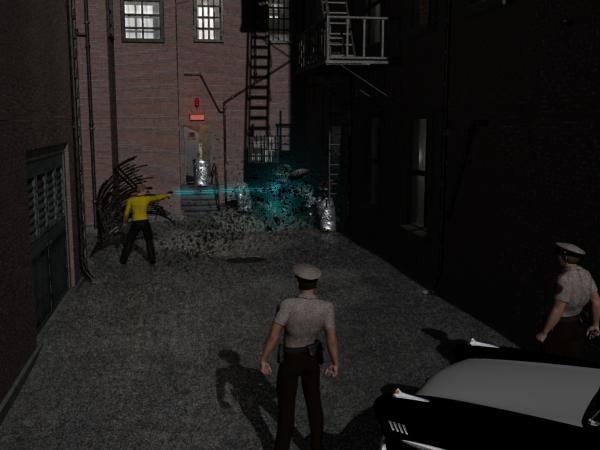
But I thought we had to post 3 wips?
Here's the near compleat scene. One more figure to add then it's just trimmings; trash, rats, pigeons, little things people may not even notice.
manleystanley posted Thu, 19 September 2013 at 10:35 AM
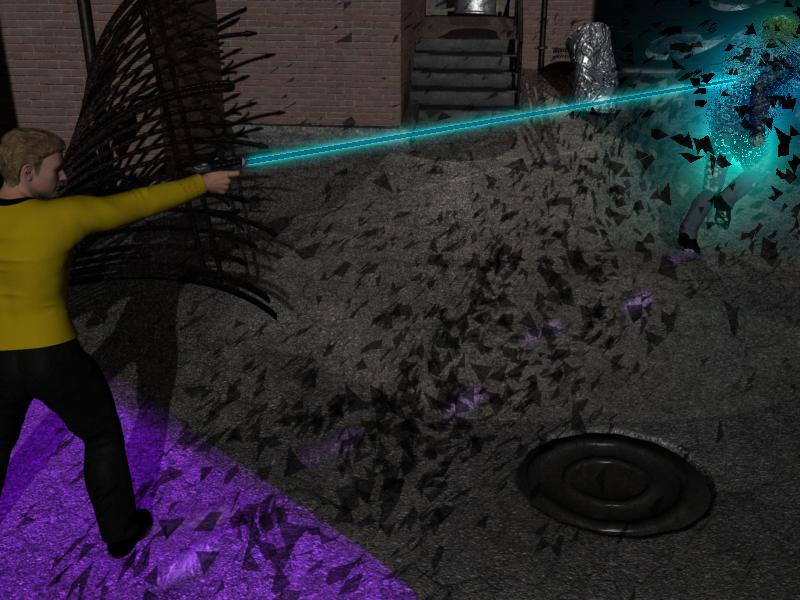
Like I said, this scene is just falling together. I'll probably spend a lot of time useing the carrara options for special effects. Here I am checking out footprints. This coming together quick gives me plenty of time to work on lighting, textures, and effects.
booksbydavid posted Thu, 19 September 2013 at 11:10 AM
Ooooo! Star Trek.
I'm liking the beam and disintegration effects. Pretty cool. Curious how you got the beam effect.
Just an opinion, but I wonder if it would have more impact if the police were a bit closer to the action. It seems as though the main action, the cool stuff, is going on too far from the camera. I mean, it appears that the disintergration should be the focus, but it's made small by its distance from the camera.
Also, I've never really played with the explode effect much. How would you use that for splatter?
manleystanley posted Thu, 19 September 2013 at 12:45 PM
Very low settings lol For most of your exploid settings use just 1 or 2%. The higher the poly the model the finer the exploid bits. So a simple dark red plane can appear to be splatter from a sword slash.
The beam is just a cylender with the glow set to a color and the aura effect.
An issue I am having now is models textured just on the outside. Meaning most of the pieces of the swirling garbage following the villian is showing it's gray back side 
I'm thinking of doing something 3 pains from 3 camera angles, one of the guy at the back door, one of the cops, and the big bottom pain of the center scene.
Now can anyone guess as to why the star trek theme in a twilight zone render?
booksbydavid posted Thu, 19 September 2013 at 7:04 PM
Quote - Now can anyone guess as to why the star trek theme in a twilight zone render?
Shatner. Just a guess:)
What's that out on the wing? Ahhhhhhh! Don't you see it?
booksbydavid posted Thu, 19 September 2013 at 7:06 PM
Interesting about the splatter thing. That never occurred to me. I'll have to try that.
I wonder if you took a cube and flattened it, then textured it with what ever. When you explode it, you wouldn't really see the inside because it would be flattened. You'd only see the outside bits.
headwax. posted Thu, 19 September 2013 at 8:34 PM
Classis work Man :)
Nice suggestion David. There is also fenrics toward away shader - nots ure if it would work. Other thing is: What you could try is render out an object index pass.
Might work then you can eaily select the splatter pieces in post and change their textures where necessary .Can't remember who put me onto the object index pass but they deserve a big pat on the back. It's the only pass I;ve been using since I found it.
Manstan, if you wouldlikeme to post your wip in the wip thread let me know please.
manleystanley posted Thu, 19 September 2013 at 9:56 PM
Yes please.
This is still flowing along nicely. I changed up one of the effects from an explode to shatter and now it looks like some energized smoke, cool.
I can't say I have played around with the object modifie options. A lotOfun to be had there And better yet, they seem to work on everything. That disintigrating V4, urbanware shirt and jacket is a simple exploid with low setting and set to exploid top to bottom.
But I tied adding thickness inthe modeling room, still didn't help the back side grays. I had a brain storm and am going to give it a try, probably just lock up carrara, but use a surface shader with an exploiding object as the base to replicate on.
Some one could check me, I may be wrong, but I think there was 3 or 4 of the enterprise bridge crew that did an episode of twilight zone.
Hmm, didn't lock up carrara, didn't work ether. 

jonstark posted Thu, 19 September 2013 at 10:04 PM
Cool scene Stan, looks like it all fell into place for you. Looks like a starfleet officer is murdering some poor guy in a backalley!
manleystanley posted Fri, 20 September 2013 at 8:39 AM
Well actually it is a villian and the title is "wont escape again".
manleystanley posted Sun, 22 September 2013 at 12:07 PM
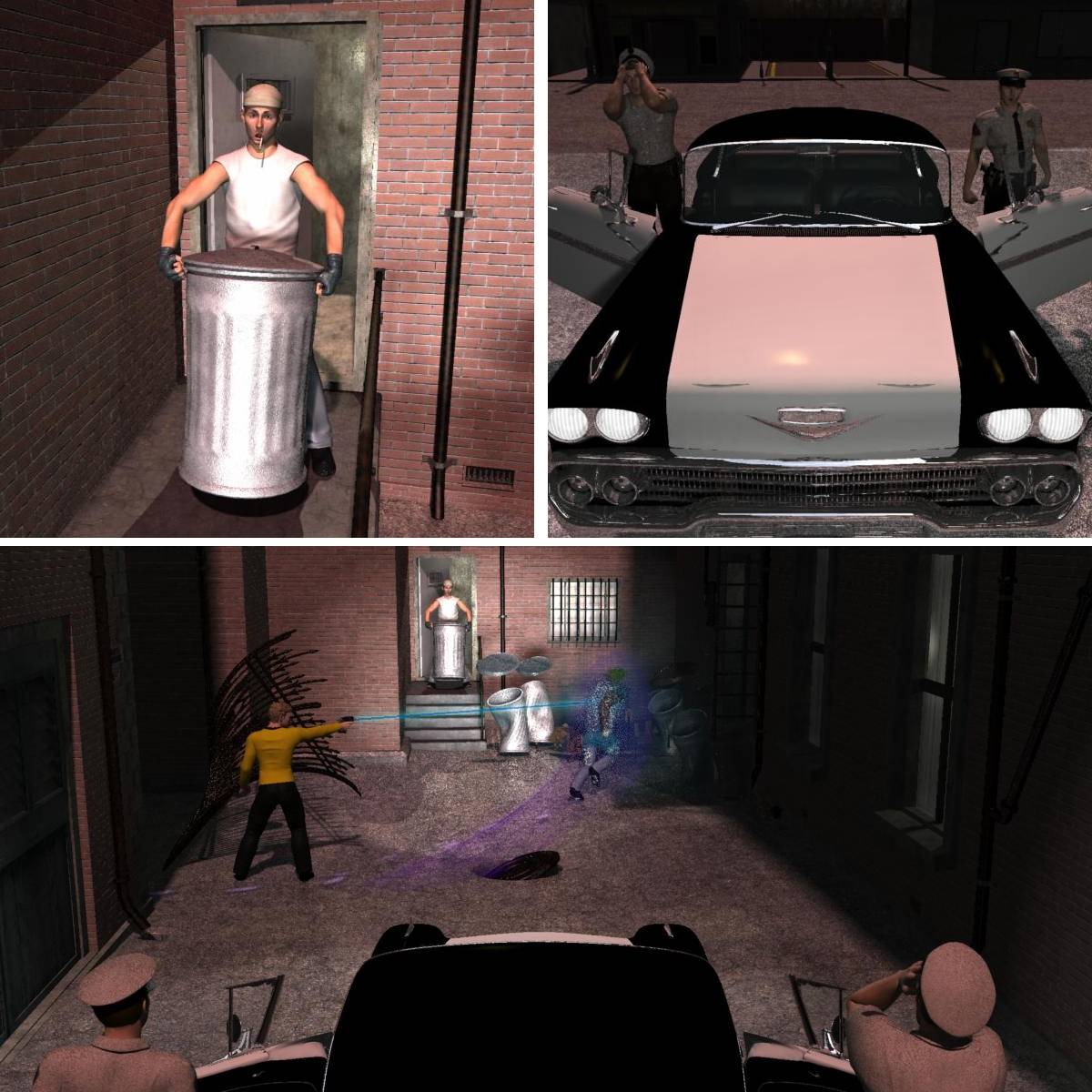
A few tips. The trashcans are a mix shader. I used stonemasons origenal texture as the bump and color in the aluminumfoil carrara shader. Came out nice, looks like a new galvenized can.
The brick texture is stonemason's, but I have "normalized" the bump map in genetica. 
Yes that Tshirt is too clean. I will fix it  only take about a half an hour from exporting the Tshirt UV to new nasty texture. I could just take the model in genetica and texture directly, but I already have a grungy texture build and I'd just need to swap the converted UV.
Yes, still a lot of texture tweakage to do. Some stuff I am not happy with. And I have been contompalting doing some motion blur on suposed to be moving props; trash cans and exploding boxes. Which shuold prove interesting 
booksbydavid posted Sun, 22 September 2013 at 12:33 PM
I love the looks on their faces. Priceless.
Also, the trashcan is looking pretty good.
The whole scene is shaping up nicely. :)
manleystanley posted Sun, 22 September 2013 at 5:55 PM
Well 6 hours of trying and I apparently don't understand how motion blur works. That was only 4 trys though. I'm just going to have to work this out, outside of the scene.
ncamp posted Sun, 22 September 2013 at 7:04 PM
Quote - Well 6 hours of trying and I apparently don't understand how motion blur works. That was only 4 trys though. I'm just going to have to work this out, outside of the scene.
Is your object actually moving? I just did a quick test in 8.5Pro with a ball. Set the position at 0 sec on one side, at 1 sec I moved it to the other side. Turned on blur with 6 additional frames and it worked like I expected.
manleystanley posted Sun, 22 September 2013 at 9:51 PM
Yes I set them up that way. Maybe I didn't move then fast enough. Still playing around with it. Even set up a scene with just a moving trashcan. I don't know. I know I've used it before for light streaks on moving cars, so I know it has worked.
ncamp posted Sun, 22 September 2013 at 10:18 PM
Quote - Yes I set them up that way. Maybe I didn't move then fast enough. Still playing around with it. Even set up a scene with just a moving trashcan. I don't know. I know I've used it before for light streaks on moving cars, so I know it has worked.
I set mine up too slow the first time as well. Speeding up the movements or changing the extra frames on either side (under render settings) both help.
I havn't used motion blur since the Frazetta contest years ago.
manleystanley posted Sun, 22 September 2013 at 10:19 PM
Quote - > Quote - Well 6 hours of trying and I apparently don't understand how motion blur works. That was only 4 trys though. I'm just going to have to work this out, outside of the scene.
Is your object actually moving? I just did a quick test in 8.5Pro with a ball. Set the position at 0 sec on one side, at 1 sec I moved it to the other side. Turned on blur with 6 additional frames and it worked like I expected.
Did the same thing in C8.1 and no motion blur.
ncamp posted Sun, 22 September 2013 at 10:22 PM
Oops, I also selected the scene. Clicked on the Filters tab. Clicked on the +. Then Selected Motion Blur.
manleystanley posted Sun, 22 September 2013 at 11:05 PM
That got it, thanks. Seems the check in the render room does nothing 
Now comes the fun part. Being a still shot I will have to render in sequince to have the last frame.
headwax. posted Mon, 23 September 2013 at 2:45 AM
hi Manley looks wonderbang!!
for motion blur justrender out an object index pass and use it to select what you want to blur in post - easy peasy, then use the motion blur command in your post working program
headwax. posted Mon, 23 September 2013 at 3:26 AM
oh the trick is to iolstae what you want to blur = another way is http://www.daz3d.com/forums/viewthread/24644/P60
that's isolate by the way
manleystanley posted Mon, 23 September 2013 at 7:44 AM
I'll have to give it a go. After letting the scene render out I didn't get motion blur, what I got was a frosted lens effect on the scene