
putrdude opened this issue on Feb 21, 2013 · 56 posts
putrdude posted Thu, 21 February 2013 at 3:27 PM
Hello!
I'm trying to make a wand glow. I can do it in photoshop, but I'd like to do it inside the render as the wand is inside a cage and would look better casting light inside the cage.
Other than adding a jillion lights and pointing them all over the place from the wand out, is there an easier way?
I'm kind of a newbie, so please dumb it down for me doc.
Thank you!
I have poser pro 2010.

26Fahrenheit posted Thu, 21 February 2013 at 3:31 PM
turn up luminosity in the materials section .. WHITE is full black "standard" is non ..
put your texture into it and play with the setting ..if you check indirect lighting on while rendering the light will show on other props or inside of the box etc ect
Chris

markschum posted Thu, 21 February 2013 at 3:41 PM
I put a point light inside the prop, and set the prop for not casting shadows.
putrdude posted Thu, 21 February 2013 at 3:42 PM
Thank you!
Love your kitty image! Real or photoshop?
vilters posted Thu, 21 February 2013 at 6:29 PM
Connect the texture of your wand to the ambient node.
Set ambient value to 1 or higher.
Render with raytrace ON.
Poser 1, 2, 3, 4, 5, 7,
P8 and PPro2010, P9 and PP2012, P10 and PP2014 Game
Dev
"Do not drive
faster then your angel can fly"!
putrdude posted Thu, 21 February 2013 at 6:41 PM
I'm so ignorant. Thank you so much I will try everything you suggest.

cedarwolf posted Thu, 21 February 2013 at 10:29 PM
There is also a lighting prop called GloBalls. I don't remember who put it out but I have used it with great success in just such instances.

ashley9803 posted Thu, 21 February 2013 at 11:59 PM
There's a free lightsabre HERE. It comes with material settings for a great blue glowing aura which you can copy and paste to the wand if you don't want/know how to set it up yourself.
vilters posted Fri, 22 February 2013 at 4:13 AM
Sorry, I forgot to add.
Connect the texture in ambient_color, set ambient_value to 1 or more, and render with raytracing and IDL ON.
Poser 1, 2, 3, 4, 5, 7,
P8 and PPro2010, P9 and PP2012, P10 and PP2014 Game
Dev
"Do not drive
faster then your angel can fly"!
putrdude posted Fri, 22 February 2013 at 12:19 PM
Thanks everyone again.
Downloaded the light sabre, should be perfect, since I'm basically doing the same thing with a wand.
I couldn't find the globalls thingy.
I'll try it all.
Thanks!
putrdude posted Fri, 22 February 2013 at 12:32 PM
Follow up!
I found goball on sharecg.
Thanks again.

foxylady1 posted Fri, 22 February 2013 at 1:44 PM
Putrdude,
Do you have a link for the balls?
putrdude posted Fri, 22 February 2013 at 2:13 PM
www.Sharecg.com
Search for globalls and it should come up.
foxylady1 posted Fri, 22 February 2013 at 2:31 PM
I tried that, but I go zero results. I did use the term "globalls", is there more in the title of the item?

SeanMartin posted Fri, 22 February 2013 at 3:29 PM
http://www.sharecg.com/v/28959/View/11/Poser/Globall-Cast-Light-Simulator
docandraider.com -- the collected cartoons of Doc and Raider
cedarwolf posted Fri, 22 February 2013 at 3:33 PM
http://www.sharecg.com/v/28959/View/11/Poser/Globall-Cast-Light-Simulator
foxylady1 posted Sun, 24 February 2013 at 10:31 AM
Thank you SeanMartin and cedarwolf.

seachnasaigh posted Thu, 28 February 2013 at 5:40 PM
Putrdude, Have you got this solved? Post a pic of the wand so that we can see the shape? I may be able to make a three-layer prop which will glow and cast light.
Poser 12, Poser 13, Poser 14, in feet.
OSes: Win7Prox64, Win7Ultx64, Win11
Silo Pro 2.5.6 64bit, Silo 2025.1, Vue Infinite 2014.7, Genetica 4.0 Studio, UV Mapper Pro, UV Layout Pro, PhotoImpact X3, GIF Animator 5
putrdude posted Thu, 28 February 2013 at 6:59 PM
You people are ruining my misanthropic ways. ;)
So nice! I'm not used to this.
I have been playing with it...ahem.. the wand..ahem I mean the globall... ahem... gah!
The globall thing is very cool, but not really helping for this project. Great for a torchlight in the corners of the room.
I downloaded the glowing light sabre. Cool, but hard to make something that is black glow. I think it's probably more of conceptual issue for me.
I bought an evil black box/cage with heavy iron bars etc. (very cool). Inside, of course, the evil black wand suspended in mid air (omg). I want it to glow evil, black if possible, but if its black, its not exactly a light. So, I'm playing around with dark blue-ish.
If anyone has any ideas how a black wand that sucks all light like a black hole can glow evil, i'm all ears. :) I'm guessing I need to play in photoshop for a bit to see what evil looks like when it glows.
I'll try to post something tomorrow. Many many thanks. Stop being so nice or my wife wont recognise me.
seachnasaigh posted Thu, 28 February 2013 at 7:59 PM
How about sparkles and electric crackling on it's surface?
Do you want to use some specific wand model? If so, post a pic of it.
Poser 12, Poser 13, Poser 14, in feet.
OSes: Win7Prox64, Win7Ultx64, Win11
Silo Pro 2.5.6 64bit, Silo 2025.1, Vue Infinite 2014.7, Genetica 4.0 Studio, UV Mapper Pro, UV Layout Pro, PhotoImpact X3, GIF Animator 5

rokket posted Fri, 01 March 2013 at 6:29 AM
I did a grim reaper image kind of like that, but I had to do all the glowing in post. It's in my gallery.
I think I know how to pull off that effect without post work. I'll play with it and post something.
If I had a nickle for ever time a woman told me to get lost, I could buy Manhattan.
rokket posted Fri, 01 March 2013 at 8:01 AM
Oops... Nevermind.
All I come up with is making the object glow, sort of... and it doesn't give off light.
Sorry. I thought I'd pulled this off with Poser 8, but for the life of me, I can't remember how.
The only thing I can remember is using the Gather node in there somewhere...
If I had a nickle for ever time a woman told me to get lost, I could buy Manhattan.
putrdude posted Fri, 01 March 2013 at 12:59 PM
Quote - I did a grim reaper image kind of like that, but I had to do all the glowing in post. It's in my gallery.
I think I know how to pull off that effect without post work. I'll play with it and post something.
I looked at the grim reaper glow in your gallery. Very nice. I actually thought about a red glow, red being a typically evil color, unless it's valentines day. ;) Orange-ish was a nice choice. I'll post something so you can see the wand etc. I could do it in layers in photoshop, and have already thought how that might be done, post. Just was hoping for some cool lighting some way or another.
putrdude posted Fri, 01 March 2013 at 1:45 PM

Hi, thanks!
Really good idea!
I'm using a wand model from Forest Faerie. I wish I could find the docs, but I cant. Everyone names their docs the same thing so they often get overwritten.
I'm using the box model attached, purchased either here or elsewhere.
You can see the wand in the box, but it is barely visible. Still playing with it, but your suggestion is very good. I could do it post, but in poser, still a mystery.
SeanMartin posted Fri, 01 March 2013 at 3:45 PM
My suggestion is two fold:
(1) use a point light, set the intensity way up there, like 200%, but set the end at a relatively low number, like 8.
(2) At the same time, try inverting the intensity and using a negative number.
docandraider.com -- the collected cartoons of Doc and Raider
seachnasaigh posted Fri, 01 March 2013 at 8:10 PM
(Rokket)> Quote - Oops... Nevermind.All I come up with is making the object glow, sort of... and it doesn't give off light.
Sorry. I thought I'd pulled this off with Poser 8, but for the life of me, I can't remember how.
The only thing I can remember is using the Gather node in there somewhere.
Rokket, you need to account for three effects:
Giving the model (doll, in your case) a little ambient takes care of only the first effect. Poser's render engine (Firefly) is not set to react (in IDL) in proportion to the visible brightness of your doll. So, to acheive the second effect -casting light- you need to use a strongly ambient emitter which will itself remain unseen, but whose IDL effect is seen. For the third effect, the aura, I usually use a envelope surrounding the model.
This shows such an emitter/aura system fitted around Posette (P4 female); the aura is much lower poly than the doll, and is rigged to follow her posing, while the streamer trail is "EZ-posed" (using Phil Cooke's All Tied Up). Note the light cast onto the water surface where Tink's corkscrew path came close to the water.
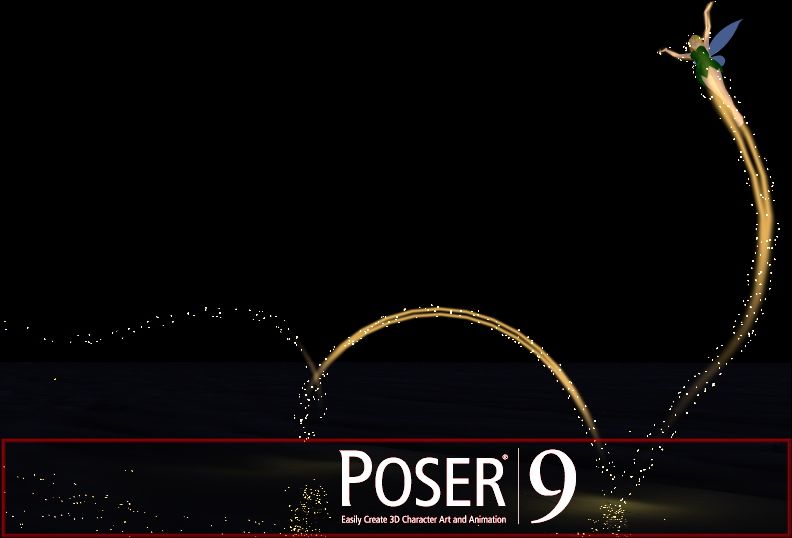
The gather node is crude and render time intensive; I would only use it for P7 and earlier versions of Poser.
edit to update/correct:* Putrdude*, I found that Forest Faerie wand in my runtime. I can make an emitter and aura smart-propped to the wand, and an mc6 material file to re-MAT the wand itself. :D
Poser 12, Poser 13, Poser 14, in feet.
OSes: Win7Prox64, Win7Ultx64, Win11
Silo Pro 2.5.6 64bit, Silo 2025.1, Vue Infinite 2014.7, Genetica 4.0 Studio, UV Mapper Pro, UV Layout Pro, PhotoImpact X3, GIF Animator 5
seachnasaigh posted Fri, 01 March 2013 at 8:40 PM

Poser 12, Poser 13, Poser 14, in feet.
OSes: Win7Prox64, Win7Ultx64, Win11
Silo Pro 2.5.6 64bit, Silo 2025.1, Vue Infinite 2014.7, Genetica 4.0 Studio, UV Mapper Pro, UV Layout Pro, PhotoImpact X3, GIF Animator 5
cedarwolf posted Fri, 01 March 2013 at 10:32 PM

seachnasaigh posted Sat, 02 March 2013 at 5:21 AM

Silo screenshot showing the various aura meshes enveloping the wand. Not visible are the IDL emitters, which are closely fitted just inside the wand. Only the spheres and the green spirals will have emitters. For putrdude's eeeebil version of the wand, I envisioned glowing blood and/or fire in the spiral bits. :scared:
I'll also make a TinkerBell MAT for this.
I usually use procedurals for aurae, but to allow for image map texturing (and in particular to facilitate use in D/S) I'll try to UV-unwrap the aurae meshes.
Poser 12, Poser 13, Poser 14, in feet.
OSes: Win7Prox64, Win7Ultx64, Win11
Silo Pro 2.5.6 64bit, Silo 2025.1, Vue Infinite 2014.7, Genetica 4.0 Studio, UV Mapper Pro, UV Layout Pro, PhotoImpact X3, GIF Animator 5
rokket posted Sat, 02 March 2013 at 5:34 AM
What are you using for an emitter? That's the only part I am lost on...
If I had a nickle for ever time a woman told me to get lost, I could buy Manhattan.
seachnasaigh posted Sat, 02 March 2013 at 5:50 AM
The wand itself, even if it is given an ambient strength of 0.5 or 0.75 won't cast enough light. So, I make a mesh shaped like the glowy parts -though often lower poly- but slightly skinnier, so that the emitter mesh fits just inside the wand. This emitter -hidden inside the wand- can be given an ambient strength of 5, or even 32 (the max Poser seems to acknowledge), so that it does cast light.
Here's a diagram:
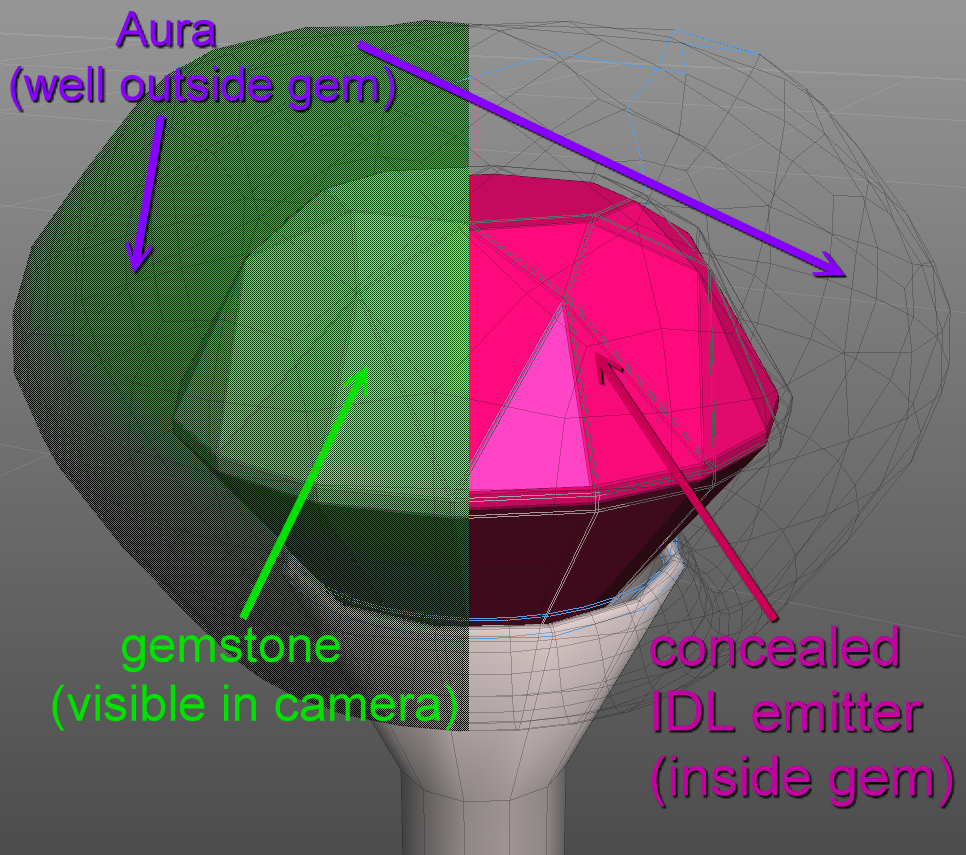 .
.  .
.
Poser 12, Poser 13, Poser 14, in feet.
OSes: Win7Prox64, Win7Ultx64, Win11
Silo Pro 2.5.6 64bit, Silo 2025.1, Vue Infinite 2014.7, Genetica 4.0 Studio, UV Mapper Pro, UV Layout Pro, PhotoImpact X3, GIF Animator 5
rokket posted Sat, 02 March 2013 at 6:16 AM
Got it! I think I can do this now. Thanks a bunch.
I hope it helps the OP too!
If I had a nickle for ever time a woman told me to get lost, I could buy Manhattan.
seachnasaigh posted Sat, 02 March 2013 at 6:30 AM
Here are two threads which expound on glowing objects. Two threads, because the method above is for P8 and Poser Pro 2010, but if you have P9 or PP2012 you can use an easier technique and it gives better results and renders quicker.
.
Poser 12, Poser 13, Poser 14, in feet.
OSes: Win7Prox64, Win7Ultx64, Win11
Silo Pro 2.5.6 64bit, Silo 2025.1, Vue Infinite 2014.7, Genetica 4.0 Studio, UV Mapper Pro, UV Layout Pro, PhotoImpact X3, GIF Animator 5
rokket posted Sat, 02 March 2013 at 6:39 AM
I have Poser 9...
Thanks for the links. I'll study them and see what I can come up with.
If I had a nickle for ever time a woman told me to get lost, I could buy Manhattan.
putrdude posted Sat, 02 March 2013 at 4:21 PM
OMG, who are you people!
How do you know so much? Did you build the firefly engine?
Yep that's the wand alright, though I made all parts of it black, cuz it's evil.
I have no clue what you're even talking about! :( Ignorance is not bliss, no matter what you hear.
The tink effect you made is amazing, water and all. Write a book! Phil Cookes stuff is amazing too. how you ever thought to use all tied up for the fairy trail is quite a leap.
Thanks to all. Now if I could only apply your brains to my pic.
Rokket, I love your facebook quote!
seachnasaigh posted Sun, 03 March 2013 at 10:53 AM

Also you must render with IDL enabled.
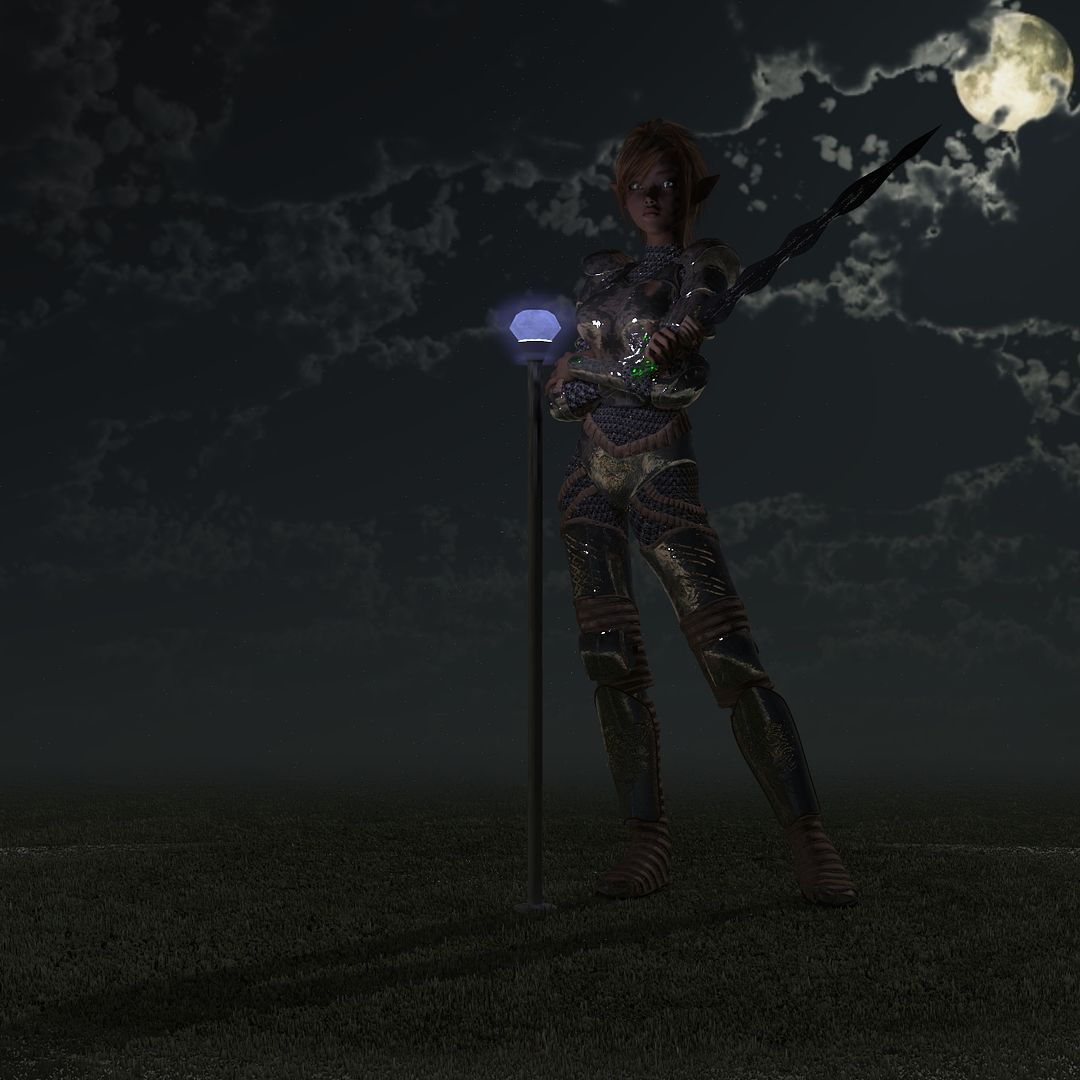
I got the new mesh pieces UV-unwrapped, and imported the OBJs into Poser. So far, I only have materials worked up for the center ball (visible ball of the original wand, the IDL emitter concealed inside, and the aura outside surrounding the visible ball). Here is a proof-of-concept render showing that the center ball glows, casts light, and has a glowing aura.
Poser 12, Poser 13, Poser 14, in feet.
OSes: Win7Prox64, Win7Ultx64, Win11
Silo Pro 2.5.6 64bit, Silo 2025.1, Vue Infinite 2014.7, Genetica 4.0 Studio, UV Mapper Pro, UV Layout Pro, PhotoImpact X3, GIF Animator 5
cedarwolf posted Sun, 03 March 2013 at 11:22 AM
Wow...just...Wow!
putrdude posted Sun, 03 March 2013 at 7:01 PM
Quote - Putrdude, the finished prop will be "plug-n-play"; you won't need to do anything except to set the wand's parameter properties:
- un-tick visible in raytracing
- un-tick casts shadows
Also you must render with IDL enabled.
I got the new mesh pieces UV-unwrapped, and imported the OBJs into Poser. So far, I only have materials worked up for the center ball (visible ball of the original wand, the IDL emitter concealed inside, and the aura outside surrounding the visible ball). Here is a proof-of-concept render showing that the center ball glows, casts light, and has a glowing aura.
Really amazing. now I owe you a book, if I ever get published. :) Of course i wish you spoke english. just kidding, kinda. I'll try it for sure, it looks really great, but.. i have poser pro 2010, not the newer versions. Will it still work? and more importantly will I know what I am doing?
seachnasaigh posted Mon, 04 March 2013 at 4:13 AM

I still need to check parenting and pack it as a zip, etc., but here is a test render.
Poser 12, Poser 13, Poser 14, in feet.
OSes: Win7Prox64, Win7Ultx64, Win11
Silo Pro 2.5.6 64bit, Silo 2025.1, Vue Infinite 2014.7, Genetica 4.0 Studio, UV Mapper Pro, UV Layout Pro, PhotoImpact X3, GIF Animator 5
cedarwolf posted Mon, 04 March 2013 at 8:25 AM
Looking forward to the package.
putrdude posted Mon, 04 March 2013 at 11:12 AM
How did you get a picture of my knees?
seachnasaigh posted Wed, 06 March 2013 at 2:53 PM
(putrdude)
Quote - How did you get a picture of my knees?
Them's some knobby knees, dude! :laugh:
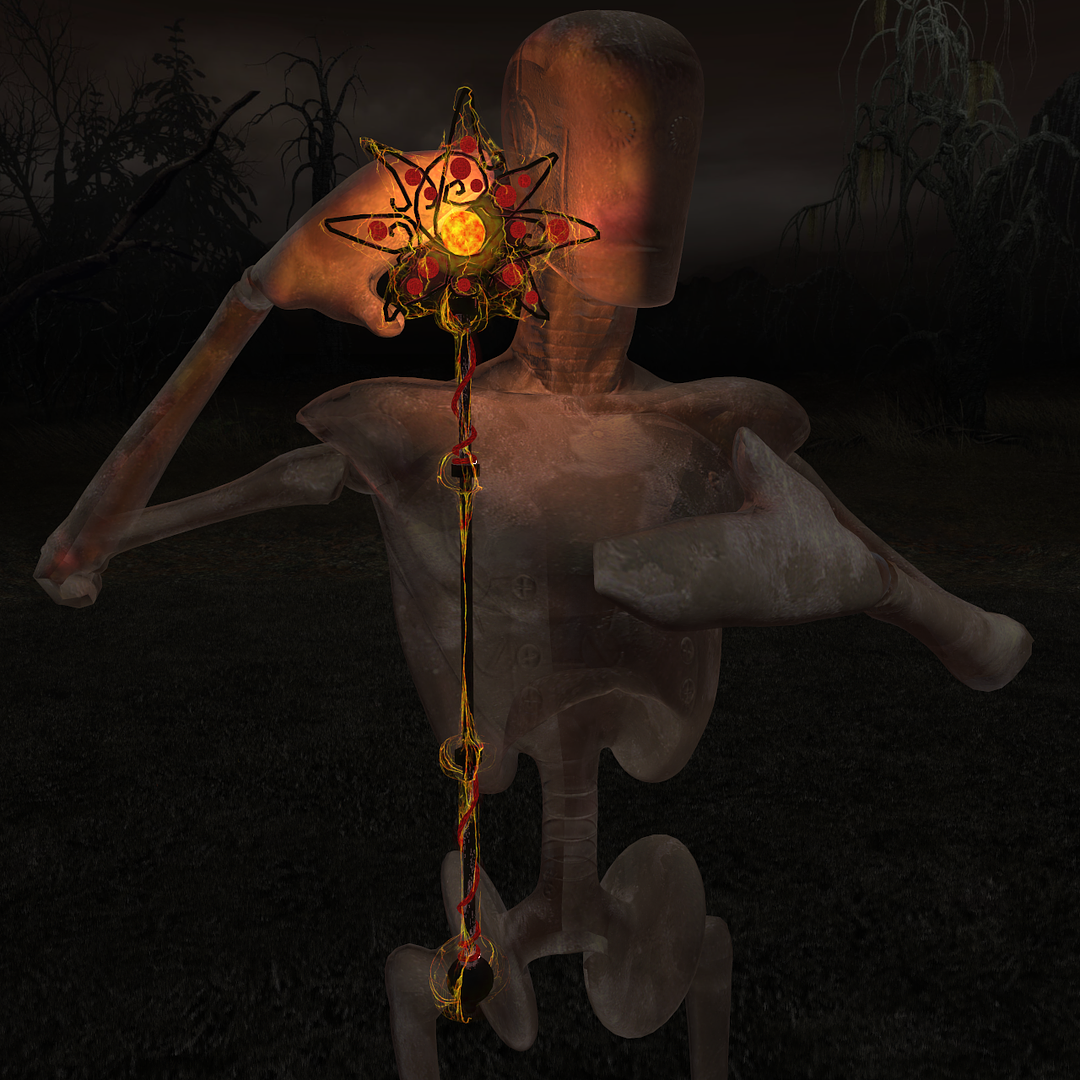
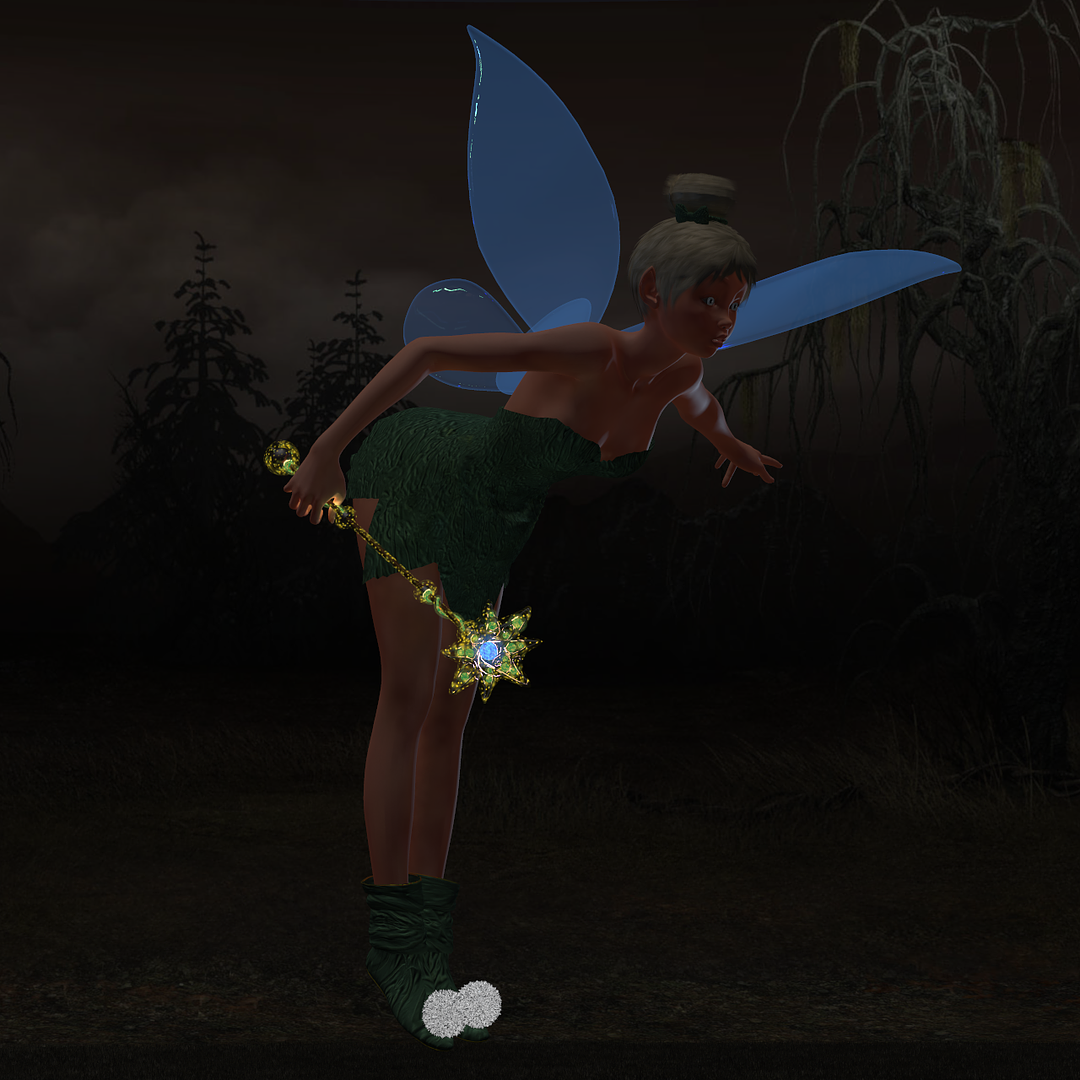
I've uploaded the 3.82MB runtime zip to the freestuff area, but it may take a day or so for it show up. The emitter and aura meshes are remotely referenced geometries, in case someone wants to make and distribute their own textures for the IDL kit. 
Bear in mind that this is an add-on pack; you must have DAZ's Forest Faerie wand. It came in the V3RR 3D starter bundle and is found in the props folder. Here's a screen cap of the promo header:
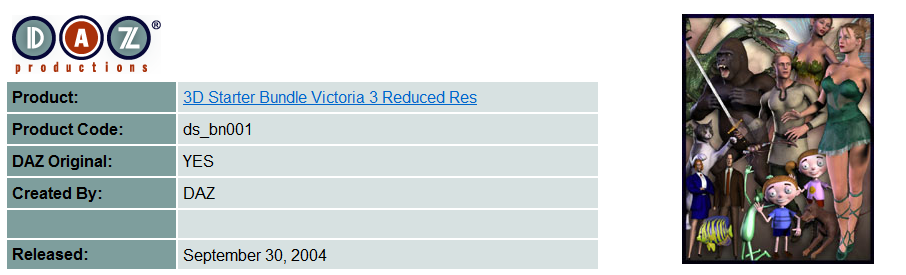 .
.
Here are PP2010 test renders of the fiery texture and of the TinkerBell texture:
 .
.  .
.
Poser 12, Poser 13, Poser 14, in feet.
OSes: Win7Prox64, Win7Ultx64, Win11
Silo Pro 2.5.6 64bit, Silo 2025.1, Vue Infinite 2014.7, Genetica 4.0 Studio, UV Mapper Pro, UV Layout Pro, PhotoImpact X3, GIF Animator 5
putrdude posted Wed, 06 March 2013 at 5:15 PM
Really nice of you. Thank you.
seachnasaigh posted Thu, 07 March 2013 at 3:21 PM
It's in the freestuff area now: Forest Faerie wand P8+ IDL kit
Poser 12, Poser 13, Poser 14, in feet.
OSes: Win7Prox64, Win7Ultx64, Win11
Silo Pro 2.5.6 64bit, Silo 2025.1, Vue Infinite 2014.7, Genetica 4.0 Studio, UV Mapper Pro, UV Layout Pro, PhotoImpact X3, GIF Animator 5
putrdude posted Fri, 08 March 2013 at 4:00 PM
First, thank you. It is really cool. When I render it alone, it looks very good. When I add it to my scene and click the "indirect lighting" box in Render options, my cpu cores get buried for a long time, and all the other lighting (spots) goes wacky.
I think I'm just too dumb. So, maybe I'll just render it and put it in there with photoshop.
sigh.
It really was very nice of you though. I'll try to post what it ended up looking like in my scene.
seachnasaigh posted Fri, 08 March 2013 at 4:09 PM
Post a screenshot of the render settings? Perhaps a "wacky lighting" render for diagnostic purposes?
How many cores? HyperThreaded?
Poser 12, Poser 13, Poser 14, in feet.
OSes: Win7Prox64, Win7Ultx64, Win11
Silo Pro 2.5.6 64bit, Silo 2025.1, Vue Infinite 2014.7, Genetica 4.0 Studio, UV Mapper Pro, UV Layout Pro, PhotoImpact X3, GIF Animator 5
putrdude posted Fri, 08 March 2013 at 4:42 PM

Attached were the render settings I used. I canceled the job after just part of it was rendered. I'll render it on my 6 core ht machine at home to show you the funky render.
Thank you.
seachnasaigh posted Fri, 08 March 2013 at 9:33 PM
Try this:
I suspect that it's the high irradiance caching which is most responsible for slowing the render, and the raytrace bounces should be kept down to only what's needed; you can later increase it if the render finishes quickly, but don't start with a lot of bounces. Increase irradiance caching and indirect light quality together, if you can do so with reasonable render times. The low indirect light quality will cause splotchy IDL effects. Engage the use displacement maps because my wand MAT has fine bas-relief detail on the wand shaft.
Render four threads at work; render twelve threads on the HyperThreaded hex-core at home.
You should not try to use the existing wand which was in your scene. It will not have the properties set correctly. So, note the translations and rotations, delete the wand, add my wand & IDL kit to the scene, select the new wand, and give it the same translations and rotations as the old wand.
Poser 12, Poser 13, Poser 14, in feet.
OSes: Win7Prox64, Win7Ultx64, Win11
Silo Pro 2.5.6 64bit, Silo 2025.1, Vue Infinite 2014.7, Genetica 4.0 Studio, UV Mapper Pro, UV Layout Pro, PhotoImpact X3, GIF Animator 5
putrdude posted Mon, 11 March 2013 at 11:13 AM
Seachnasigh,
You are too kind. I realized that i was canceling the job prematurely. On my machine it appears as red dots on a dark background outlining the characters, props etc. on the first pass. I never used IDL before so I thought it was wonky. I let it go and it rendered fine.
I deleted the other wand and am using yours. I've been playing with yours and it is truly amazing. Took me forever to figure out what did what to what, but I'm getting closer to the evil look I was looking for. Thank you so much. It's still not done, but I'm closer and now I can try your suggested settings.
I read all the software you use. Without getting too personal, is this what you do for a living or for fun?
seachnasaigh posted Mon, 11 March 2013 at 4:21 PM
[quote]* Seachnasigh,*
You are too kind. I realized that i was canceling the job prematurely. On my machine it appears as red dots on a dark background outlining the characters, props etc. on the first pass. I never used IDL before so I thought it was wonky. I let it go and it rendered fine. Since IDL was introduced in P8 and PPro2010, that's happened to a lot of folks. First is the precalculating indirect light pass (with the red dots), then a subsurface scattering pass (if using SSS materials), and then the final render.
Quote - * I deleted the other wand and am using yours. I've been playing with yours and it is truly amazing. Took me forever to figure out what did what to what, but I'm getting closer to the evil look I was looking for. Thank you so much. It's still not done, but I'm closer and now I can try your suggested settings.*
The original wand is set to cast shadows and be visible in raytracing; these properties would block the light from the emitter. My version of the wand has the properties set to allow the concealed emitter to work, plus has the emitter and aura meshes parented to the wand. > Quote - * I read all the software you use. Without getting too personal, is this what you do for a living or for fun?*
My background is all hard sciences (upper-level math, physics, biological sciences), not art. I worked as a lifeguard and firefighter for a paycheck. This stuff is a hobby that is a means of artistic expression, as is building supercharged hot rod engines - sort of heavy metal sculpture. I will not be renewing some of those programs. I'll keep up with Poser, Vue, Silo, modo, and Genetica, and some support utilities. There; just updated the list of software in my sig.
Poser 12, Poser 13, Poser 14, in feet.
OSes: Win7Prox64, Win7Ultx64, Win11
Silo Pro 2.5.6 64bit, Silo 2025.1, Vue Infinite 2014.7, Genetica 4.0 Studio, UV Mapper Pro, UV Layout Pro, PhotoImpact X3, GIF Animator 5
putrdude posted Mon, 11 March 2013 at 6:53 PM
Hey, thank you, yet again.
Still an impressive list of graphics programs for someone who builds hot rod engines. You are a strange mix, with all due respect. Not often you see upper level math physics science in a lifeguard firefighter: an altrusitic supercharged scientist. You would make a good character for a sci-fi hero. :) Got any gnarly powers, besides wand making?
Thanks again.
seachnasaigh posted Mon, 11 March 2013 at 7:40 PM
Thank you, and you are welcome, putrdude. ^^
I took the firefighter's job simply to pay for college; the free time in the evenings also allowed me to study. The original plan was to go into either medicine or engineering. But soon I found that I reveled in the mayhem of firefighting.
:woot: So, although I did finish the degrees, I stayed with the fire department. It doesn't pay as much, but it well suits my Celtic & Viking blood. :biggrin:
Quote - Got any gnarly powers, besides wand making?
Um, well, I can make a pretty good pixie dust. TinkerBell is my muse.
 . I used to have a spotty firedog who was faster than a goosed moose and able to make firehouse leftovers disappear as if by magic.
Poser 12, Poser 13, Poser 14, in feet.
OSes: Win7Prox64, Win7Ultx64, Win11
Silo Pro 2.5.6 64bit, Silo 2025.1, Vue Infinite 2014.7, Genetica 4.0 Studio, UV Mapper Pro, UV Layout Pro, PhotoImpact X3, GIF Animator 5
putrdude posted Tue, 12 March 2013 at 1:32 PM
Even better!
Dirk Daggard, Lifeguard/Firefighter with a spaceship, travels the galaxies with his trusty dog, Spot.
Got any kids? "IF" I ever finish this book, (second version so far ugh!) you can fight with them over it. You would love it. Lots of fairies, pixie dust galore. It's a childrens' book, so I'm not sure it's right for a spaceship riding, firefighting, physics biologist manly man! But then again, you make tinkerbell pics, so...
I like to use Poser pics to give me an idea of what is in my head, hence the evil wand etc. Don't think I'll be using them in the book, unless it stinks, and nobody wants to publish it, except me. :) Publishers typically pick their own illustrator, and often dont use illustrations unless its a picture book. Oh well. Still fun to do.
Anyway, thanks Dirk. Very nice of you to have helped and made the wand "thingy" (that's the technical term I like to throw around to show off.) I'm a poser ignoramous, but I try. Photoshop helps me hide my incompetence.
Thanks muchly! I won't forget your help.
seachnasaigh posted Tue, 12 March 2013 at 4:43 PM
Hmmm, funny - I use Poser to hide my PhotoShop incompetence.  Heh, heh. If you are using Poser to sort of storyboard your work, you might want to try Poser's sketch renderer (as opposed to Firefly). It simulates pencil, charcoal, etc drawings.
A dog on a spaceship - would always want to open a window and stick it's head out so it's ears could flap in the wind. :laugh: It is a great mercy that man still has one species which calls him friend.
A traditional male admiring TinkerBell? Those two characteristics aren't in conflict; indeed, it is natural. TinkerBell is a petite, trim yet shapely (her top half fits through a keyhole, but her derriere gets stuck! :tongue2: ) blue-eyed blonde whose personality is exquisitely feminine. She's very ladylike; even her imperfections (jealousy, temper, etc) are so characteristically feminine as to be endearing - a male's natural reaction is to just smile and ride out the tempest. :rolleyes:
Frankly, I think that women would do better to follow TinkerBell as a role model, rather than so many of the current crop of singers, actresses, and anti-feminine "feminists".
I recall reading that when a reporter asked Walt Disney who was his favorite character, Disney said something to the effect of "Mickey Mouse and Donald Duck have made me a lot of money over the years, but I'm head over heels in love with TinkerBell!"
Poser 12, Poser 13, Poser 14, in feet.
OSes: Win7Prox64, Win7Ultx64, Win11
Silo Pro 2.5.6 64bit, Silo 2025.1, Vue Infinite 2014.7, Genetica 4.0 Studio, UV Mapper Pro, UV Layout Pro, PhotoImpact X3, GIF Animator 5
putrdude posted Tue, 12 March 2013 at 5:51 PM
Well your dog would be wearing a space helmet, so he could open the window and stick his head out. Duh.
I always liked tinkerbell too, but my fondness for her was surpassed when I watched Rocky & Bullwinkle and found my true soulmate: the Fractured Fairy Tale fairy. Julia Roberts ruined tinkerbell forever.
As for traditional males admiring Tinkerbell. You would not believe how much razzing I get for writing a book about fairies.
Yours in Machonessness,
KOF
King of the Fairies
seachnasaigh posted Tue, 12 March 2013 at 6:13 PM
The dog will want air jets inside the helmet, to make his ears flap, otherwise it just wouldn't be satisfying. :laugh:
Hah! I remember the Fractured Fairy Tales! I can still picture the intro and epilogue where the fairy appears, and the theme music! :lol:
Poser 12, Poser 13, Poser 14, in feet.
OSes: Win7Prox64, Win7Ultx64, Win11
Silo Pro 2.5.6 64bit, Silo 2025.1, Vue Infinite 2014.7, Genetica 4.0 Studio, UV Mapper Pro, UV Layout Pro, PhotoImpact X3, GIF Animator 5