
ladylake opened this issue on Jan 19, 2013 · 13 posts
ladylake posted Sat, 19 January 2013 at 9:20 AM
In my scene I have a hill/small mountain. I put in a pine population. Added several surface layers for the rocks/etc. THEN decided to put in a crack shader for the upper elevation. Doing that changed the density of the pine population in places...not everywhere, just in places.
Why?????

bobbystahr posted Sat, 19 January 2013 at 10:02 AM
Is there a Distribution Shader of some sort in the Cracks Network some where, or a Power Fractal Shader controling distribution...all I can think of off hand....Having never used the clip file I suspect you're using that's just my guess.
Once
in a while I look around,
I see
a sound
and
try to write it down
Sometimes
they come out very soft
Tinkling light sound
The Sun comes up again

Danny_G posted Sat, 19 January 2013 at 10:18 AM
First try a force update (Project-Populate all - Force update) if that doesn't help my guess is they it didn't change any distrubution, you just can't see the population because the surface is now to deep with the cracks and other shaders, go below the terrain with your camera see if you can see the rest of your populations ? Just a reminder- remember the terrain tab in the populator node by default sits on the compute terrain node, the more surface layers you add the deeper it gets. This will bury some of your plants, If this is the case try adding a compute normal node after all your surface shaders and set that as your terrain to sit on (in the object node). Hope this helps
Danny_Gordon
New World Digital Art
ladylake posted Sun, 20 January 2013 at 11:19 PM
I changed the camera just a bit and got it. Too many layers I think.
Thanks again guys. Appreciated.
Danny_G posted Mon, 21 January 2013 at 4:20 AM
You can keep your layers just add a compute normal at the end of all your layers than assign that as your terrain to sit on, or use the top layer as yout terrain to sit on
Danny_Gordon
New World Digital Art
ladylake posted Mon, 21 January 2013 at 7:59 AM
Ah, okay. I did compute terrain...not compute nomal. Didn't read that correctly. Thanks.
Danny_G posted Mon, 21 January 2013 at 11:38 AM
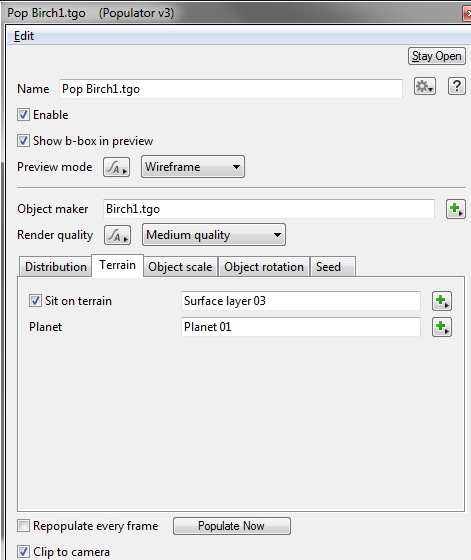
Danny_Gordon
New World Digital Art
ladylake posted Mon, 21 January 2013 at 11:49 AM
Thanks....a pic is usually needed for me to understand. There are soooooo many ways to make things different. I would have never found that choice (to put it on a certain surface layer)
BTW, do you know where to get a white birch (trunk) tree tgo? Doesn't have to be free. ;-)
Danny_G posted Mon, 21 January 2013 at 5:10 PM
bobbystahr posted Mon, 21 January 2013 at 5:51 PM
Lyla search google with images selected and type Birch bark texture and put it on another tree in a pinch. Maybe join all the terragen sites as they all have at least some freebies and maybe there will be one there...I'll search my files to see if I have one and e mail you later if I do
Once
in a while I look around,
I see
a sound
and
try to write it down
Sometimes
they come out very soft
Tinkling light sound
The Sun comes up again
bobbystahr posted Mon, 21 January 2013 at 5:55 PM
Attached Link: birch
try this link
Once
in a while I look around,
I see
a sound
and
try to write it down
Sometimes
they come out very soft
Tinkling light sound
The Sun comes up again
Danny_G posted Mon, 21 January 2013 at 6:25 PM
Marc Gebharts High Res Birch
http://store.nwdanet.com/terragen2store/13-objects/14-trees/43-white-birch-pack-v10-high-resolution.html
Walli Sweet Seduction Pack could pass for a birch
http://www.silva3d.com/product.php?id_product=17
Danny_Gordon
New World Digital Art
ladylake posted Mon, 21 January 2013 at 6:40 PM
Thanks gusy will check these out. Appreciated.