
MarkHirst opened this issue on Jun 18, 2012 · 9 posts
MarkHirst posted Mon, 18 June 2012 at 2:46 PM
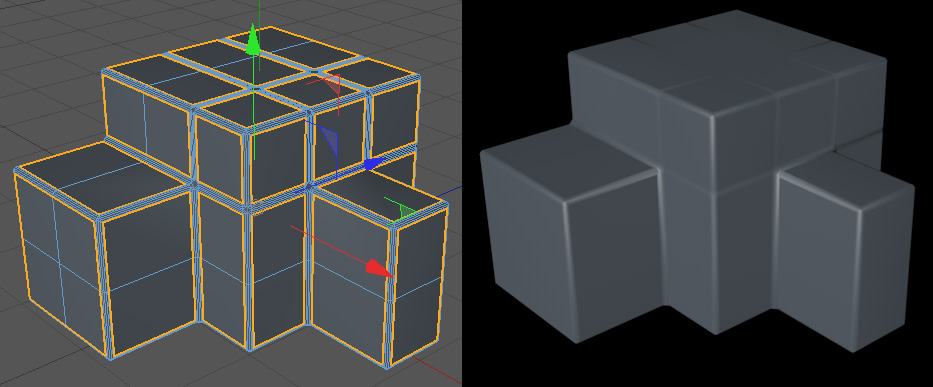
I tried some experiments with a simpler cubic model (see enclosed image), but still get the same problematic results. The strange thing is that even flat surfaces show these shading artefacts, such as the top of the main cube.
Is there an alternative approach to getting the rounded edges?

strata posted Mon, 18 June 2012 at 4:31 PM
You got to lower the phong angle until those "artifacts" are gone. :)
“The scientists of today think deeply instead of clearly. One must be sane to think clearly, but one can think deeply and be quite insane.” Nikola Tesla
MarkHirst posted Tue, 19 June 2012 at 1:16 AM
I've had no luck changing the phong angle, but thanks for the suggestion.

contrafibbularities posted Tue, 19 June 2012 at 4:06 AM
Although the object looks simple enough, you will always run into trouble using convex bevels on a model like this.
Like strata said, decreasing the phong angle often helps. With convex bevels, however, you can only decrease it so much before you get a facetted look. Besides decreasing the phong angle, you can also try to perform an inner extrude on the polygons.
In your image, the geometry after beveling is a mess. Neither of the above tips will do you much good. Why did you bevel pretty much all the edges to begin with? That's part of your problem. Only bevel the ones you really need to bevel.
Do you really need those convex bevels? If you just want to get highlights on the edges and make them look more realistic a simple bevel with no subdivisions is all you need. Any resulting problems are much easier to clean up, too.
Possible other solutions you might want to check out:
Cheers
contrafibbularities
MarkHirst posted Tue, 19 June 2012 at 7:26 AM
Quote - In your image, the geometry after beveling is a mess. Neither of the above tips will do you much good. Why did you bevel pretty much all the edges to begin with?
That was the design I was looking for, all outer edges of the shape to be rounded.
Quote - If you just want to get highlights on the edges and make them look more realistic a simple bevel with no subdivisions is all you need.
I tried subdivisions 0, but this has a similar problem but without the rounded edges I wanted.
I'll look at the options you mentioned.
contrafibbularities posted Tue, 19 June 2012 at 12:44 PM
I tried subdivisions 0, but this has a similar problem but without the rounded edges I wanted.
Just reduce the phong angle to something like 33 degrees, doing a linear bevel really shouldn't cause any problems:

Wire:

Some more examples:
1a) HN

1b) HN wire

2a) SolidChamfer (plugin)

2b) Solid Chamfer wire (yikes, too many subdivisions :-) )


MarkHirst posted Tue, 19 June 2012 at 1:27 PM
Thanks for your previous post; there are more options than I realised.
I have decided to go for SolidChamfer, as this lets me create edges with large radii.
Just waiting for my serial number to come through....

FranOnTheEdge posted Sun, 24 June 2012 at 1:25 PM
That HyperNurbs option is pretty much how I'd model that shape in Wings - using edge loups for control - works pretty well too.
*note to self, do more modelling in C4D...
Measure
your mind's height
by the shade it casts.
Robert Browning (Paracelsus)

perilous7 posted Wed, 27 June 2012 at 5:04 AM
solidchamfer is amazing! well worth using if you arent already. looking at your screen cap do you need to have bevels in the top of the cube? if you arent after a recessed effect they need removing, in solidchamfer its a two second job, into edge mode then use ring selection and most of it is done,just choose your level of rounding and thats it :-)
A cleaved head no longer plots.
http://www.perilous7.moonfruit.com