
george85 opened this issue on May 29, 2011 · 45 posts
george85 posted Sun, 29 May 2011 at 6:26 AM
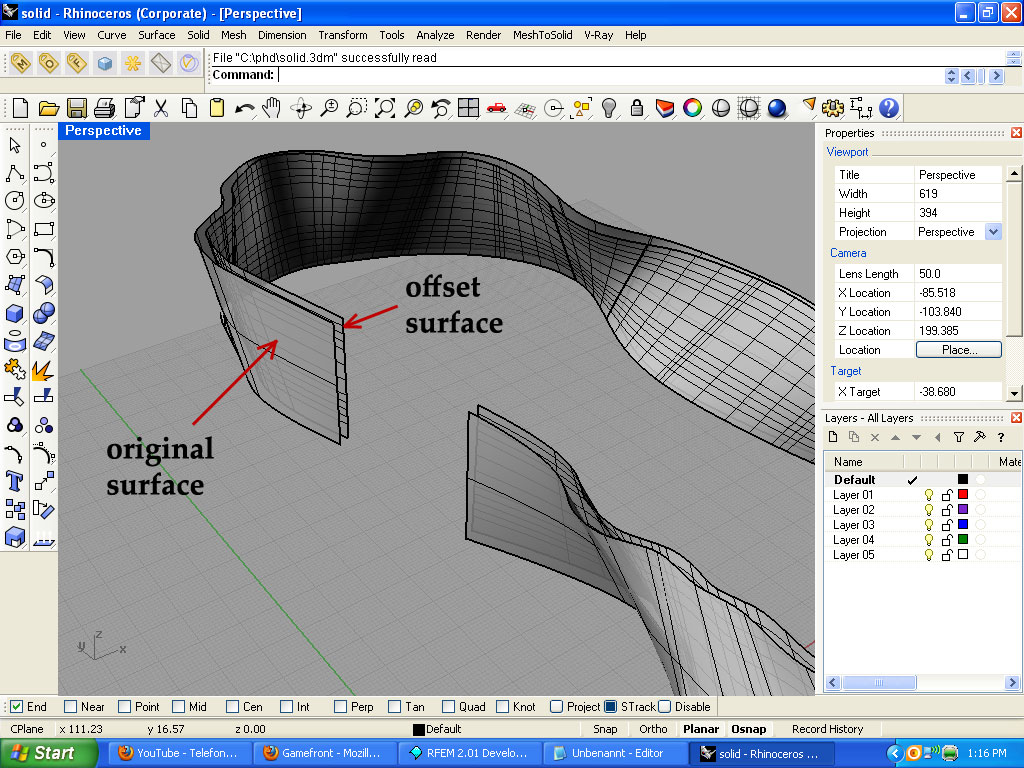
Take a look at the picture above: I have an original curved surface, and then I made an offsetted one to the inner direction. This offesetted surface should be bounday untill which I want to create a solid.
So how can I do this?
Here is my .3dm file:
http://www.gamefront.com/files/20378138/solid.3dm
Thank you.

Billy57 posted Sun, 29 May 2011 at 6:40 AM
You can do this using Offset Surface with the Solid parameter.
When you click on Offset Surface, and the Offset Distance query appears, hit 'S'.
Billy
george85 posted Sun, 29 May 2011 at 9:11 AM
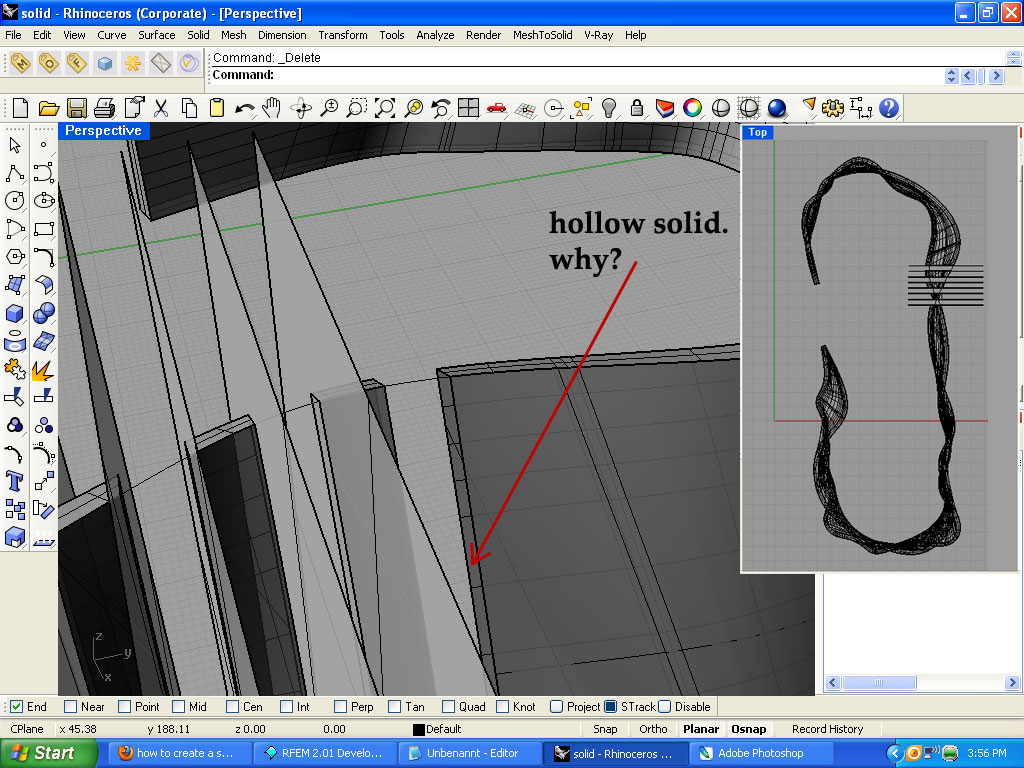
But now I have another problem:
I want to cut this solid that I got into smal pieces with a distance between each other (take a look at the picture)
But the problem is that, when I do this, I realize that my solid is hollow. And because it is a hollow All this small cut pieces that I got, do not have a lateral sides (surfaces). This means that I need to create this lateral surfaces on each of those small pieces separately.
Well is there any other way I can create a solid which is not hollow, but a inner-filled?
Here is my .3dm file with the cutted pieces.
http://www.gamefront.com/files/20378555/solid2.3dm
Billy57 posted Sun, 29 May 2011 at 11:00 AM
Probably what I would do in this situation is just select the individual pieces and hit "Cap planar holes" under Solid. It only takes a moment.
Some of the more experienced folks here might know a more sophisticated way to do it.
Billy

EHNisja posted Sun, 29 May 2011 at 2:02 PM
The surfaces that you want to cap can be selected by using the bounding box selection method, and let Rhino figure out the rest. Ether a "window rectangle" or a "crossing rectangle" should do the trick for the mass selection.
I must not fear.
Fear is the mind killer.
Fear is the little death that brings total
obliteration.
I will face my fear.
I will permit it to pass over me and through me.
And when it has gone past, I will turn the inner eye to see its
path.
When the fear has gone there will be nothing.
Only I will remain.
Frank Herbert, author of Dune
george85 posted Sun, 29 May 2011 at 3:21 PM
thank you for the help both of you.
So the best method is to select all the these small pieces with a "window rectangle" or "crossing rectangle" and then use the "_Cap" (Cap Planar Holes) command?
EHNisja posted Sun, 29 May 2011 at 3:58 PM
I'd say so, Rhino will tell you if it has any issues. For this to work you must use planar surfaces for the cutting.
I must not fear.
Fear is the mind killer.
Fear is the little death that brings total
obliteration.
I will face my fear.
I will permit it to pass over me and through me.
And when it has gone past, I will turn the inner eye to see its
path.
When the fear has gone there will be nothing.
Only I will remain.
Frank Herbert, author of Dune
Billy57 posted Mon, 30 May 2011 at 12:55 AM
I tried it on the model and it seemed to work fine.
george85 posted Mon, 30 May 2011 at 6:26 AM
me too. And it worked fine also, thank you.
Now I am curious:
what if I would have curved surfaces for cutting this main curved solid. So instead of all this vertical planar surfaces I used for cutting, what if I would have a curved ones.
Then the "Cap Planar Holes" command would not work?
In that case I would have to use the "_EdgeSrf" (Surface from 2,3 or 4 edge curves) ?

UVDan posted Mon, 30 May 2011 at 11:44 AM Forum Moderator
If you ever need edges that are not planar you can split two surfaces one with the other and join them together. I do that all the time.
Split surface A with surface B.
Split surface B with surface A.
Delete the waste parts and join A to B.
Free men do not ask permission to bear
arms!!
EHNisja posted Mon, 30 May 2011 at 12:36 PM
In V4, there is a command called "_CreateSolid" that automates what Dan just said. I'd give that one a try.
I must not fear.
Fear is the mind killer.
Fear is the little death that brings total
obliteration.
I will face my fear.
I will permit it to pass over me and through me.
And when it has gone past, I will turn the inner eye to see its
path.
When the fear has gone there will be nothing.
Only I will remain.
Frank Herbert, author of Dune
george85 posted Mon, 30 May 2011 at 2:28 PM
thank you for the advices once again.
@UVDan: I tried you method and it works on my Rhino4 SR8
@EHNisja: I believe you that this works perfectly, but maybe on some other SR?
This is what I get when I type "_CreateSolid" command:
Quote -
Command: _Paste
Command: _CreateSolid
Select intersecting surfaces and polysurfaces to automatically trim and join into a closed polysurface:
Select intersecting surfaces and polysurfaces to automatically trim and join into a closed polysurface:
Select intersecting surfaces and polysurfaces to automatically trim and join into a closed polysurface. Press Enter when done:
Select intersecting surfaces and polysurfaces to automatically trim and join into a closed polysurface. Press Enter when done:
Solid creation in progress... Press Esc to cancel
Unable to create solid.
EHNisja posted Mon, 30 May 2011 at 2:50 PM
Hello George, I get that alot as well! I'm on sr8 also. Like I said, "I'd give it a try." It might not like that some of the surfaces are trimmed to the edge that is needed to make the closed polysurface. You sometimes can get lucky with the soilds tools but there's always the robust surfacing tools to fall back on.
I must not fear.
Fear is the mind killer.
Fear is the little death that brings total
obliteration.
I will face my fear.
I will permit it to pass over me and through me.
And when it has gone past, I will turn the inner eye to see its
path.
When the fear has gone there will be nothing.
Only I will remain.
Frank Herbert, author of Dune
george85 posted Mon, 30 May 2011 at 3:03 PM
understood. thank you once again.
george85 posted Mon, 30 May 2011 at 3:37 PM
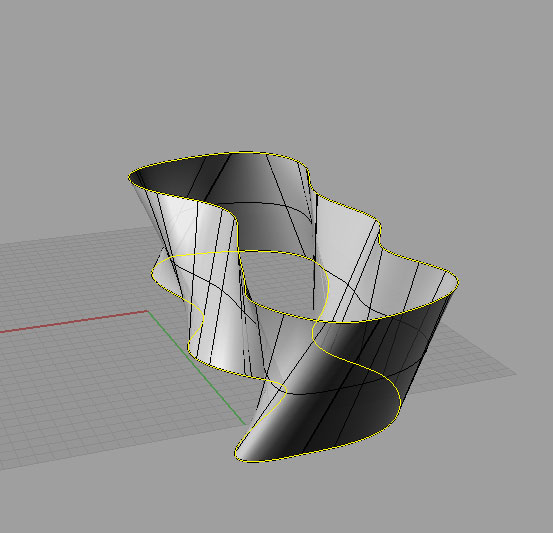
Can I ask for one more question?
How can I make surface, similar to the one that I already had, but with the curved top.
for example before I had this (take a look at the image).
george85 posted Mon, 30 May 2011 at 3:38 PM
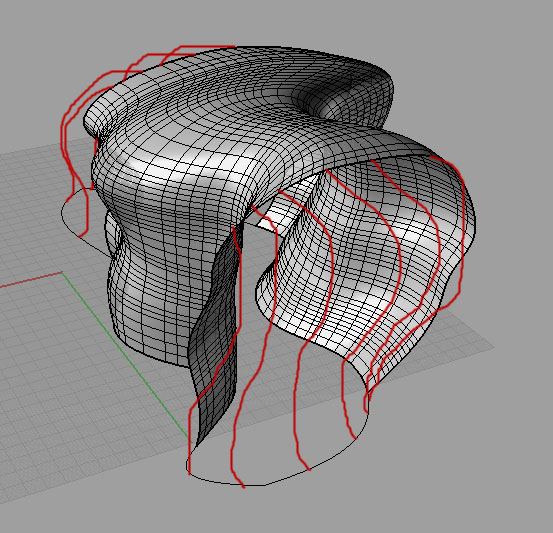
so I want to add a curved top.
any suggestions please?
thank you.
Billy57 posted Tue, 31 May 2011 at 5:28 AM
Not quite sure what you need here, but it looks to me like a job for Sweep Two Rails.
george85 posted Tue, 31 May 2011 at 7:02 AM
Here is a more closer example of what I want to do (take a look at the picture).
But I am definitively doing something wrong. Ok here is what I did with the Sweep To Rail 2 command.
I created the two "ends" of the surface:
First I used the curves 1 and 2 as the the first and the second rails, and then used the curve 3 as a crossection curve.
| did the same thing with curves 1,2 and 4: curves 1 and 2 as the the first and the second rails, and then used the curve 4 as a crossection curve.
Then I created the "middle" part:
used curves 1 and 2 as the the first and the second rails, and then used both curves 3 and 4 as a crossection curve. And I got the middle part.
Bu the problem is that the transitions between the two "ends" and the "middle" part are two sharp. How can I fix this?
Here is the .3dm file:
http://www.gamefront.com/files/20386569/solid.3dm
george85 posted Tue, 31 May 2011 at 7:03 AM
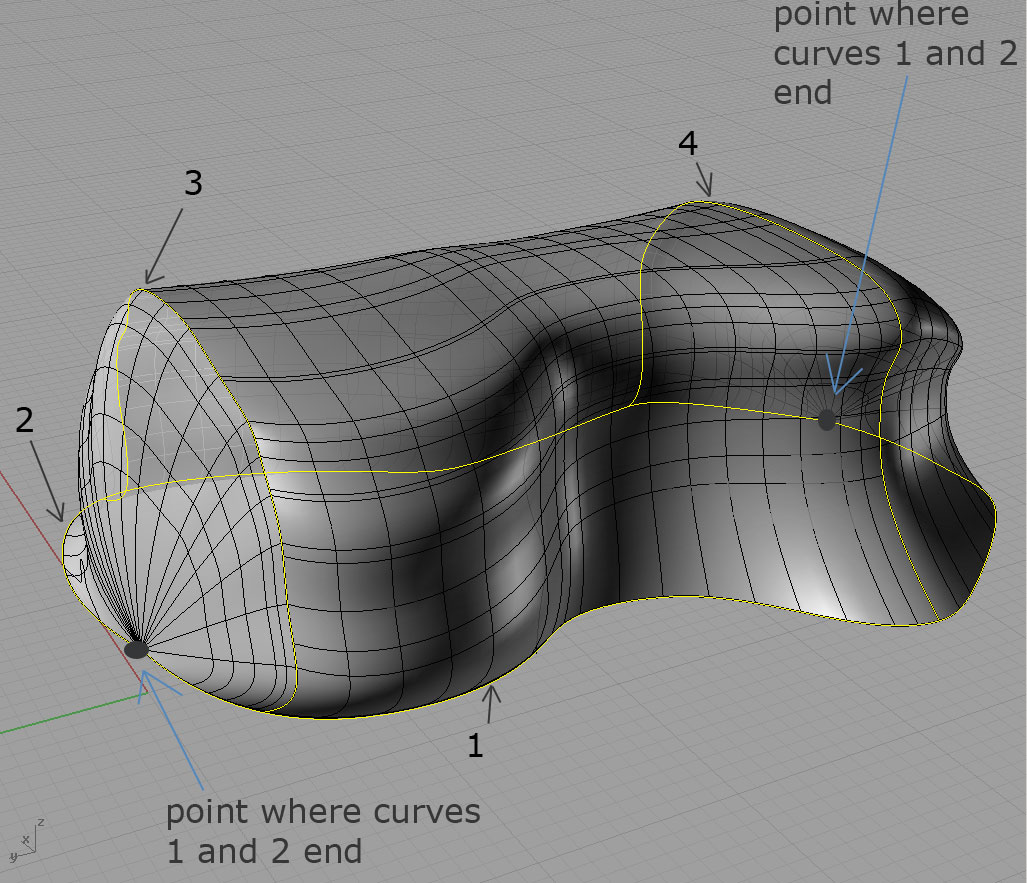
But I am definitively doing something wrong. Ok here is what I did with the Sweep To Rail 2 command.
I created the two "ends" of the surface:
First I used the curves 1 and 2 as the the first and the second rails, and then used the curve 3 as a crossection curve.
| did the same thing with curves 1,2 and 4: curves 1 and 2 as the the first and the second rails, and then used the curve 4 as a crossection curve.
Then I created the "middle" part:
used curves 1 and 2 as the the first and the second rails, and then used both curves 3 and 4 as a crossection curve. And I got the middle part.
Bu the problem is that the transitions between the two "ends" and the "middle" part are two sharp. How can I fix this?
Here is the .3dm file:
http://www.gamefront.com/files/20386569/solid.3dm

An_Anthropologist posted Tue, 31 May 2011 at 9:33 AM
Rhino has limitations when it comes to these types of surfaces. Amorphous, closed, continuosly curving surfaces are tough to create using a NURBS program. Sweep 2 Rails works best if the rails never meet. The closer the rails become, the more deformed the surface becomes. There are many methods you can use that can approximate the shape you are looking for. The trick is keeping your model clean, with as few surfaces, booleans, and fillets as possible. Remember, Rhino is a precision tool: it works best if you know the exact dimensions, angles, and shapes you desire to model. If you are looking for a "free-form" modeler that will allow you to be more flexible with your objects, I would suggest you look to polygonal modeling tools such as Blender.
I will try a few solutions and post images if I come up with something suitable. In the meantime, you may want to play around with Rail Revolve. I would also suggest using control points to "sculpt" a surface that is acceptable.
george85 posted Tue, 31 May 2011 at 4:12 PM
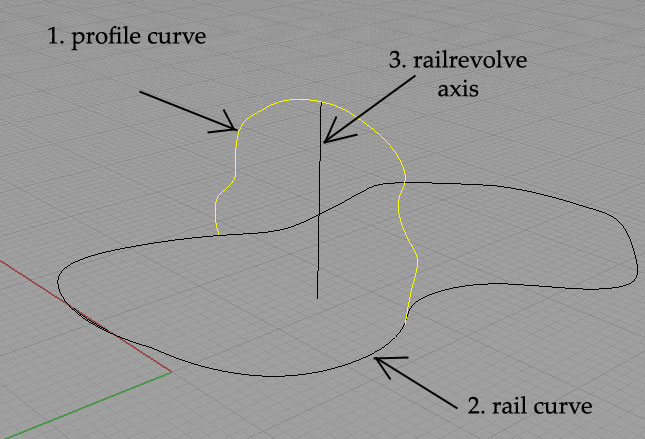
george85 posted Tue, 31 May 2011 at 4:12 PM
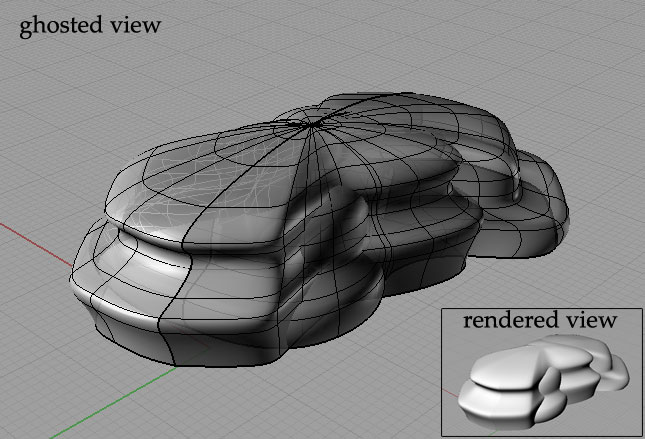
EHNisja posted Tue, 31 May 2011 at 6:31 PM
Hello George, You will need to split curve #1 with curve #3 and use only one of the halves to get the correct results from the rail revolve command.
I must not fear.
Fear is the mind killer.
Fear is the little death that brings total
obliteration.
I will face my fear.
I will permit it to pass over me and through me.
And when it has gone past, I will turn the inner eye to see its
path.
When the fear has gone there will be nothing.
Only I will remain.
Frank Herbert, author of Dune
george85 posted Wed, 01 June 2011 at 2:24 AM
thank you for the tip once again EHNisja.
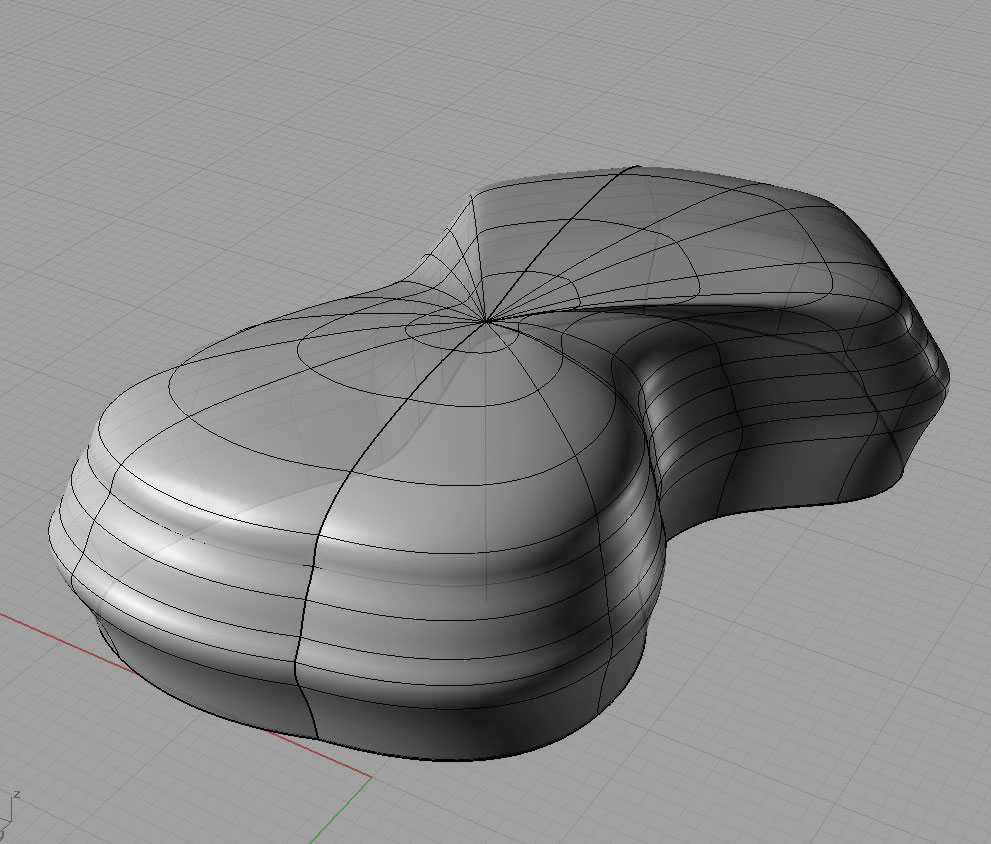
I did it like you told me, and now I am more closer to what I want to do (look at the image).
But I want my surface to change along the rail. Not to be the same, like it is in the case of using the "RailRevolve" command.
That`s why I tried to use the "_PointsOn" (control points) command.
But it says:
"Cannot turn on points for polysurfaces."
So what should I do?
george85 posted Wed, 01 June 2011 at 6:05 AM
An_Anthropologist posted Wed, 01 June 2011 at 7:29 AM
The reason why your solid is split into multiple surfaces is because the rail curve is too complex. Use edit>rebuild to reduce the number of points in this curve. Once you have created a single surface, you should be able to enable control points.
george85 posted Thu, 02 June 2011 at 2:18 AM
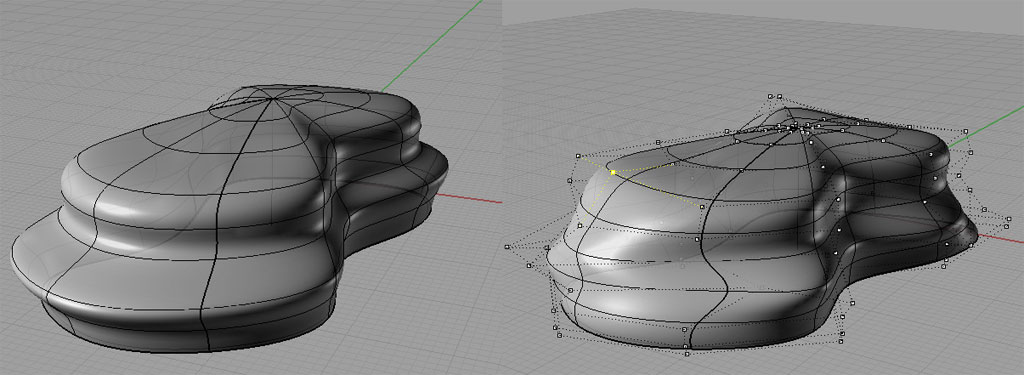
When I finnish with the editing of the surface (that is control points editing), do I need to use the "Smooth" command?**
**
george85 posted Sat, 04 June 2011 at 5:43 PM
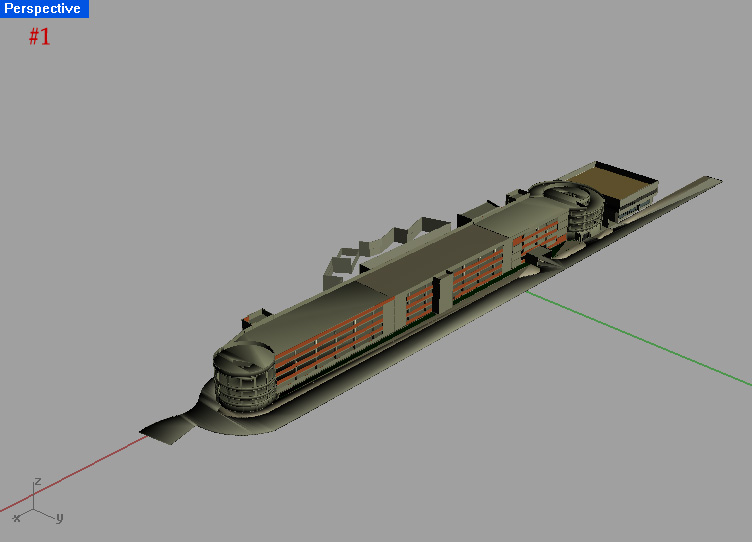
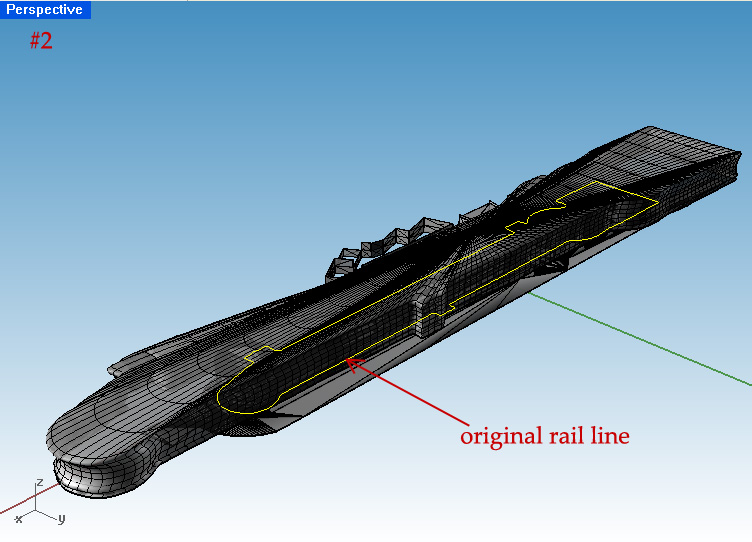
I am trying to create a free shaped facade all over my parking garage.
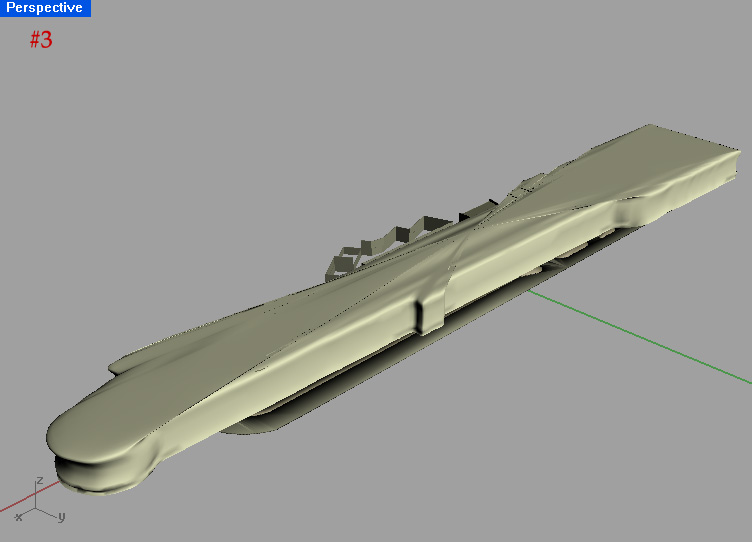
But it seems that RailRevolve can not be implemented in this case, maybe because of the longitudinal characteristic of my object. The biggest problem lies in the top part of the surface which is very deformated (image #3).
And also my created surface is bigger than it should be. A lot bigger. Take a look at the image #2.
what should I do, and how can I create this surface?
Here is the .3dm file:
http://www.gamefront.com/files/20403317/Untitled.3dm
george85 posted Sat, 04 June 2011 at 5:44 PM
george85 posted Sat, 04 June 2011 at 5:44 PM
EHNisja posted Sat, 04 June 2011 at 9:38 PM
I would try a sweep2 surface, the inner rail could be a long oval and outer rail is your original rail curve. In the sweep2 command you can "add slashes" that will allow Rhino to control the surface better. Your profile curves will be the general shape of the surface needed.
I must not fear.
Fear is the mind killer.
Fear is the little death that brings total
obliteration.
I will face my fear.
I will permit it to pass over me and through me.
And when it has gone past, I will turn the inner eye to see its
path.
When the fear has gone there will be nothing.
Only I will remain.
Frank Herbert, author of Dune
george85 posted Sun, 05 June 2011 at 4:02 PM
I did not understand you about the "inner rail".
Which curve will it be?
EHNisja posted Sun, 05 June 2011 at 7:53 PM
You will need to make the "inner rail". It will be at the elevation that you want the top of your surface to finish at and in the middle of your original rail, it will be oval- like in shape. The sweep2 command needs to have 2 separate curves to guide Rhino in the making of the surface. In this case they will both be closed cuvres. The small area that is left in the middle can be closed using the patch command.
I must not fear.
Fear is the mind killer.
Fear is the little death that brings total
obliteration.
I will face my fear.
I will permit it to pass over me and through me.
And when it has gone past, I will turn the inner eye to see its
path.
When the fear has gone there will be nothing.
Only I will remain.
Frank Herbert, author of Dune
george85 posted Mon, 06 June 2011 at 3:14 AM
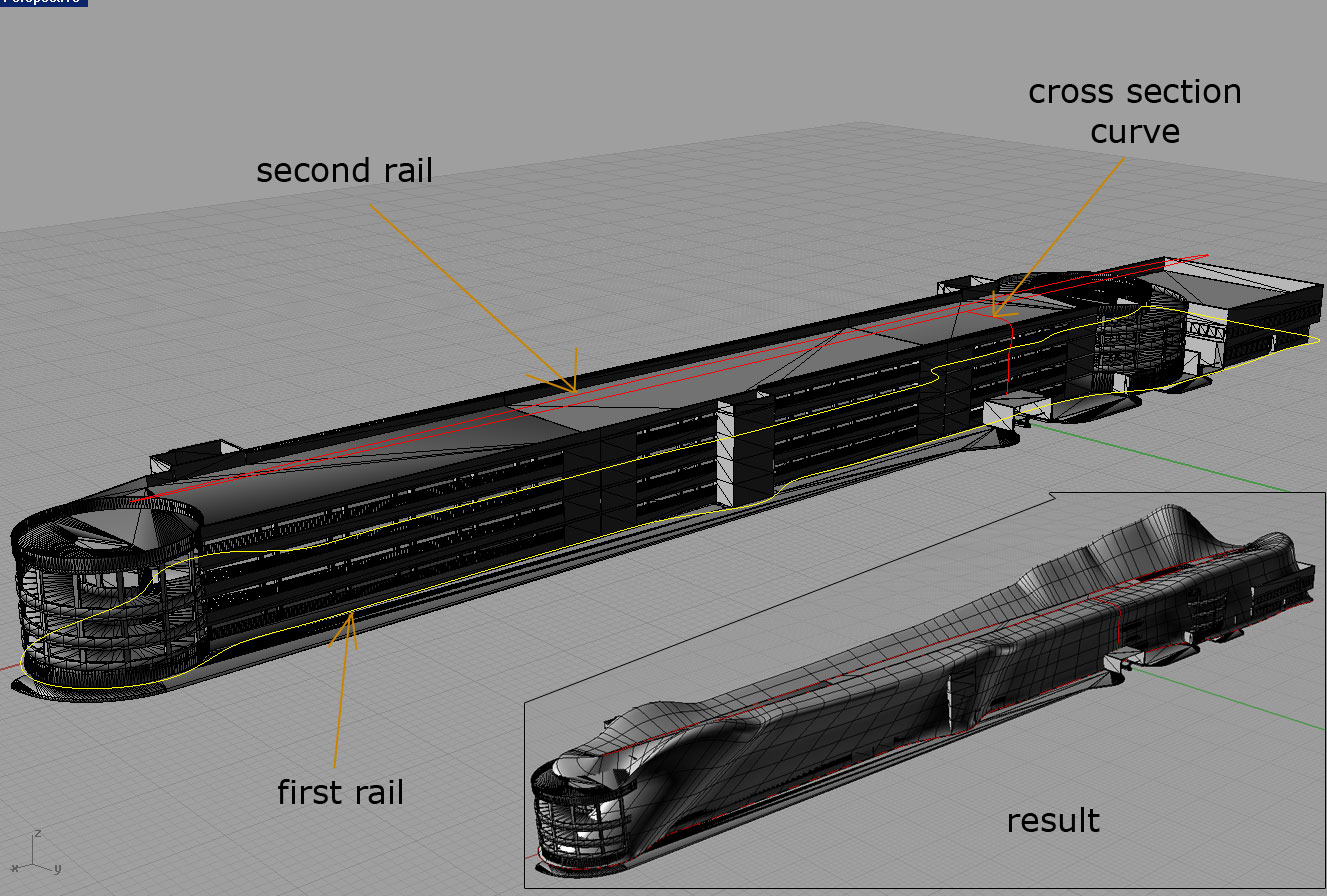
Take a look.
EHNisja posted Mon, 06 June 2011 at 8:19 PM
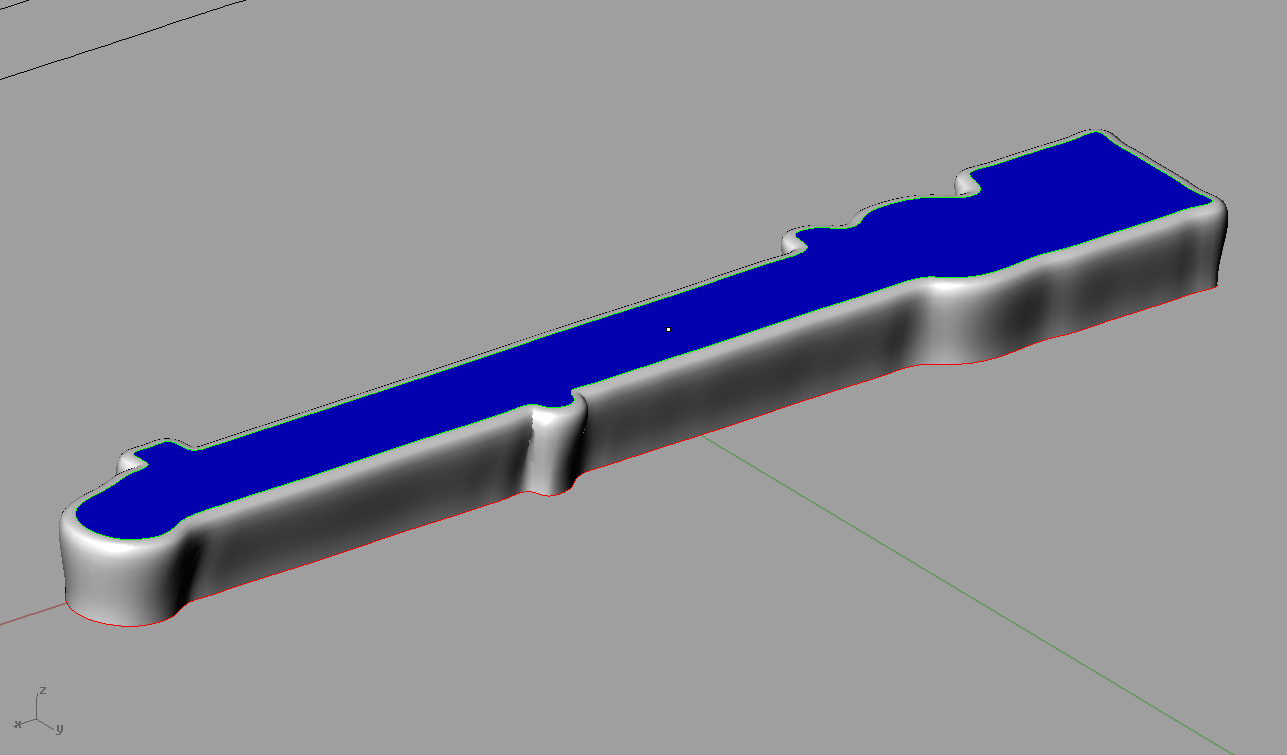
Experiment with the different surface tools to see the style of surface that they make and use the parts that you like to form the surface that you need. If this is going to be a "real" structure, you need to keep in mind construction costs. I would hate to figure out how much this one would cost to make!
I must not fear.
Fear is the mind killer.
Fear is the little death that brings total
obliteration.
I will face my fear.
I will permit it to pass over me and through me.
And when it has gone past, I will turn the inner eye to see its
path.
When the fear has gone there will be nothing.
Only I will remain.
Frank Herbert, author of Dune
EHNisja posted Mon, 06 June 2011 at 8:20 PM
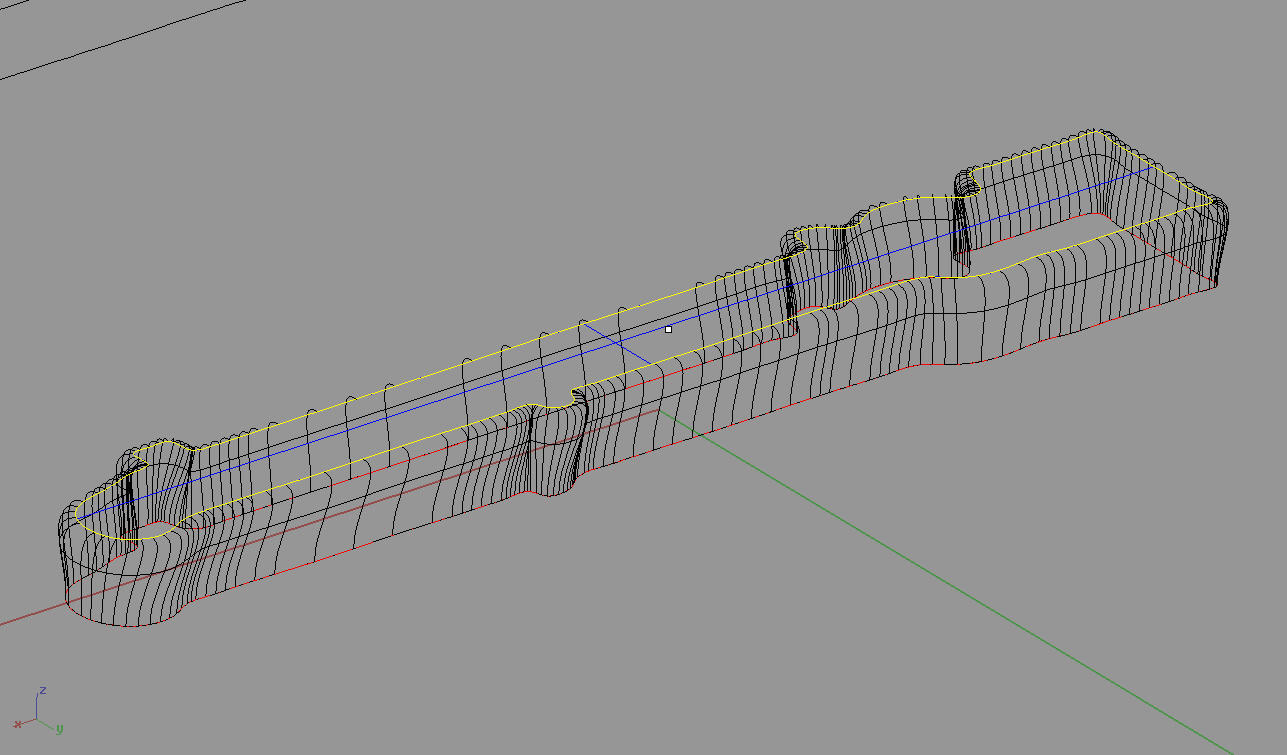
I must not fear.
Fear is the mind killer.
Fear is the little death that brings total
obliteration.
I will face my fear.
I will permit it to pass over me and through me.
And when it has gone past, I will turn the inner eye to see its
path.
When the fear has gone there will be nothing.
Only I will remain.
Frank Herbert, author of Dune
george85 posted Thu, 09 June 2011 at 1:32 PM
worked perfectly thank you.
P.S.
just this: why do I have to extrude my outer curve 5 units down?
EHNisja posted Thu, 09 June 2011 at 5:26 PM
The "blend surface" command needs two surfaces to work with. I used 5 units just to get enough to work with. I deleted it as soon as I was done using it. Rhino uses the UVs of BOTH sets of surfaces to make the blend. If you extruded the outer surface with a taper, you would get a whole different outcome! You might want to try it, I think that it could have a neat effect.
I must not fear.
Fear is the mind killer.
Fear is the little death that brings total
obliteration.
I will face my fear.
I will permit it to pass over me and through me.
And when it has gone past, I will turn the inner eye to see its
path.
When the fear has gone there will be nothing.
Only I will remain.
Frank Herbert, author of Dune
george85 posted Fri, 10 June 2011 at 2:58 AM
now I understand. you deleted the extruded surface (the one that went 5 units down).
Thank you EHNisja, I owe you for all this.

Imperamon posted Thu, 16 June 2011 at 9:56 AM
different way: planar surface out of the lower curve --> extrude the surface and bevel the edges...
george85 posted Sun, 03 July 2011 at 1:54 PM
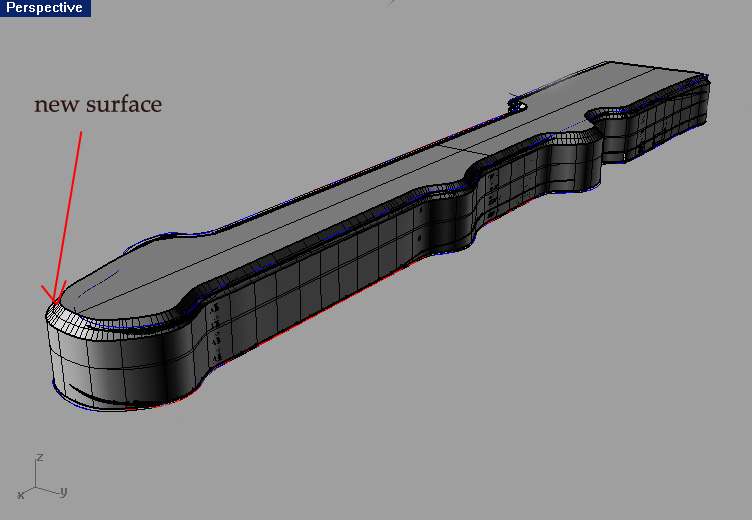
But which command do you exactly have on your mind by: "bevel the edges"? ChamferEdge? I tried ChamferEdge but the results was quite odd, as I got the flat surface as a transition between top and vertical one.
Imperamon posted Sun, 03 July 2011 at 2:48 PM
No, you're right chamfer edges is not the right one.
The command in my german version "kante verrunden" means "bevel edge" translated into english and in Maya, the other 3d program I use, it's called that way...I got a bit confused...
So the correct command for you would be "_FilletEdge" (Select the top edge) This gives you a nice round edge (you can change the radius for a bigger/smaller bevel). And as a second advantage your extruded walls will be perfectly straight.
I'm a bit curious...do you make the model for yourself or for a client?
george85 posted Sun, 03 July 2011 at 3:15 PM
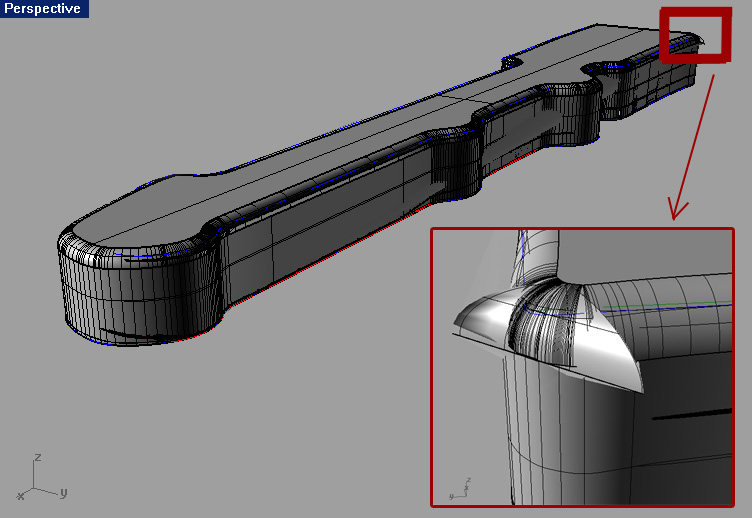
By the way, I am a student. I am making the model for my faculty project.
P.S.
I love your "Fragile" movie! Fantastic work. I did not know that Rhino has that powerfull video making abilities.
Imperamon posted Sun, 03 July 2011 at 4:21 PM
Thanks! I have to dissapoint you though...I did just some of the modeling in Rhino, the animation/rigging part was created with autodesk maya 2012.
I have my last day of school tomorrow :biggrin: ...after the summer break I'll be studying architecture too.
Your mesh issue could be connected to your display settings. Type "_DocumentPropertiesPage" hit Enter & Enter again. Now in the Document property window (on the left side) under Documentproperties-->Polygonnet select "smooth and slower" instead of the default "faster" option.
george85 posted Sun, 03 July 2011 at 5:40 PM
thank you for the advice.
but I did not have a chance to test it. As I did not saved the change of my previous work. So I tried to do the same procedure again: create the planar surface from the bottom curve, extrude this planar surface and then Filletedge of its upper edge. Now everything worked without problems.
But I will keep in mind your last tip about the "smooth and slower" issue.
I wish you all the best with your studies. Architecture is a great profession.
You are 18 years old? Great Rhino knowledge, I must admit.