
gavotte opened this issue on Aug 17, 2010 · 13 posts
gavotte posted Tue, 17 August 2010 at 8:57 PM

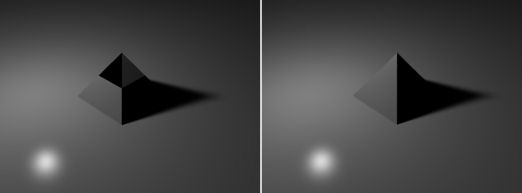
The problem is when I render it, I get what is shown above. The top of the pyramid is in constant shadow. I looked at the object in the vertex modeler and there are no subdivisions at this point. What is going on here… and better yet, how do I fix it?

thomllama posted Tue, 17 August 2010 at 9:00 PM
looks like the light is pointed wrong is all.. try adding a new light and maybe some background walls to bounce the rays around
Hexagon, Carrara, Sculptris, and recently Sketchup.

sparrownightmare posted Tue, 17 August 2010 at 9:25 PM
Not sure I understand your method. I would
Spline Modeler, create a 4 node square and center the section (Don't use the square tool, freehand it. elongate it on the y axis, choose the first section and create a second section. go to the 2nd. section and move all 4 nodes to the center. Don't try and do this with extrusion or it may have issues. Make sure the first section is set to shape-to-shape. That should work. You can adjust size and proportions by manipulating the first section only using the symmetrical extrusion envelope. Keep in mind that sometimes a test render or the modeling or assembly room may not display it properly so do a semi final test render from the render room to get a realistic idea of what it will look like.
gavotte posted Tue, 17 August 2010 at 9:44 PM
Thomllama - I tried a variety of lights placed at different locations and nothing helps.
Sparrownightmare - I think we are building the pyramid the same way, I am just using different views to allow me to pull the top end to a point (and I used the rectangle tool to create the initial shape).
By the way, I am using C7P. I just tried it in C5P and I get exactly the same thing.

Miss Nancy posted Tue, 17 August 2010 at 10:15 PM
this was also a problem in some versions of poser when using shadow-mapped lites.
if a single object comprised the scene and said object was too small, e.g. under 0.1 foot,
it would be partially blocked by its own bad shadow map. hence, try scaling up pyramid
by 10X.
gavotte posted Tue, 17 August 2010 at 10:37 PM
Miss Nancy - I just tried expanding it by 10X. It did not help. This is getting stranger and stranger!

Kixum posted Wed, 18 August 2010 at 6:53 AM
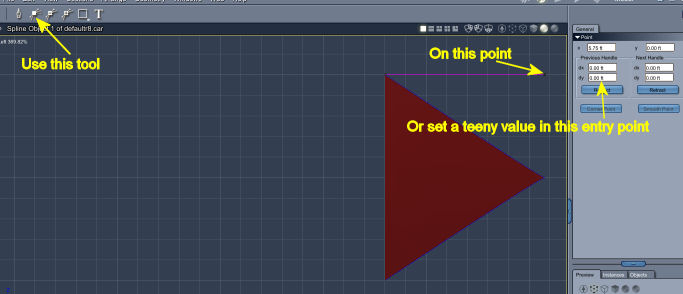
Carrara has had this weird glitch in it for the last several versions. The fix is simple. Just use the convert point tool on the end point of the extrusion path. For some reason, Carrara is inverting that last point perfectly by 180 degrees (it's kind of like a negative zero, it's still zero but negative).
Regardless, it will flip it and straighten it out. If that doesn't work, actually convert the point to a smooth point and set it to tweeny eeeny eeny (like 0.00001) and that will also work.
-Kix
Kixum posted Wed, 18 August 2010 at 6:59 AM
-Kix
Kixum posted Wed, 18 August 2010 at 10:16 AM
I went back and played with this some more and found that this fix does not always work. You may also have to click on the last point in the envelope and convert the tip of the pyramid directly.
-Kix

MarkBremmer posted Wed, 18 August 2010 at 10:52 AM
While I adore the spline modeler, using the vertex modeler, inserting a cube and then selecting and welding the top 4 points is another easy way to do this. ;-)
Miss Nancy posted Wed, 18 August 2010 at 2:14 PM
that also happens to the poser cone, where it comes to a sharp point at the tip. the
fix to that was to convert the cone to quads and convert the tip to an extremely tiny
empty polygon.
gavotte posted Wed, 18 August 2010 at 11:47 PM
Thanks to everyone for their help. Both solutions worked (converting the point and creating it in the vertex room). The solution(s) were simply once I saw it (which seems to happen a lot in life).

Plutom posted Thu, 19 August 2010 at 8:24 AM
LOL, yeah sort of happens to me too (on more than one occasion). Jan