
replicand opened this issue on Jun 16, 2010 · 6 posts
replicand posted Wed, 16 June 2010 at 1:45 PM
Forgive me in advance if this sounds confusing.
In factory default mode, Maya opens to the four pane view. In each of the orthagonal projections, you can add an image to the image plane to guide your modeling (just found out that you can use .png, which is AWESOME because the alpha channels work. This is not part of my problem, I'm just excited about the discovery. Anyway.)
So I'm wondering: is it possible to "image plane" the perspective camera and its resolution gate? To think of it another way, is it possible to "gobo" the perspective camera? Image planing the persp camera works more like a background image, no bueno. I want to overlay a "Rule of Thirds" image file into the perspective view for arranging shots.

ronviers posted Wed, 16 June 2010 at 3:28 PM
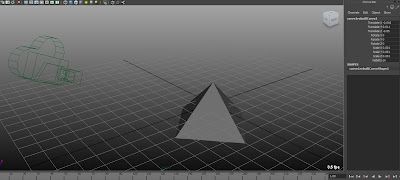
Hi replicand. Cameras are either orthogonal or perspective. There is a box on the shape node you can tick to select which it will be. Here is just a thought for adding a rule of thirds gobo. Notice on this image the tiny green dot at the cameras nodal point. That is a curve that is parented to the camera and sets just in front of the lens - about .001 units.
And here is what it looks like from the view of that camera.
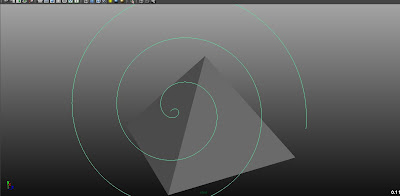
Since it's attached to the camera it never changes and since it is so close, nothing gets between it and the other objects in the scene.
replicand posted Wed, 16 June 2010 at 5:22 PM

ronviers posted Wed, 16 June 2010 at 7:36 PM
Looks good. I just used the spiral as a sample curve, it could be anything. I wanted to do the golden spiral but I have limited myself to python and I could not get the fibinachi sequence to work - probably need to load a module. I just finished my first python program yesterday so I know very little about it.
replicand posted Thu, 17 June 2010 at 12:43 PM
ronviers, the next time you're in Southern California, look me up. Beer (or Blueberry Blast smoothie with protein powder and bee pollen) on me. I just had an epiphany of galactic proportions.
(1) I used the Rule of Thirds as an example; I really wanted to use a Fibonacci spiral. Are you a mind reader?
(2) Your spiral node is user-created and not a Maya 2011 default item?
(3) Hot dog! An arbitrary curve place 0.001 units before the camera indeed shows up in its viewport. If the curve is parented to the camera, voila, instant image plane on a perspective camera.
(4) sure, it's cooler to do procedurally but currently manually constructing a Fibonacci curve using Maya tools.
The universe is in serious trouble now, mwah ha ha ha ha!
ronviers posted Thu, 17 June 2010 at 1:27 PM
That should be less intrusive than the field chart. You could make a shelf button to toggle its visibility.
Hey, beer is cruelty free so I could go either way on that offer - minus the bee pollen of course. Wish I were there.
You know, my first notion was to try this in a more complicated way. By moving the spiral behind the camera and projecting it onto a plane that had its z translate plugged in to the persp camera's center of interest. The projected curve was duplicated and the plane hidden. This worked but because things could come between the curve and the camera, the spiral was often blocked. That's when it occured to me to just move the curve in front of the lens and scale it down. Sometimes the simple ways are the best.