
rtlehr opened this issue on Mar 05, 2009 · 9 posts
rtlehr posted Thu, 05 March 2009 at 8:13 AM
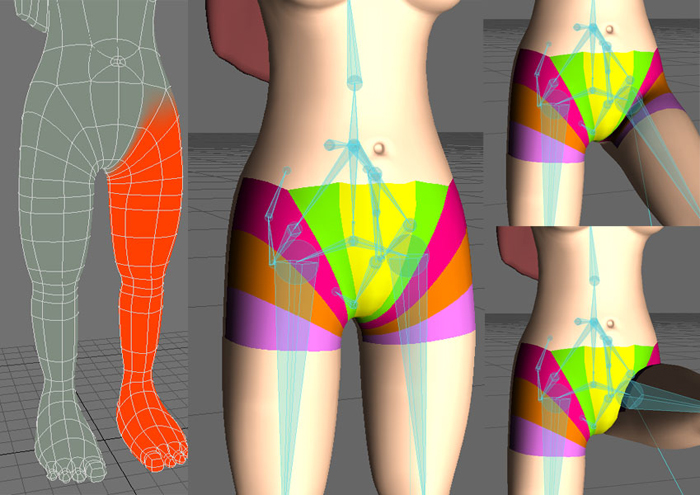
About every so often I try to get a character rigged. I have very little call for 3d in my professional work, so do not get to do much character animation. I always seem to get so far, I get the knees and the ankles rigged just fine, BUT then…. I come to the hips. OH THE HIPS!! And for some reason, I cannot for the life of me get them rigged, so they bend half way decent. You guys that make the videos and tutorials all make it look so easy, but mine come out looking like crap. The mesh at the hip collapses in on itself. I’ve tried everything (well, everything I know of) different weights, holding bones EVERYWHERE, morphs, changing the geometry, but to no avail. I’d love some tips or advice on what I might be doing wrong. I’ve included some images of the mesh, weight mad, and bone set up (I’m using 9.6’s joints). I’ve also included what happens to the mesh when the joint is bent. I don’t have the model and scene with me, but I can upload them to if it will help. I’m almost at a point where I’m willing to pay someone to rig the character for me (but, not sure the wife will approve that expense :-) ). Thanks for any advice you may have.
Ross
rtlehr posted Thu, 05 March 2009 at 8:14 AM

petes posted Thu, 05 March 2009 at 8:41 AM
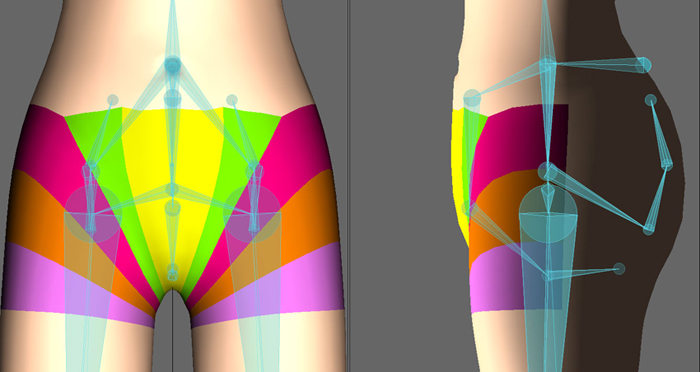
well, really..you rig looks pretty good. It's more the deformation..
This is a really tough area to get looking perfect. What I would tend to do is create a smart morph ans tie it to the bone. Though I am not sure if it works with IK so you may have to bake off the movement after your IK animation.
Basically, smartmorph means taking your pose with the leg up. and saving out the position..I don't remember if yo save it as a seperate model or save it as an endo. Then you open model, duplicate that endo, then sculpt it the way you want. i.e. what you want the deformatin to really look like. Then apply the original bent pose -100%. What is left is your smartmorph for that bone pose. You coulkd then apply it manually in LW or tie it to a bone pitch.
If you are just using a still image, then forget all teh above and export the pose as a object in layout and model the deformations straight out. Which would be the way to go if you are not animating her.
I know this is pretty indepth, do a search on it for more info...or someone here may have a better idea.
BTW..I believe they are talking about LW CORE to have more deformation controls..but we'll see ;-)
Good luck,
Pete
lightwave, photoshop, oreo's...tools of the trade.
AlbertGriffin posted Thu, 05 March 2009 at 9:37 AM
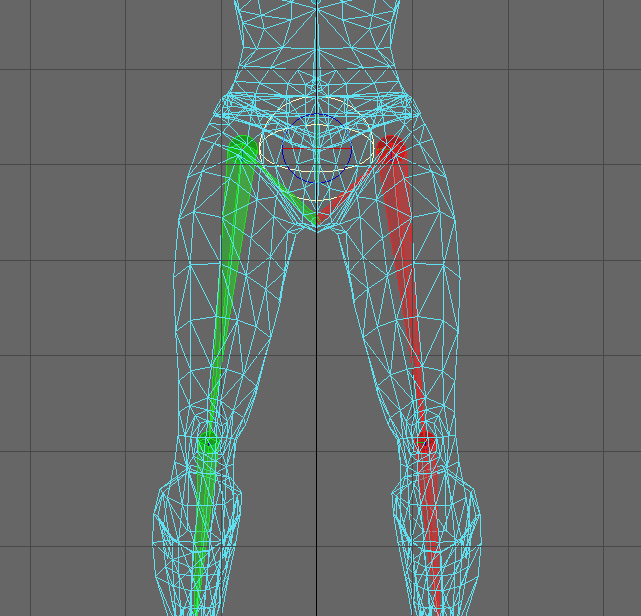
I place the joint higher up the leg, and wider then you have.
I also have one pelvis bone, leading down from my root, and a spine chain leading up.
The pelvis bone keeps the center section where it belongs.
pentamiter_beastmete posted Thu, 05 March 2009 at 9:48 AM
first off your weightmap is way too hard edged, you need better blending... also... ur hold bones look a lil all over the place... i very much doubt u need so many... dont forget their influence is additive, so u need to manage their individual strengths and falloffs... it takes a bit of play, but your mesh lines are good, so u should be able to get it.
rtlehr posted Tue, 17 March 2009 at 7:27 AM
Thanks for all the advice. I upgraded my copy of maestro and it seems to be doing a good job. The joint is still a little “off” but it looks better than it had. Thanks again.
Ross
Tephladon posted Sun, 19 April 2009 at 1:17 PM
My question is why are you even using morph-maps to correct deformation. Clever rigging can do this for you with much less cost management. One of my core principles are Keep it as simple as possible. You've got too much going on in the gluts. It seems as though you're trying to force desired deformation. Allow natural weighing and falloff to happen and adjust as needed. You've rigged yourself into an unflexible corner and now you're trying to rig, morph and weigh your way out. Keep it simple.
I'll post my methodology to rigging hips in another thread.
rtlehr posted Mon, 20 April 2009 at 11:43 AM
Thanks for replying Tephladon. The simple answer to your question, is becasue I don't really know what I'm doing. My 3d experience is very limited. The only thing I've done professionally is a 15 minute weapon system demo for the Army and it did not have any human models, just high-res military equipment. I'd love to read about your hip philosophy. Thanks again.
Ross

crocodilian posted Mon, 20 April 2009 at 2:16 PM
An observation: getting correct looking joints is tough-- if you're seeing skin. If you're not seeing skin -- and most of the time, you're not, its much easier.
The #1 pearl of 3D wisdom is that there's no reason to do work for stuff that can't be seen.
So consider your output first: is the character going to be clothed? Unless she's walking around naked, you don't have to wrestle with the thorny problem of her hips.
Biomechanically, the hip joint is a ball and socket joint, with a very broad range of motion. The deformations it causes are very much a function of the muscles that actuate it, and the amount of fat that covers it. A skinny woman will have a very noticeable iliac crest, for example, which will be more or less prominent as pose changes and abdominal muscles move. On a heavier middle aged guy, you'll never see that anatomy at all . . .
All of which takes you back to the pearl of 3D: decide exactly what shot you want, of precisely what kind of character, before you start modeling.