
FranOnTheEdge opened this issue on Feb 22, 2009 · 37 posts
FranOnTheEdge posted Sun, 22 February 2009 at 8:35 AM
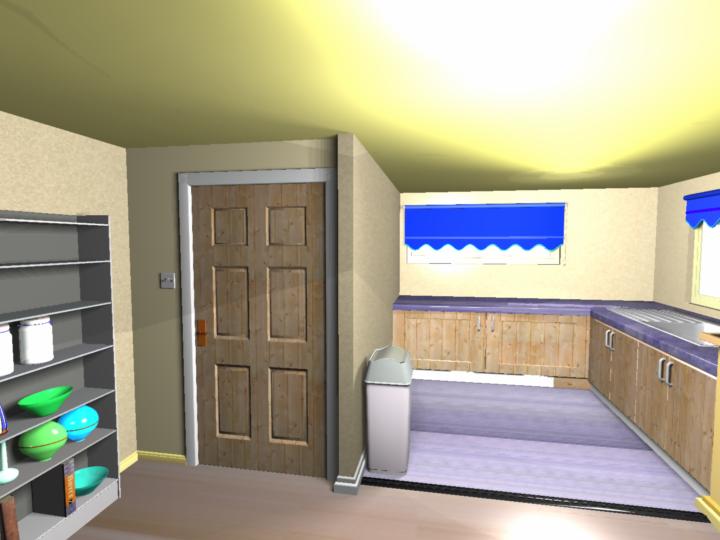
I have various areas on this rather complex model that have been uvmapped and have their own textures.
The ones on the doors and cupboards are just right, but the ones on the two different floors are coming up looking weirdly stretched.
Help?
What do I need to do to correct this?
(the UV-ing was done in Wings3D - and I'm a poor student so I can't afford to buy anything to make this work, so please don't suggest that.)
(Oh and I've tried looking at the Mark Bremmer tutorials but they are obliterated by adverts, so you can't see what's happening.)
So I'm hoping that it's some simple procedure that a Carrara user would know all about and it's just that I haven't used Carrara that much and then it was only Carrara 3D Basics, along time ago...
I have been able to jigger around with the basic Wings materials that were imported with the model - jigger with them in Carrara's texture room I mean, but again this is just prodding things and hoping. I can sort of get rid of excessive shine - I tried this out on the ceiling, and although I did manage to get rid of the shine, I seem to have got rid of it only to replace it with a sort of softer but much bigger area of white out.
Hmmm...
So the image above shows the stretching of the floor UV's and the odd soft shine on the ceiling...
Can anyone help with these two things?
Measure
your mind's height
by the shade it casts.
Robert Browning (Paracelsus)