
jackhalsey opened this issue on Jun 04, 2008 · 9 posts
jackhalsey posted Wed, 04 June 2008 at 9:54 PM
Okay its a real noobie question but I have the book and the manual and I cant find the answer.
Thank you.

MarkBremmer posted Wed, 04 June 2008 at 10:21 PM
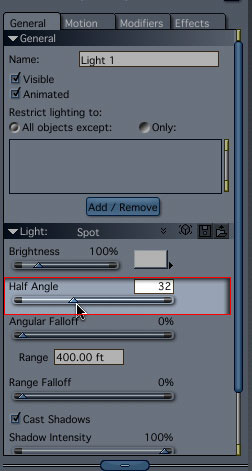
jackhalsey posted Wed, 04 June 2008 at 10:52 PM
Wow fast and simple. Thank you so much.

sparrownightmare posted Thu, 05 June 2008 at 9:55 AM
I don't suppose anyone knows how to do the opposite, I want to be able to increase the width of the starting point of a spot light, for scenes like my lighthouse model?
MarkBremmer posted Thu, 05 June 2008 at 9:58 AM
Hi Sparrow,
At this point, that's not an option in Carrara. :-/
sparrownightmare posted Thu, 05 June 2008 at 10:00 AM
Yeh I thought so. You would think something basic like that would have been put in by now. Oh well, I'll go post a suggestion on the DAZ site.
whkguamusa posted Thu, 05 June 2008 at 6:46 PM
Until they add the "real" option you may be able to do it with an inverted shadow on the light cone, look here about midway down the page:
http://forum.daz3d.com/viewtopic.php?t=82115&postdays=0&postorder=asc&start=0
wayne k
guam usa
MarkBremmer posted Thu, 05 June 2008 at 6:52 PM
Nice Wayne. I stopped following that thread before you posted your work around. I learn something every day. :-)
sparrownightmare posted Thu, 05 June 2008 at 6:58 PM
I'll give it a try. You know, another thing that would help would be some way to add lightcone to an anything glows. Have you choose a surface to be the emitter, so a spotlight wouldn't require that extra light source.. Looks like another thing I should put over at Daz's suggestion box.I looked at your tutorial site. Great site. A bit out of my budget I'm afraid, but the tutorials look great.
Quote - Until they add the "real" option you may be able to do it with an inverted shadow on the light cone, look here about midway down the page:
http://forum.daz3d.com/viewtopic.php?t=82115&postdays=0&postorder=asc&start=0
wayne k
guam usa