
cryptojoe opened this issue on Jan 07, 2008 · 9 posts
cryptojoe posted Mon, 07 January 2008 at 10:03 AM
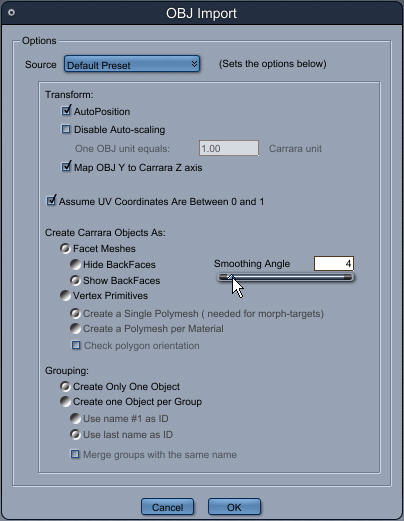
The smoothing angle slides between 0 and 90. Which is smoother? I am assuming 0 but you know what they say when one assumes...
Yank My Doodle, It's a
Dandy!
cryptojoe posted Mon, 07 January 2008 at 10:05 AM
There will be several other pieces I will be importing for grouping, so, what other settings should I be aware of that I should change, or leave alone?
Yank My Doodle, It's a
Dandy!

MarkBremmer posted Mon, 07 January 2008 at 10:34 AM
Some of this depends on the nature of the .obj being imported. I typically just leave the defaults and then adjust the settings for smoothness later if I need to. The only time that you would really want to change the defaults is if you were importing .obj files all prepared from the same author and software so you could create a specific import to match their methods.
cryptojoe posted Mon, 07 January 2008 at 10:48 AM
Thanx Mark.
For texturing purposes, I split a model into its three parts (ungrouping them) in UV Mapper Pro. After texturing them, I opened and imported each of the three parts of the model into Carrara 6 Pro. The objects are like way out of scale, the smallest of the three is twice as large as the largest object.
What gives? Should I ungroup them in Carrara and then texture map in Photoshop?
Yank My Doodle, It's a
Dandy!
cryptojoe posted Mon, 07 January 2008 at 11:08 AM
Hmmm.... tried opening the entire model and can see no way of ungrouping the pieces.
Yank My Doodle, It's a
Dandy!
MarkBremmer posted Mon, 07 January 2008 at 11:10 AM
Since you can work independently with texture maps within Carrara, keeping the object in one part and then working with the texture maps (domain areas) from with the Carrara vertex modeler is usually easier. Not knowing the requirements of your model, I can't really offer any specific advice since how it was originally created/mapped kind of determines that.
cryptojoe posted Mon, 07 January 2008 at 11:29 AM
Thanx Mark. I brought the entire model into Carrara. The model has three distinct movable parts, similar to a bicycle with two solid wheels. For texturing purposes, because these parts touch and rub against each other, it is easier to texture map the parts separately. Or, at least, before I began using Carrara it was.
I can reassemble the parts in Rhino and apply the texture maps for each part as decals... I cannot reassemble them in UV Mapper Pro or Carrara as near as I can tell.
...maybe I should go back to basics, wait for the Carrara book to arrive from Barns & Nobel dot com, and try again next month?
Thanx Mark.
Yank My Doodle, It's a
Dandy!

Miss Nancy posted Mon, 07 January 2008 at 11:49 AM
just to agree with mark, leave smoothing at default. to select groups of the object, go to vertex room and select by polygon or material.

GKDantas posted Mon, 07 January 2008 at 11:50 AM
I have done things like that, importing objects in parts and assembling in one group without porblems. Just when you import all using the default settings they go to the center of the scene. Like Mark said I use the smooth option only after import and if needed.
Follow me at euQfiz Digital