
boeing opened this issue on Jan 03, 2008 · 10 posts
boeing posted Thu, 03 January 2008 at 11:22 AM
Hello folks, I've loaded V4.1 into Carrara from the Poser content runtimes (in Carrara) and have posed her. As we all know, depending on the pose, joints do not always appear accurate. In Poser I would just use the morph brush, but in Carrara it brings V4 into the modeling room in her default pose, is there a way to keep her in her posed postion from the Assemble room and morphing her?
Thanks way too much!

MarkBremmer posted Thu, 03 January 2008 at 11:43 AM
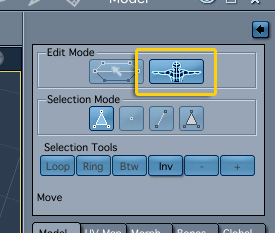
boeing posted Thu, 03 January 2008 at 12:05 PM
Wow!! Thanks Mark! You know, I have used Poser 7 for years and have recently switched to Carrara 6 pro, and I'm glad I did. I'm really starting to like this program! It helps when you have others with your talent to help us along.
Thanks,
Philip
boeing posted Thu, 03 January 2008 at 12:34 PM
Wow, Carrara just crashed on me. I even tried to hide some of the body parts except only the ones I need to model and its a slide show.... Memory Allocation Error. I guess I need to search the forums for some instruction on how to modify V4 in Carrara, is it possible to select and move points/polys in the Animation mode? Does she need to be converted to something else?
Thanks a bunch!
Philp
MarkBremmer posted Thu, 03 January 2008 at 1:07 PM
Hmm, everything is working here in C6P 6.0.3 How exciting. You don't mention how much RAM you have - that could be the culprit. I think I remember seeing somewhere that there are some memory management improvements for a C6 update. But even so, working with highly detailed meshes does require some decent RAM anyhow. Regarding the other question, weight painting is all that's available in Animation Mode. If you're going to do a still pose, you can export V4 as a .obj or .3ds and then reimport the figure into the scene (you'll have two v4's unless you delete the original) or simply open a new scene and then import the converted V4. (this is the safest method) P7 is a good product but not without it's own quirks. The workflow in Carrara is easier and faster when working with figures. I do use both depending on the assignment parameters.

Miss Nancy posted Thu, 03 January 2008 at 1:25 PM
o.k. mark, thx fr the tip on the joint morphing. I didn't update to 6.03 yet, but it seems to be working o.k.
boeing posted Thu, 03 January 2008 at 2:09 PM
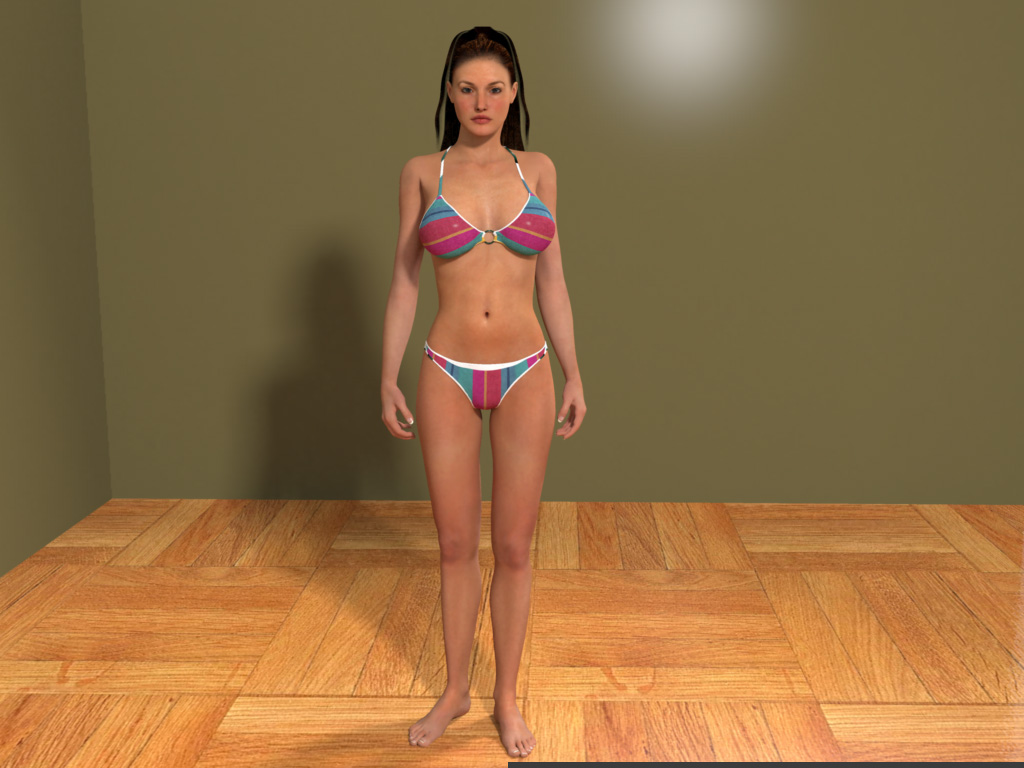
I really do like Carrara and would love to at least do some minor tweaking to V4. My workflow has been to model in ZBrush (create morphs or new figures) and in Poser I would pose and use the morph brush to tweak the bends to look more realistic. Carrara IMHO (I just learned what that acronym was today) handles shadows and renders much better than Poser and Vue 6 for me at least.
Here is a low rez version of a render done in Carrara. I know I have a long way to go to get the realism, but it’s much easier in Carrara.
Thanks,
Philip
MarkBremmer posted Thu, 03 January 2008 at 2:48 PM
Nice start Philip. Looking forward to seeing more. You can never have too much RAM. :D However, depending on whether you have open apps or not, it sounds like you should have enough to do the job. Rumor has it that there is another Carrara patch coming very soon so some of those enhancements may also help your efforts! Mark
boeing posted Thu, 03 January 2008 at 3:16 PM
Hey Mark, you have been way more than helpful! I think I might try installing the Transposer 2 and see if maybe I could do the morphs in Poser 7 and then bring the scene into Carrara, but not sure if the morphs applied in Poser will import into Carrara.
I eagerly await the update from DAZ. I really really hope they carry this product to its full potential, because I really think it has the ability to compete with any program out there, even the Maya and 3dMax's of the world.
Thanks for the kind words about the render, it looks much better with the higher settings.
Thanks,
Philip
boeing posted Thu, 03 January 2008 at 4:21 PM
OK, I think I have the workflow... create pose in Poser and morph brush till the heart is content. Save scene with just V4 if you want to use a Carrara scene. I have used the Global Illumination scene and modified it in Carrara. I would open the V4 scene with my posed and morphed V4 and it seemed to carry the morph brush morphs over (clicking the carry moprh option in the dialogue box upon opening scene in Carrara helps). Then in the browser tray bring in your Global Illumination scene, scale it up or scale V4 down...and there you go.
Thanks,
Philip