
Renderosity Forums / Poser - OFFICIAL
Welcome to the Poser - OFFICIAL Forum
Forum Moderators: RedPhantom Forum Coordinators: Anim8dtoon
Poser - OFFICIAL F.A.Q (Last Updated: 2026 May 23 8:20 pm)

Subject: Meterials from ZBrush3.1 to Poser7


John
Fugazi (without the aid of a safety net)
https://www.facebook.com/Fugazi3D
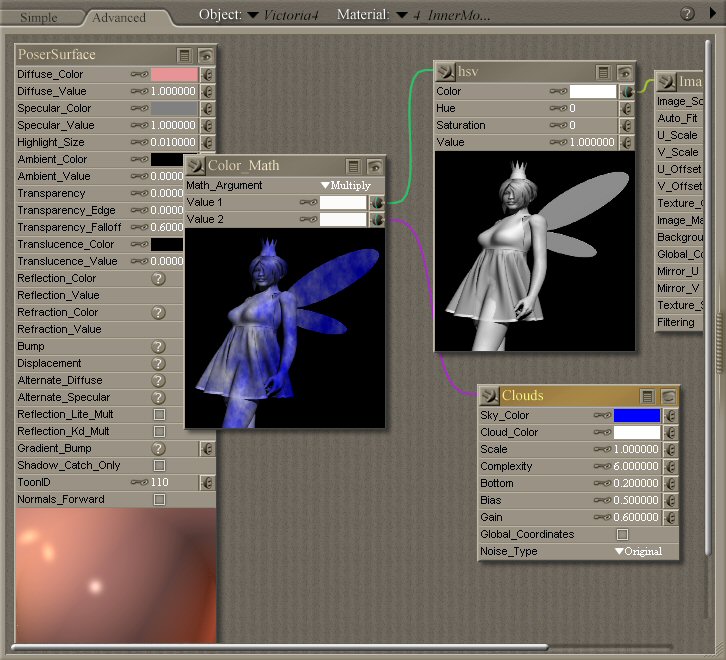
Ok it takes some experimentation, you'll probably spend alot of time trying the materials(Nodes) to get similar effects to ZBrush.
First of all right click on a bit of grey space next to the main PoserSurface and select Add New Node. From there you will get a choice of which Nodes to use. Each of them provides a different effect. For example the blue and white node in the example is a Clouds node, I usually use it to give a texture a slightly uneven look.
If you look through the poser reference under the help menu it has a description of what they all do.
Once you have your node, click on the little plugon the top left corver and drag it to a socket. To start off with drag it to the Diffuse socket, you will get an immediate idea of whats going on then :)
John
Fugazi (without the aid of a safety net)
https://www.facebook.com/Fugazi3D
Great :) I would be interested to see what you come up with :)
John
Fugazi (without the aid of a safety net)
https://www.facebook.com/Fugazi3D
Hi Fugazi,
My 'discovery' boils down to :the following:
In ZB I use the possibility to create new subgroups (masking>HidePts, PolyGroups>GroupVisible) that define areas where I want in Poser to use material.
Back in Poser I AssignMaterial to these subgroups (GroupingTool)
In the MaterialRoom I choose from the definied subgroup listing one of the new subgroups and load from the MaterialLibrary the wished for preinstalled material.
I hope you follow the procedure.
Greetings, EddyL

Privacy Notice
This site uses cookies to deliver the best experience. Our own cookies make user accounts and other features possible. Third-party cookies are used to display relevant ads and to analyze how Renderosity is used. By using our site, you acknowledge that you have read and understood our Terms of Service, including our Cookie Policy and our Privacy Policy.
It's possible to polypaint not only with color but also with materials on your mesh in ZB. Then Tool>Texture>Col>Txr. If, with MRGB=On and RGBIntensity=100, you Texture>Export your texture with material 'embedded as an alphachannel'. I also export the object for which this texture is made.
Now the question:
Back in Poser, after importing the object I import my texture and I also want to make my embedded materials visible.
That seems to be difficult, because ZB actually does not export the material itself but an alpha with the places marked where the different materials are 'placed' during the polypainting.
Now in Poser it is possible to use many Poser-fit textures. And I thought it to be nice if I could use Posermaterials that are similar to ZBMaterials on the areas that are defined in the alpha'part' of the exportedtexturemap. But how to do that?