
jackhalsey opened this issue on Oct 25, 2007 · 13 posts
jackhalsey posted Thu, 25 October 2007 at 9:52 PM
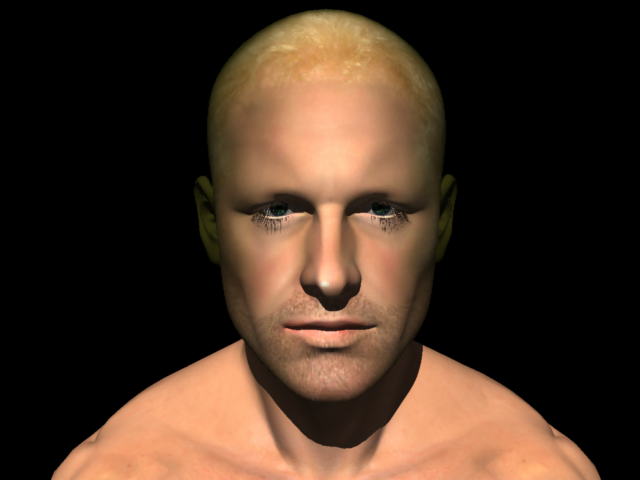
I have attached a face room project where I put a face on James..it worked out extremely well except for the eyelashes and the extra eye showing.
Is there a way to paint over this in Carrara or a fix. Thank you very much.

MarkBremmer posted Thu, 25 October 2007 at 10:41 PM
Hi Jack, That will need to be fixed in Poser since Carrara is taking it's UV coordinates instructions from that original file. :-/

Miss Nancy posted Thu, 25 October 2007 at 10:57 PM
Quote - except for the eyelashes and the extra eye showing.
the third eye? if yer asking how to render the eylashes, c6pro can do that, but ya need to set the shader tree correctly, then use the correct render settings. post a screenshot of yer render settings.
jackhalsey posted Fri, 26 October 2007 at 1:55 PM
Thank you both.
Miss Nancy do you mean render settings in Carrara or poser I assume Carrara. Could you advise how to use shaders in C6 to correct as I worked for a long time and the face is pretty good except for the eyebrows.
Miss Nancy posted Fri, 26 October 2007 at 3:24 PM
post a screenshot of yer render settings in carrara here. AFAIK carrara is able to open a james cr2 file with correct shaders. the eyelashes are gonna have the same appearance in poser with bad render/light settings, but that's off-topic here. the eyebrows are a different problem involving the use of an eyebrow group, eyebrow prop and/or eyebrow material. poser users usually fake it by using an headtex with eyebrows painted on it, which looks lousy IMVHO, but that's where they're at. there are some folks in the poser forum who can explain how to do eyebrows correctly.
jackhalsey posted Sat, 27 October 2007 at 6:51 PM
Here is the screen shot thank you Miss Nancy and I noticed you have changed your avatar.
jackhalsey posted Sat, 27 October 2007 at 6:56 PM
Okay it keeps saying that I dont have a valid file extension and my file extension is bmp..so here are the settings"
Full raytracing with everything under raytracing checked.
Object and shadow accuray and anti aliasing checked to highest quality.
Filter sharpness to 75 percent
Raytracing to 8.
And thats it. Nothing done to shaders mainly because I have no idea how to work it with eyelashes.
Miss Nancy posted Sun, 28 October 2007 at 3:13 PM
light thru transparency (everywhere it occurs)? GI render (indirect lite) or ordinary directional lites? images posted in this forum should either be linked from postmyimage.com (2.5 MB size limit) or uploaded as jpeg (204800 byte limit).
jackhalsey posted Sun, 28 October 2007 at 5:05 PM
Okay...lets see if we can attach picture this time.
http://www.postmyimage.com/images/imagesvlf09062.jpg
Miss Nancy posted Sun, 28 October 2007 at 5:10 PM
I noticed they tried to explain the eyelash deal to ya in the poser forum, but I would hafta say, having scanned the thread for 8 or 9 seconds without reading any of the replies fully (and seeing that none of 'em posted a screencap of the correct settings) that said replies were lacking in sufficient detail IMVHO. but I could be wrong. now ask 'em how to do the eyebrows, and let the fun begin! I see ya missed a few things in c6pro (referring to yer img src below): full raytracing best anti-aliasing 1 pixel accuracy (obj and shad) output: tiff (no compression) (not critical, my pref, but never use jpg output)

jackhalsey posted Sun, 28 October 2007 at 7:21 PM
Yeah I did but finally got around it thank you very much. BTW do you have any idea how to do eyebrows.....
Miss Nancy posted Sun, 28 October 2007 at 9:03 PM
jackhalsey posted Tue, 30 October 2007 at 1:36 AM
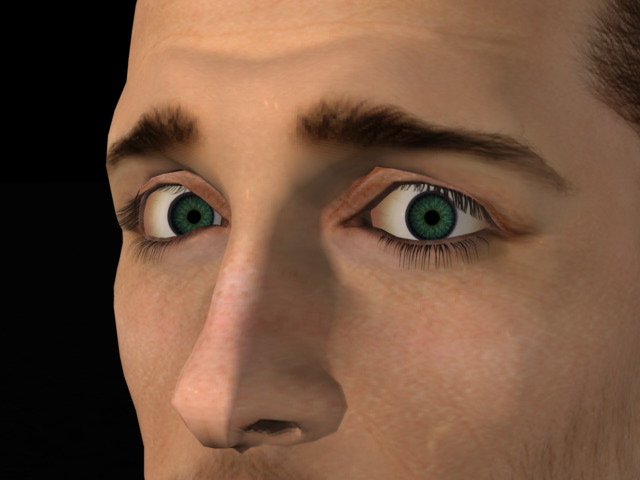
Okay thank you. The problem was the model was blonde anyway and the eyebrows werent that visible.