estherau opened this issue on Feb 03, 2006 · 18 posts
estherau posted Fri, 03 February 2006 at 8:18 AM
because when I use one of the presets it doesn't show up in the preview render window and when I render it doesn't show up, but all the shaders seem to be present Love esther
I aim to update it about once a month. Oh, and it's free!

enigmaticredfrog posted Fri, 03 February 2006 at 8:34 AM
I think you have to put a infinite plane down
Christina -- "Love me but don't tell me so" Lilly
Bart
My Art

dlk30341 posted Fri, 03 February 2006 at 10:03 AM
No you can't...turn it off & use an infinite plane :)

bwtr posted Fri, 03 February 2006 at 11:41 PM
You can texture both the plane and the infinite plain. If you have selected the plain first, then gone to the texture room, you should not experience the problems you suggest.
bwtr
estherau posted Sat, 04 February 2006 at 6:44 AM
well I deleted the ground plain, created an infinite plane and textured it as water but I still don't see any water when I render. Love esther
I aim to update it about once a month. Oh, and it's free!
estherau posted Sat, 04 February 2006 at 6:46 AM
I just realized in the directors view, the infinitie plain doesn't look infinite, it only seems little. Love esther
I aim to update it about once a month. Oh, and it's free!
estherau posted Sat, 04 February 2006 at 6:49 AM
In vue the infinite plane stretches on as far as the camera can see. What's with this? Love esther
I aim to update it about once a month. Oh, and it's free!

Patrick_210 posted Sat, 04 February 2006 at 8:14 AM
The whole infinite plane will only show up when rendered. In working mode, it is shown as a standard plane. If you need it to be larger for the working space, you can resize it.

jimbo90125 posted Sat, 04 February 2006 at 3:26 PM
Estherau, if you're coming to Carrara from Vue5i, prepare that a lot of the workflow will be different, yet basically the same. In other words, it might take a little getting used to, but you can do most of the same stuff, in fact, even more. I like to resize the infinite plane as well, especially if I'm placing objects "out of range".
estherau posted Sat, 04 February 2006 at 5:05 PM
yes i read in the manual that it just looks non-infinite. but no matter what i do it still comes out nontextured in the renders love esther
I aim to update it about once a month. Oh, and it's free!
Patrick_210 posted Sat, 04 February 2006 at 5:17 PM
Okay, just to cover all the bases. Which background atmosphere are you using? Realistic sky, regular sky, none? If you are using a sky background then uncheck the "ground" box. Also try setting your infinite plane slightly above zero in the z height dimension. Which shader are you applying? If it is purely reflective like a mirror or water and there is no sky, then there will be nothing to show up in the reflection. There are no bugs in this situation, it is just something that you don't realize is happening.
estherau posted Sat, 04 February 2006 at 5:43 PM
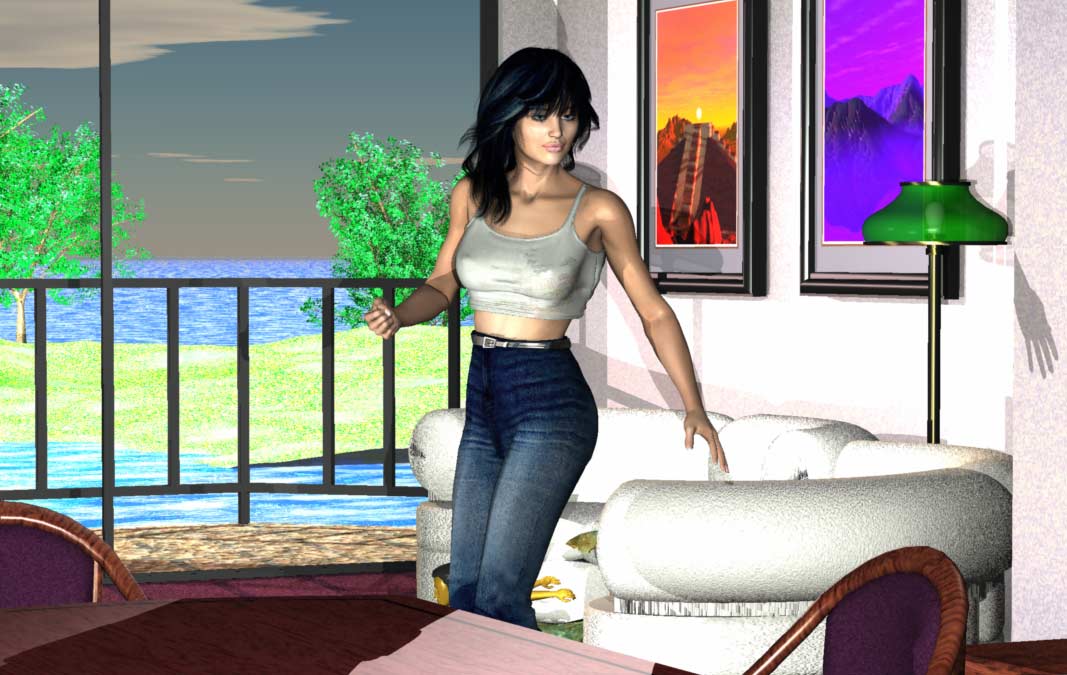
Yes, the background - I didn't realize it had a ground! (No ground was listed in my list of things where the other ground was until I deleted it.) I've just turned it off. I was using one of the water presets so it should show up, waiting, waiting....and...YES - it worked. Thankyou! Love esther
I aim to update it about once a month. Oh, and it's free!
estherau posted Sat, 04 February 2006 at 6:38 PM

ren_mem posted Sat, 04 February 2006 at 11:15 PM
Nice, esther, but I am sure you can tell that you outdoors looks very washed out...too much light. Like the couch...glad I don't own it tho...wouldn't stay white for long :)It looks like it has too much light also tho. I tell you lighting, I think is the hardest part of all the scenes..it has to be right.
No need to think outside the box....
Just make it
invisible.
ren_mem posted Sat, 04 February 2006 at 11:17 PM
It actually is too much everywhere, but shows there the most.
No need to think outside the box....
Just make it
invisible.
estherau posted Sun, 05 February 2006 at 5:13 AM
yep - and i turned the lights down after import from poser too (althoug h i added a sunlight). poser scenes always look so dark - i'm not used to the light in carrara - off to get sofa recovered love esther
I aim to update it about once a month. Oh, and it's free!
ren_mem posted Tue, 07 February 2006 at 1:12 AM
Yeah, there appear to be big lighting differences.That's aside from all the odd trans/gi stuff.LoL pick out something nice for the sofa:)
No need to think outside the box....
Just make it
invisible.
estherau posted Tue, 07 February 2006 at 2:59 AM
well just before the power failure I was playing around with photoshop brushes in postwork and had a nice floral pattern on the sofa. I just started using my wacome tablet for first time last night. It's quite interesting but tricky to get the hang of. Love esther
I aim to update it about once a month. Oh, and it's free!