
Samhain74 opened this issue on Jan 25, 2006 · 12 posts
Samhain74 posted Wed, 25 January 2006 at 5:59 PM
Are there any good outdoor lighting tutorials for beginners out there? I am messing with the ambient setting and such and still cant get exactly what i want.Everyuthing is either to washed out,or to plastic looking.I am using C4Pro if that helps.I dont like any of the default sky lighting.I am used to using Vue,but really want to learn Carrara.Any help would be much apreciated of course(;

bwtr posted Wed, 25 January 2006 at 11:39 PM
Samhain with say, a realistic sky atmosphere you can change the strength of the sunlight (general Tab) In Effects you can sellect shadow softness or go to the Shadow Buffer. And in Rendering you can have Shadow Accuracy and the other global Illumination decissions. And then you can add other lights either distant or specific, all modifiable in a variety of ways. Work on/modify the variety of lighting scenes in the browser to see how the effects were attained and the effects of modifications. And read the manual relating to light! Hope you find something helpful in all that
bwtr

ShawnDriscoll posted Thu, 26 January 2006 at 1:05 AM
First thing I do is turn ambient brightness for my scenes down to 0%. I never set any of my lights to more than 100%. I leave the background brightness, skylight and GI intensity at 100% for day time. For night scenes, I start turning down the background brightness and distant lights to 50% or less. I still leave any intensity settings at 100% (for skylight and GI).
Post a shot of something and I'll know right away what to adjust for you.
Message edited on: 01/26/2006 01:07

arcady posted Thu, 26 January 2006 at 2:50 AM
Here's one in the semi-outdoor camp. Carrara: http://www.deviantart.com/view/28169120/ Vue: http://www.deviantart.com/view/27623001/ Same elements in the composition. Vue managed to end out a lot more 'solid' in the colors, while Carrara on this one seems 'grainy'. My only other Carrara render before hitting the 'Aiko bug' (Carrara has issues importing a clothed and haired Aiko-see bug forum at eovia3d.net) was this: http://www.deviantart.com/deviation/28168987/
Truth has no value without backing by unfounded belief.
Renderosity
Gallery

ren_mem posted Fri, 27 January 2006 at 1:31 AM
well the vue thing is a switch carrara grainy and vue not(Lol).Probably washed out. Turning ambient down to 0% is good tho. You can always add it back. It's real easy with outdoor stuff in carrara and the defaults to end up with way too much light.
No need to think outside the box....
Just make it
invisible.
ren_mem posted Fri, 27 January 2006 at 1:35 AM
the adult content filter is on so couldn't see it.
No need to think outside the box....
Just make it
invisible.
LCBoliou posted Fri, 27 January 2006 at 10:59 AM
Same here -- couldn't get past the filter (didn't try too hard though).
I own Vue5I also, and almost always the Vue images have MUCH more of a problem with grainy renders than C5Pro. And just try to render a medium-complex scene in Vue5I with raytraced soft shadows! It takes about 10 times longer to render in Vue compared to a similar scene in C5Pro -- been there!
arcady posted Fri, 27 January 2006 at 4:16 PM
I actually did turn ambient lighting down to zero in Carrara, and still got what's seen in the image.
It's a "semi-nude Furrette" btw.
The Vue version is also here on Renderosity
This Carrara render is not a nude and so doesn't require a login to see like the other one did.
Message edited on: 01/27/2006 16:18
Truth has no value without backing by unfounded belief.
Renderosity
Gallery
ren_mem posted Fri, 27 January 2006 at 10:12 PM
That's the same scene? Did you try shonner's suggestions? That car scene looks washed out. The fog probably complicates things tho. The sun looks too big also and with fog probably wouldn't be big and bright like that. Try turning off GI and seeing what lights are doing...I don't know what you have, but it is too much. You might also want to play with gamma adjustment at render just to see if there is any help there. If you have sunlight w/ a bunch of other lights it can quickly be too much.
No need to think outside the box....
Just make it
invisible.
arcady posted Fri, 27 January 2006 at 10:55 PM
These two were the same scene: Carrara: washed out here Vue: here and also: here And yes, ambient is at zero, with skylight and GI used as noted above. The post with the girl in red is an entirely different scene. It was my first attempt with poser import in Carrara.
Truth has no value without backing by unfounded belief.
Renderosity
Gallery
arcady posted Fri, 27 January 2006 at 11:29 PM
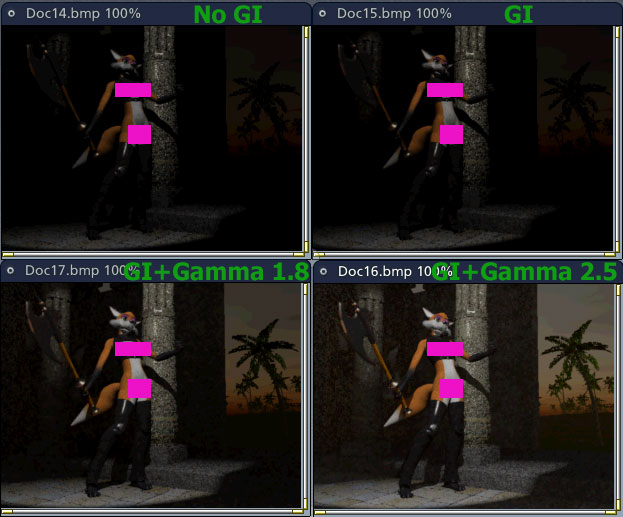
Take a look at this mini-renders.
One with no GI, the other three with GI, but no gamma versus different levels of gamma.
So, now that I've managed a complete thread-jack, I guess the process of solving this one makes for one tutorial. :)
Message edited on: 01/27/2006 23:34
Truth has no value without backing by unfounded belief.
Renderosity
Gallery
bwtr posted Sat, 28 January 2006 at 4:32 AM
Arcady thanks for doing all that work and showing us. I just did a small exercise myself and surprised at the extra time it takes to read for the gamma lighting before rendering. I am a bit spoilt because my son lets me use Photoshop CS with the Shadow/Highlight filter!
bwtr