estherau opened this issue on Jan 18, 2006 · 10 posts
estherau posted Wed, 18 January 2006 at 3:40 AM

Sans2012 posted Wed, 18 January 2006 at 5:37 AM
Still new myself but, have you tried the motion options?
I never intended to make art.

falconperigot posted Wed, 18 January 2006 at 6:11 AM
The Sun Light is part of the Sky or Realistic Sky Atmosphere. You need to add one of them to the Atmosphere Scene effect and then click Edit to change the sun position. Click on Scene in the Properties Tray, then choose Effects>Atmosphere and Realistic Sky. Click the Edit button.
Message edited on: 01/18/2006 06:13
estherau posted Wed, 18 January 2006 at 6:24 AM
hmm I tried that but I still can't see where the sun is compared to the rest of my picture. Love esther
I aim to update it about once a month. Oh, and it's free!
falconperigot posted Wed, 18 January 2006 at 6:49 AM
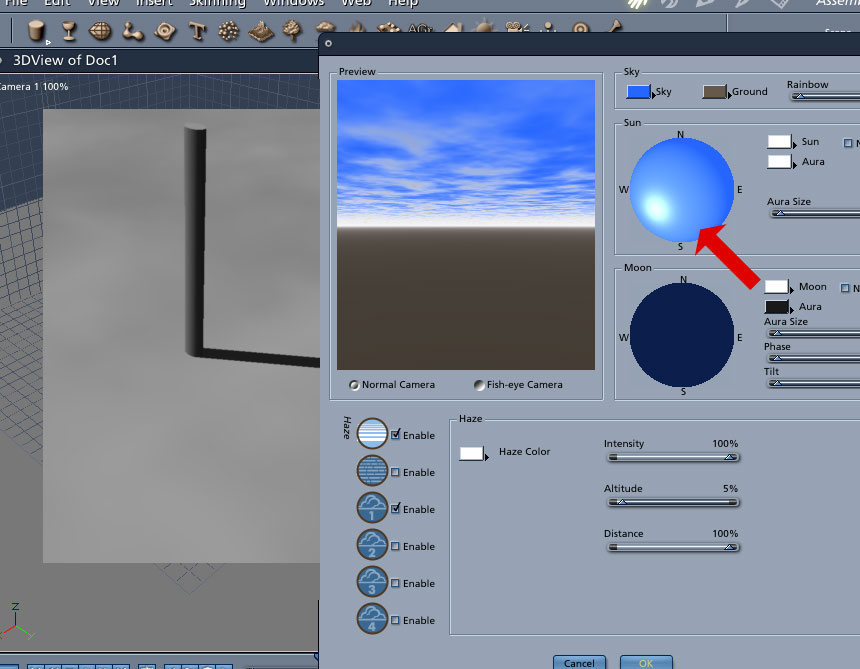
To see where the sun is in relation to your scene do a preview render so that you can see the shadows. Note that if you have other lights in your scene their shadows may confuse you so switch those off. NB. North-South is along the X axis.
Message edited on: 01/18/2006 06:52

Rids posted Wed, 18 January 2006 at 7:21 AM
Have you added a sun as a light source? Adding a realistic sky doesn't do it for you, it has to be added seperately, its in the same menu as the other light types. Also, remove the default light if you haven't already as that will make the lighting unrealistic.
Sans2012 posted Wed, 18 January 2006 at 8:01 AM
Thanks for the heads up there;)
I never intended to make art.
estherau posted Wed, 18 January 2006 at 5:19 PM
Thanks everyone! I think what was confusing me is I thought I would see the sun in the scene preview asse3mbly room like I see other lights. Love esther
I aim to update it about once a month. Oh, and it's free!

gavotte posted Thu, 19 January 2006 at 8:05 PM
A couple of things help, first make sure you have turned on both the sun and the aura (click in the checkboxes). Then to help locate the sun in the preview box, make the aura very large. By making the aura very large, it makes it easier to determine when the sun is getting close. Then move the sun around but keep it close to the horizon until you can see the aura. Once you see the aura, then it becomes easier to actually get the sun into the preview screen (and thus into the render). This technique also works well for finding the moon in a night sky.
estherau posted Thu, 19 January 2006 at 8:11 PM