
onimusha opened this issue on Jan 05, 2006 · 5 posts
onimusha posted Thu, 05 January 2006 at 6:06 AM
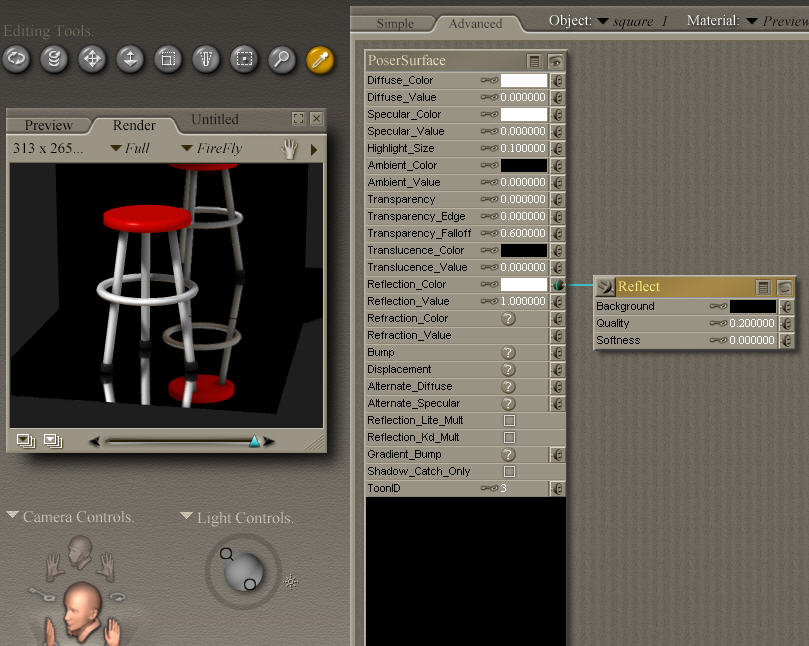
I used P6's add a reflection to a surface in the material room, but the reflection comes out milky and unclear. I've tried to change the lighting and other parameters to no avail. Is there a setting in the material room that will create a perfect mirror out of any surface? Is so could someone post a screenshot of their material room settings to do this? Thanks...

Fugazi1968 posted Thu, 05 January 2006 at 6:36 AM
I'm at work at the mo so no screenshot, but I think I remember the settings. On the Reflect Node there is a quality settings, I think 1 is near perfect. On the main shader under the reflect colour I think there is reflect strength, you'll probably need to set that to 1 too. They will effect your render time though. John :)
Fugazi (without the aid of a safety net)
https://www.facebook.com/Fugazi3D

bagginsbill posted Thu, 05 January 2006 at 7:53 AM
Renderosity forum reply notifications are wonky. If I read a follow-up in a thread, but I don't myself reply, then notifications no longer happen AT ALL on that thread. So if I seem to be ignoring a question, that's why. (Updated September 23, 2019)

stewer posted Thu, 05 January 2006 at 8:02 AM
For a mirror reflection, set the diffuse_value to 0 and make sure reflection_lite_mult is unchecked. The add reflection wacro literally adds reflection - that is an existing diffuse component persists (for example polished plastic has its own color and a reflection), where a perfect mirror has virtually no diffuse color. The quality parameter of the reflection node controls the number of rays used for a reflection, so increasing it will only reduce jaggies in the reflection, if there should be some, or if you're using soft reflection, it'll also reduce grain (at the expense of longer render times).

Acadia posted Thu, 09 February 2006 at 4:19 AM
.
"It is good to see ourselves as
others see us. Try as we may, we are never
able to know ourselves fully as we
are, especially the evil side of us.
This we can do only if we are not
angry with our critics but will take in good
heart whatever they might have to
say." - Ghandi