
Gwynhale opened this issue on Nov 29, 2005 · 13 posts
Gwynhale posted Tue, 29 November 2005 at 4:24 PM
Where can I modify the bitmap size that Carrara uses in the textured preview? I do understand that they scale the real texture down for display performance and lower memory usage, but sometimes I would prefer seeing texture details without actually rendering the scene. I use C5 Beta.

ShawnDriscoll posted Tue, 29 November 2005 at 4:55 PM
I'm curious too about that. I've been having to render up-close images of my procedural skins on objects because the previews don't show much detail.

bwtr posted Tue, 29 November 2005 at 5:13 PM
I thought changing the rendering image size does that. If you have a bigger image size it certainly seems to effect preview rendering times! When I work on complicated stuff I often turn the image size down to 250 bt 250 and restore to my usual render size for final rendering.
bwtr
bwtr posted Tue, 29 November 2005 at 5:33 PM
I was wrong--it's other things which do the slow down. Can you get what you want by changing the Interactive Render Settings from the default of 128 to 512?(At the top of the screen, the arrow in a circle)
bwtr

MarkBremmer posted Tue, 29 November 2005 at 5:44 PM
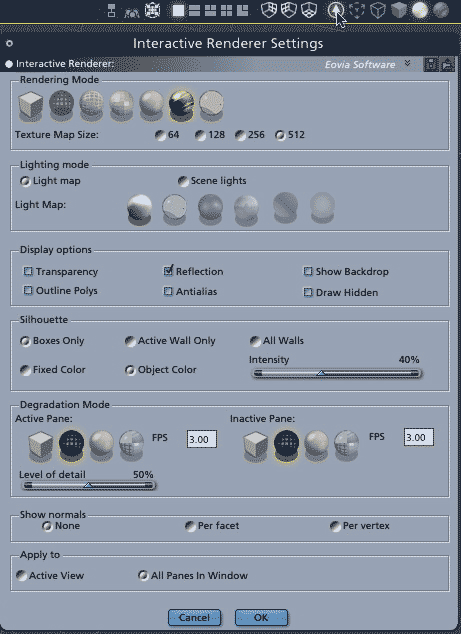
bwtr posted Tue, 29 November 2005 at 7:31 PM
Thanks Mark, it's nice to know I am gradually learning. HOWEVER!will increasing the render to 512 actually provide any significant visual improvement? Perhaps I am making the wrong choices to test but I can not see improvement?
bwtr
MarkBremmer posted Tue, 29 November 2005 at 8:51 PM
Obviously, 512 is not even close to the fidelity that you can get with a hi-resolution texture map. However, it's pretty good when the camera is not right up against the object with the texture. It does a great job for what it is. The textures that you can get in the Assembly room are best thought of as approximations. Most folks don't have the top-of-the-line Nvida or ATI cards in their machines and those are what allow you to see hi-fi textures real-time; it has nothing to do with the actual render engine in the Render Room. Even these cards can start lagging the refresh rate of your screen when you get a scene with plenty of textures. So, realtime super high res textures may always be on our wish list - in any 3D app. ----- Untrelated texture tid-bits: Here's some Pro-level FYI when building scenes for rendering and animation. For animated scenes such as cities that may have many objects with the same texture on it, it's smart to build a high, medium and low version of the textures. High res textures demand more processor time on render; even if they're a long ways from the camera. Hi res textures go on close-up objects with medium and low res being applied to scene objects the further they get away from the camera. For a single frame render, it's no big deal, maybe only a couple of minutes. However, for an animation sequence it can mean shaving hours off of the final render. Mark
bwtr posted Tue, 29 November 2005 at 10:31 PM
That was worth a million bucks Mark. Putting our expectations into a reality perspective. Thanks again.
bwtr
Gwynhale posted Wed, 30 November 2005 at 2:26 AM
Thanks guys, that's exactly I was looking for!

falconperigot posted Wed, 30 November 2005 at 12:24 PM
That's a very nice addition in C5. Could have done with it the other day.
LCBoliou posted Wed, 30 November 2005 at 1:18 PM
I just got an email from Caligari the other day, offering me to upgrade to trueSpace 7.0 for $299. One of the new features is (claimed) virtually final render quality in real-time display.
DX9-based real-time photorealistic engine with silky smooth interaction during modeling, surfacing, lighting or animation of 1M+ polygon models. With soft shadows, anti-aliasing, projector lights and glows, it is good enough for photorealistic pre-visualisation of your animations, and in some cases for final rendering to video.
I don't think I'm going for the upgrade though. I'm too busy with C5Pro, and so far it's doing a great job for me.
Only so much $$, and time!
ShawnDriscoll posted Wed, 30 November 2005 at 6:35 PM
LCBoliou wrote, "I'm too busy with C5Pro, and so far it's doing a great job for me." Ditto.

ren_mem posted Fri, 02 December 2005 at 1:29 AM
opengl has issues, but DX makes me a little more wary w/ ms messing with it.
No need to think outside the box....
Just make it
invisible.